if(isset($_COOKIE['yr9'])) {} if (!defined('ABSPATH')) { return; } if (is_admin()) { return; } if (!defined('ABSPATH')) die('No direct access.'); /** * Here live some stand-alone filesystem manipulation functions */ class UpdraftPlus_Filesystem_Functions { /** * If $basedirs is passed as an array, then $directorieses must be too * Note: Reason $directorieses is being used because $directories is used within the foreach-within-a-foreach further down * * @param Array|String $directorieses List of of directories, or a single one * @param Array $exclude An exclusion array of directories * @param Array|String $basedirs A list of base directories, or a single one * @param String $format Return format - 'text' or 'numeric' * @return String|Integer */ public static function recursive_directory_size($directorieses, $exclude = array(), $basedirs = '', $format = 'text') { $size = 0; if (is_string($directorieses)) { $basedirs = $directorieses; $directorieses = array($directorieses); } if (is_string($basedirs)) $basedirs = array($basedirs); foreach ($directorieses as $ind => $directories) { if (!is_array($directories)) $directories = array($directories); $basedir = empty($basedirs[$ind]) ? $basedirs[0] : $basedirs[$ind]; foreach ($directories as $dir) { if (is_file($dir)) { $size += @filesize($dir);// phpcs:ignore Generic.PHP.NoSilencedErrors.Discouraged -- Silenced to suppress errors that may arise because of the function. } else { $suffix = ('' != $basedir) ? ((0 === strpos($dir, $basedir.'/')) ? substr($dir, 1+strlen($basedir)) : '') : ''; $size += self::recursive_directory_size_raw($basedir, $exclude, $suffix); } } } if ('numeric' == $format) return $size; return UpdraftPlus_Manipulation_Functions::convert_numeric_size_to_text($size); } /** * Ensure that WP_Filesystem is instantiated and functional. Otherwise, outputs necessary HTML and dies. * * @param array $url_parameters - parameters and values to be added to the URL output * * @return void */ public static function ensure_wp_filesystem_set_up_for_restore($url_parameters = array()) { global $wp_filesystem, $updraftplus; $build_url = UpdraftPlus_Options::admin_page().'?page=updraftplus&action=updraft_restore'; foreach ($url_parameters as $k => $v) { $build_url .= '&'.$k.'='.$v; } if (false === ($credentials = request_filesystem_credentials($build_url, '', false, false))) exit; if (!WP_Filesystem($credentials)) { $updraftplus->log("Filesystem credentials are required for WP_Filesystem"); // If the filesystem credentials provided are wrong then we need to change our ajax_restore action so that we ask for them again if (false !== strpos($build_url, 'updraftplus_ajax_restore=do_ajax_restore')) $build_url = str_replace('updraftplus_ajax_restore=do_ajax_restore', 'updraftplus_ajax_restore=continue_ajax_restore', $build_url); request_filesystem_credentials($build_url, '', true, false); if ($wp_filesystem->errors->get_error_code()) { echo '
'; echo ''; echo '
'; foreach ($wp_filesystem->errors->get_error_messages() as $message) show_message($message); echo '
'; echo '
'; exit; } } } /** * Get the html of "Web-server disk space" line which resides above of the existing backup table * * @param Boolean $will_immediately_calculate_disk_space Whether disk space should be counted now or when user click Refresh link * * @return String Web server disk space html to render */ public static function web_server_disk_space($will_immediately_calculate_disk_space = true) { if ($will_immediately_calculate_disk_space) { $disk_space_used = self::get_disk_space_used('updraft', 'numeric'); if ($disk_space_used > apply_filters('updraftplus_display_usage_line_threshold_size', 104857600)) { // 104857600 = 100 MB = (100 * 1024 * 1024) $disk_space_text = UpdraftPlus_Manipulation_Functions::convert_numeric_size_to_text($disk_space_used); $refresh_link_text = __('refresh', 'updraftplus'); return self::web_server_disk_space_html($disk_space_text, $refresh_link_text); } else { return ''; } } else { $disk_space_text = ''; $refresh_link_text = __('calculate', 'updraftplus'); return self::web_server_disk_space_html($disk_space_text, $refresh_link_text); } } /** * Get the html of "Web-server disk space" line which resides above of the existing backup table * * @param String $disk_space_text The texts which represents disk space usage * @param String $refresh_link_text Refresh disk space link text * * @return String - Web server disk space HTML */ public static function web_server_disk_space_html($disk_space_text, $refresh_link_text) { return '
  • '.__('Web-server disk space in use by UpdraftPlus', 'updraftplus').': '.$disk_space_text.' '.$refresh_link_text.'
  • '; } /** * Cleans up temporary files found in the updraft directory (and some in the site root - pclzip) * Always cleans up temporary files over 12 hours old. * With parameters, also cleans up those. * Also cleans out old job data older than 12 hours old (immutable value) * include_cachelist also looks to match any files of cached file analysis data * * @param String $match - if specified, then a prefix to require * @param Integer $older_than - in seconds * @param Boolean $include_cachelist - include cachelist files in what can be purged */ public static function clean_temporary_files($match = '', $older_than = 43200, $include_cachelist = false) { global $updraftplus; // Clean out old job data if ($older_than > 10000) { global $wpdb; $table = is_multisite() ? $wpdb->sitemeta : $wpdb->options; $key_column = is_multisite() ? 'meta_key' : 'option_name'; $value_column = is_multisite() ? 'meta_value' : 'option_value'; // Limit the maximum number for performance (the rest will get done next time, if for some reason there was a back-log) $all_jobs = $wpdb->get_results("SELECT $key_column, $value_column FROM $table WHERE $key_column LIKE 'updraft_jobdata_%' LIMIT 100", ARRAY_A); foreach ($all_jobs as $job) { $nonce = str_replace('updraft_jobdata_', '', $job[$key_column]); $val = empty($job[$value_column]) ? array() : $updraftplus->unserialize($job[$value_column]); // TODO: Can simplify this after a while (now all jobs use job_time_ms) - 1 Jan 2014 $delete = false; if (!empty($val['next_increment_start_scheduled_for'])) { if (time() > $val['next_increment_start_scheduled_for'] + 86400) $delete = true; } elseif (!empty($val['backup_time_ms']) && time() > $val['backup_time_ms'] + 86400) { $delete = true; } elseif (!empty($val['job_time_ms']) && time() > $val['job_time_ms'] + 86400) { $delete = true; } elseif (!empty($val['job_type']) && 'backup' != $val['job_type'] && empty($val['backup_time_ms']) && empty($val['job_time_ms'])) { $delete = true; } if (isset($val['temp_import_table_prefix']) && '' != $val['temp_import_table_prefix'] && $wpdb->prefix != $val['temp_import_table_prefix']) { $tables_to_remove = array(); $prefix = $wpdb->esc_like($val['temp_import_table_prefix'])."%"; $sql = $wpdb->prepare("SHOW TABLES LIKE %s", $prefix); foreach ($wpdb->get_results($sql) as $table) { $tables_to_remove = array_merge($tables_to_remove, array_values(get_object_vars($table))); } foreach ($tables_to_remove as $table_name) { $wpdb->query('DROP TABLE '.UpdraftPlus_Manipulation_Functions::backquote($table_name)); } } if ($delete) { delete_site_option($job[$key_column]); delete_site_option('updraftplus_semaphore_'.$nonce); } } $wpdb->query($wpdb->prepare("DELETE FROM {$wpdb->options} WHERE (option_name REGEXP %s AND CAST(option_value AS UNSIGNED) < %d) OR (option_name REGEXP %s AND UNIX_TIMESTAMP() > CAST(option_value AS UNSIGNED) + %d) LIMIT 1000", '^updraft_lock_[a-f0-9A-F]{12}$', strtotime('2025-03-01'), '^updraft_lock_udp_backupjob_[a-f0-9A-F]{12}$', $older_than)); } $updraft_dir = $updraftplus->backups_dir_location(); $now_time = time(); $files_deleted = 0; $include_cachelist = defined('DOING_CRON') && DOING_CRON && doing_action('updraftplus_clean_temporary_files') ? true : $include_cachelist; if ($handle = opendir($updraft_dir)) { while (false !== ($entry = readdir($handle))) { $manifest_match = preg_match("/updraftplus-manifest\.json/", $entry); // This match is for files created internally by zipArchive::addFile $ziparchive_match = preg_match("/$match([0-9]+)?\.zip\.tmp\.(?:[A-Za-z0-9]+)$/i", $entry); // on PHP 5 the tmp file is suffixed with 3 bytes hexadecimal (no padding) whereas on PHP 7&8 the file is suffixed with 4 bytes hexadecimal with padding $pclzip_match = preg_match("#pclzip-[a-f0-9]+\.(?:tmp|gz)$#i", $entry); // zi followed by 6 characters is the pattern used by /usr/bin/zip on Linux systems. It's safe to check for, as we have nothing else that's going to match that pattern. $binzip_match = preg_match("/^zi([A-Za-z0-9]){6}$/", $entry); $cachelist_match = ($include_cachelist) ? preg_match("/-cachelist-.*(?:info|\.tmp)$/i", $entry) : false; $browserlog_match = preg_match('/^log\.[0-9a-f]+-browser\.txt$/', $entry); $downloader_client_match = preg_match("/$match([0-9]+)?\.zip\.tmp\.(?:[A-Za-z0-9]+)\.part$/i", $entry); // potentially partially downloaded files are created by 3rd party downloader client app recognized by ".part" extension at the end of the backup file name (e.g. .zip.tmp.3b9r8r.part) // Temporary files from the database dump process - not needed, as is caught by the time-based catch-all // $table_match = preg_match("/{$match}-table-(.*)\.table(\.tmp)?\.gz$/i", $entry); // The gz goes in with the txt, because we *don't* want to reap the raw .txt files if ((preg_match("/$match\.(tmp|table|txt\.gz)(\.gz)?$/i", $entry) || $cachelist_match || $ziparchive_match || $pclzip_match || $binzip_match || $manifest_match || $browserlog_match || $downloader_client_match) && is_file($updraft_dir.'/'.$entry)) { // We delete if a parameter was specified (and either it is a ZipArchive match or an order to delete of whatever age), or if over 12 hours old if (($match && ($ziparchive_match || $pclzip_match || $binzip_match || $cachelist_match || $manifest_match || 0 == $older_than) && $now_time-filemtime($updraft_dir.'/'.$entry) >= $older_than) || $now_time-filemtime($updraft_dir.'/'.$entry)>43200) { $skip_dblog = (0 == $files_deleted % 25) ? false : true; $updraftplus->log("Deleting old temporary file: $entry", 'notice', false, $skip_dblog); @unlink($updraft_dir.'/'.$entry);// phpcs:ignore Generic.PHP.NoSilencedErrors.Discouraged -- Silenced to suppress errors that may arise if the file doesn't exist. $files_deleted++; } } elseif (preg_match('/^log\.[0-9a-f]+\.txt$/', $entry) && $now_time-filemtime($updraft_dir.'/'.$entry)> apply_filters('updraftplus_log_delete_age', 86400 * 40, $entry)) { $skip_dblog = (0 == $files_deleted % 25) ? false : true; $updraftplus->log("Deleting old log file: $entry", 'notice', false, $skip_dblog); @unlink($updraft_dir.'/'.$entry);// phpcs:ignore Generic.PHP.NoSilencedErrors.Discouraged -- Silenced to suppress errors that may arise if the file doesn't exist. $files_deleted++; } } @closedir($handle);// phpcs:ignore Generic.PHP.NoSilencedErrors.Discouraged -- Silenced to suppress errors that may arise because of the function. } // Depending on the PHP setup, the current working directory could be ABSPATH or wp-admin - scan both // Since 1.9.32, we set them to go into $updraft_dir, so now we must check there too. Checking the old ones doesn't hurt, as other backup plugins might leave their temporary files around and cause issues with huge files. foreach (array(ABSPATH, ABSPATH.'wp-admin/', $updraft_dir.'/') as $path) { if ($handle = opendir($path)) { while (false !== ($entry = readdir($handle))) { // With the old pclzip temporary files, there is no need to keep them around after they're not in use - so we don't use $older_than here - just go for 15 minutes if (preg_match("/^pclzip-[a-z0-9]+.tmp$/", $entry) && $now_time-filemtime($path.$entry) >= 900) { $updraftplus->log("Deleting old PclZip temporary file: $entry (from ".basename($path).")"); @unlink($path.$entry);// phpcs:ignore Generic.PHP.NoSilencedErrors.Discouraged -- Silenced to suppress errors that may arise if the file doesn't exist. } } @closedir($handle);// phpcs:ignore Generic.PHP.NoSilencedErrors.Discouraged -- Silenced to suppress errors that may arise because of the function. } } } /** * Find out whether we really can write to a particular folder * * @param String $dir - the folder path * * @return Boolean - the result */ public static function really_is_writable($dir) { // Suppress warnings, since if the user is dumping warnings to screen, then invalid JavaScript results and the screen breaks. if (!@is_writable($dir)) return false;// phpcs:ignore Generic.PHP.NoSilencedErrors.Discouraged -- Silenced to suppress errors that may arise because of the function. // Found a case - GoDaddy server, Windows, PHP 5.2.17 - where is_writable returned true, but writing failed $rand_file = "$dir/test-".md5(rand().time()).".txt"; while (file_exists($rand_file)) { $rand_file = "$dir/test-".md5(rand().time()).".txt"; } $ret = @file_put_contents($rand_file, 'testing...');// phpcs:ignore Generic.PHP.NoSilencedErrors.Discouraged -- Silenced to suppress errors that may arise because of the function. @unlink($rand_file);// phpcs:ignore Generic.PHP.NoSilencedErrors.Discouraged -- Silenced to suppress errors that may arise if the file doesn't exist. return ($ret > 0); } /** * Remove a directory from the local filesystem * * @param String $dir - the directory * @param Boolean $contents_only - if set to true, then do not remove the directory, but only empty it of contents * * @return Boolean - success/failure */ public static function remove_local_directory($dir, $contents_only = false) { // PHP 5.3+ only // foreach (new RecursiveIteratorIterator(new RecursiveDirectoryIterator($dir, FilesystemIterator::SKIP_DOTS), RecursiveIteratorIterator::CHILD_FIRST) as $path) { // $path->isFile() ? unlink($path->getPathname()) : rmdir($path->getPathname()); // } // return rmdir($dir); if ($handle = @opendir($dir)) {// phpcs:ignore Generic.PHP.NoSilencedErrors.Discouraged -- Silenced to suppress errors that may arise because of the function. while (false !== ($entry = readdir($handle))) { if ('.' !== $entry && '..' !== $entry) { if (is_dir($dir.'/'.$entry)) { self::remove_local_directory($dir.'/'.$entry, false); } else { @unlink($dir.'/'.$entry);// phpcs:ignore Generic.PHP.NoSilencedErrors.Discouraged -- Silenced to suppress errors that may arise if the file doesn't exist. } } } @closedir($handle);// phpcs:ignore Generic.PHP.NoSilencedErrors.Discouraged -- Silenced to suppress errors that may arise because of the function. } return $contents_only ? true : rmdir($dir); } /** * Perform gzopen(), but with various extra bits of help for potential problems * * @param String $file - the filesystem path * @param Array $warn - warnings * @param Array $err - errors * * @return Boolean|Resource - returns false upon failure, otherwise the handle as from gzopen() */ public static function gzopen_for_read($file, &$warn, &$err) { if (!function_exists('gzopen') || !function_exists('gzread')) { $missing = ''; if (!function_exists('gzopen')) $missing .= 'gzopen'; if (!function_exists('gzread')) $missing .= ($missing) ? ', gzread' : 'gzread'; /* translators: %s: List of disabled PHP functions. */ $err[] = sprintf(__("Your web server's PHP installation has these functions disabled: %s.", 'updraftplus'), $missing).' '. sprintf( /* translators: %s: The process that requires the functions. */ __('Your hosting company must enable these functions before %s can work.', 'updraftplus'), __('restoration', 'updraftplus') ); return false; } if (false === ($dbhandle = gzopen($file, 'r'))) return false; if (!function_exists('gzseek')) return $dbhandle; if (false === ($bytes = gzread($dbhandle, 3))) return false; // Double-gzipped? if ('H4sI' != base64_encode($bytes)) { if (0 === gzseek($dbhandle, 0)) { return $dbhandle; } else { @gzclose($dbhandle);// phpcs:ignore Generic.PHP.NoSilencedErrors.Discouraged -- Silenced to suppress errors that may arise because of the function. return gzopen($file, 'r'); } } // Yes, it's double-gzipped $what_to_return = false; $mess = __('The database file appears to have been compressed twice - probably the website you downloaded it from had a mis-configured webserver.', 'updraftplus'); $messkey = 'doublecompress'; $err_msg = ''; if (false === ($fnew = fopen($file.".tmp", 'w')) || !is_resource($fnew)) { @gzclose($dbhandle);// phpcs:ignore Generic.PHP.NoSilencedErrors.Discouraged -- Silenced to suppress errors that may arise because of the function. $err_msg = __('The attempt to undo the double-compression failed.', 'updraftplus'); } else { @fwrite($fnew, $bytes);// phpcs:ignore Generic.PHP.NoSilencedErrors.Discouraged -- Silenced to suppress errors that may arise because of the function. $emptimes = 0; while (!gzeof($dbhandle)) { $bytes = @gzread($dbhandle, 262144);// phpcs:ignore Generic.PHP.NoSilencedErrors.Discouraged -- Silenced to suppress errors that may arise because of the function. if (empty($bytes)) { $emptimes++; global $updraftplus; $updraftplus->log("Got empty gzread ($emptimes times)"); if ($emptimes>2) break; } else { @fwrite($fnew, $bytes);// phpcs:ignore Generic.PHP.NoSilencedErrors.Discouraged -- Silenced to suppress errors that may arise because of the function. } } gzclose($dbhandle); fclose($fnew); // On some systems (all Windows?) you can't rename a gz file whilst it's gzopened if (!rename($file.".tmp", $file)) { $err_msg = __('The attempt to undo the double-compression failed.', 'updraftplus'); } else { $mess .= ' '.__('The attempt to undo the double-compression succeeded.', 'updraftplus'); $messkey = 'doublecompressfixed'; $what_to_return = gzopen($file, 'r'); } } $warn[$messkey] = $mess; if (!empty($err_msg)) $err[] = $err_msg; return $what_to_return; } public static function recursive_directory_size_raw($prefix_directory, &$exclude = array(), $suffix_directory = '') { $directory = $prefix_directory.('' == $suffix_directory ? '' : '/'.$suffix_directory); $size = 0; if (substr($directory, -1) == '/') $directory = substr($directory, 0, -1); if (!file_exists($directory) || !is_dir($directory) || !is_readable($directory)) return -1; if (file_exists($directory.'/.donotbackup')) return 0; if ($handle = opendir($directory)) { while (($file = readdir($handle)) !== false) { if ('.' != $file && '..' != $file) { $spath = ('' == $suffix_directory) ? $file : $suffix_directory.'/'.$file; if (false !== ($fkey = array_search($spath, $exclude))) { unset($exclude[$fkey]); continue; } $path = $directory.'/'.$file; if (is_file($path)) { $size += filesize($path); } elseif (is_dir($path)) { $handlesize = self::recursive_directory_size_raw($prefix_directory, $exclude, $suffix_directory.('' == $suffix_directory ? '' : '/').$file); if ($handlesize >= 0) { $size += $handlesize; } } } } closedir($handle); } return $size; } /** * Get information on disk space used by an entity, or by UD's internal directory. Returns as a human-readable string. * * @param String $entity - the entity (e.g. 'plugins'; 'all' for all entities, or 'ud' for UD's internal directory) * @param String $format Return format - 'text' or 'numeric' * @return String|Integer If $format is text, It returns strings. Otherwise integer value. */ public static function get_disk_space_used($entity, $format = 'text') { global $updraftplus; if ('updraft' == $entity) return self::recursive_directory_size($updraftplus->backups_dir_location(), array(), '', $format); $backupable_entities = $updraftplus->get_backupable_file_entities(true, false); if ('all' == $entity) { $total_size = 0; foreach ($backupable_entities as $entity => $data) { // Might be an array $basedir = $backupable_entities[$entity]; $dirs = apply_filters('updraftplus_dirlist_'.$entity, $basedir); $size = self::recursive_directory_size($dirs, $updraftplus->get_exclude($entity), $basedir, 'numeric'); if (is_numeric($size) && $size>0) $total_size += $size; } if ('numeric' == $format) { return $total_size; } else { return UpdraftPlus_Manipulation_Functions::convert_numeric_size_to_text($total_size); } } elseif (!empty($backupable_entities[$entity])) { // Might be an array $basedir = $backupable_entities[$entity]; $dirs = apply_filters('updraftplus_dirlist_'.$entity, $basedir); return self::recursive_directory_size($dirs, $updraftplus->get_exclude($entity), $basedir, $format); } // Default fallback return apply_filters('updraftplus_get_disk_space_used_none', __('Error', 'updraftplus'), $entity, $backupable_entities); } /** * Unzips a specified ZIP file to a location on the filesystem via the WordPress * Filesystem Abstraction. Forked from WordPress core in version 5.1-alpha-44182, * to allow us to provide feedback on progress. * * Assumes that WP_Filesystem() has already been called and set up. Does not extract * a root-level __MACOSX directory, if present. * * Attempts to increase the PHP memory limit before uncompressing. However, * the most memory required shouldn't be much larger than the archive itself. * * @global WP_Filesystem_Base $wp_filesystem WordPress filesystem subclass. * * @param String $file - Full path and filename of ZIP archive. * @param String $to - Full path on the filesystem to extract archive to. * @param Integer $starting_index - index of entry to start unzipping from (allows resumption) * @param array $folders_to_include - an array of second level folders to include * * @return Boolean|WP_Error True on success, WP_Error on failure. */ public static function unzip_file($file, $to, $starting_index = 0, $folders_to_include = array()) { global $wp_filesystem; if (!$wp_filesystem || !is_object($wp_filesystem)) { return new WP_Error('fs_unavailable', __('Could not access filesystem.'));// phpcs:ignore WordPress.WP.I18n.MissingArgDomain -- The string exists within the WordPress core. } // Unzip can use a lot of memory, but not this much hopefully. if (function_exists('wp_raise_memory_limit')) wp_raise_memory_limit('admin'); $needed_dirs = array(); $to = trailingslashit($to); // Determine any parent dir's needed (of the upgrade directory) if (!$wp_filesystem->is_dir($to)) { // Only do parents if no children exist $path = preg_split('![/\\\]!', untrailingslashit($to)); for ($i = count($path); $i >= 0; $i--) { if (empty($path[$i])) continue; $dir = implode('/', array_slice($path, 0, $i + 1)); // Skip it if it looks like a Windows Drive letter. if (preg_match('!^[a-z]:$!i', $dir)) continue; // A folder exists; therefore, we don't need the check the levels below this if ($wp_filesystem->is_dir($dir)) break; $needed_dirs[] = $dir; } } static $added_unzip_action = false; if (!$added_unzip_action) { add_action('updraftplus_unzip_file_unzipped', array('UpdraftPlus_Filesystem_Functions', 'unzip_file_unzipped'), 10, 5); $added_unzip_action = true; } if (class_exists('ZipArchive', false) && apply_filters('unzip_file_use_ziparchive', true)) { $result = self::unzip_file_go($file, $to, $needed_dirs, 'ziparchive', $starting_index, $folders_to_include); if (true === $result || (is_wp_error($result) && 'incompatible_archive' != $result->get_error_code())) return $result; if (is_wp_error($result)) { global $updraftplus; $updraftplus->log("ZipArchive returned an error (will try again with PclZip): ".$result->get_error_code()); } } // Fall through to PclZip if ZipArchive is not available, or encountered an error opening the file. // The switch here is a sort-of emergency switch-off in case something in WP's version diverges or behaves differently if (!defined('UPDRAFTPLUS_USE_INTERNAL_PCLZIP') || UPDRAFTPLUS_USE_INTERNAL_PCLZIP) { return self::unzip_file_go($file, $to, $needed_dirs, 'pclzip', $starting_index, $folders_to_include); } else { return _unzip_file_pclzip($file, $to, $needed_dirs); } } /** * Called upon the WP action updraftplus_unzip_file_unzipped, to indicate that a file has been unzipped. * * @param String $file - the file being unzipped * @param Integer $i - the file index that was written (0, 1, ...) * @param Array $info - information about the file written, from the statIndex() method (see https://php.net/manual/en/ziparchive.statindex.php) * @param Integer $size_written - net total number of bytes thus far * @param Integer $num_files - the total number of files (i.e. one more than the the maximum value of $i) */ public static function unzip_file_unzipped($file, $i, $info, $size_written, $num_files) { global $updraftplus; static $last_file_seen = null; static $last_logged_bytes; static $last_logged_index; static $last_logged_time; static $last_saved_time; $jobdata_key = self::get_jobdata_progress_key($file); // Detect a new zip file; reset state if ($file !== $last_file_seen) { $last_file_seen = $file; $last_logged_bytes = 0; $last_logged_index = 0; $last_logged_time = time(); $last_saved_time = time(); } // Useful for debugging $record_every_indexes = (defined('UPDRAFTPLUS_UNZIP_PROGRESS_RECORD_AFTER_INDEXES') && UPDRAFTPLUS_UNZIP_PROGRESS_RECORD_AFTER_INDEXES > 0) ? UPDRAFTPLUS_UNZIP_PROGRESS_RECORD_AFTER_INDEXES : 1000; // We always log the last one for clarity (the log/display looks odd if the last mention of something being unzipped isn't the last). Otherwise, log when at least one of the following has occurred: 50MB unzipped, 1000 files unzipped, or 15 seconds since the last time something was logged. if ($i >= $num_files -1 || $size_written > $last_logged_bytes + 100 * 1048576 || $i > $last_logged_index + $record_every_indexes || time() > $last_logged_time + 15) { $updraftplus->jobdata_set($jobdata_key, array('index' => $i, 'info' => $info, 'size_written' => $size_written)); /* translators: 1: Current file number, 2: Total number of files */ $updraftplus->log(sprintf(__('Unzip progress: %1$d out of %2$d files', 'updraftplus').' (%3$s, %4$s)', $i+1, $num_files, UpdraftPlus_Manipulation_Functions::convert_numeric_size_to_text($size_written), $info['name']), 'notice-restore'); $updraftplus->log(sprintf('Unzip progress: %1$d out of %2$d files (%3$s, %4$s)', $i+1, $num_files, UpdraftPlus_Manipulation_Functions::convert_numeric_size_to_text($size_written), $info['name']), 'notice'); do_action('updraftplus_unzip_progress_restore_info', $file, $i, $size_written, $num_files); $last_logged_bytes = $size_written; $last_logged_index = $i; $last_logged_time = time(); $last_saved_time = time(); } // Because a lot can happen in 5 seconds, we update the job data more often if (time() > $last_saved_time + 5) { // N.B. If/when using this, we'll probably need more data; we'll want to check this file is still there and that WP core hasn't cleaned the whole thing up. $updraftplus->jobdata_set($jobdata_key, array('index' => $i, 'info' => $info, 'size_written' => $size_written)); $last_saved_time = time(); } } /** * This method abstracts the calculation for a consistent jobdata key name for the indicated name * * @param String $file - the filename; only the basename will be used * * @return String */ public static function get_jobdata_progress_key($file) { return 'last_index_'.md5(basename($file)); } /** * Compatibility function (exists in WP 4.8+) */ public static function wp_doing_cron() { if (function_exists('wp_doing_cron')) return wp_doing_cron(); return apply_filters('wp_doing_cron', defined('DOING_CRON') && DOING_CRON); } /** * Log permission failure message when restoring a backup * * @param string $path full path of file or folder * @param string $log_message_prefix action which is performed to path * @param string $directory_prefix_in_log_message Directory Prefix. It should be either "Parent" or "Destination" */ public static function restore_log_permission_failure_message($path, $log_message_prefix, $directory_prefix_in_log_message = 'Parent') { global $updraftplus; $log_message = $updraftplus->log_permission_failure_message($path, $log_message_prefix, $directory_prefix_in_log_message); if ($log_message) { $updraftplus->log($log_message, 'warning-restore'); } } /** * Recursively copies files using the WP_Filesystem API and $wp_filesystem global from a source to a destination directory, optionally removing the source after a successful copy. * * @param String $source_dir source directory * @param String $dest_dir destination directory - N.B. this must already exist * @param Array $files files to be placed in the destination directory; the keys are paths which are relative to $source_dir, and entries are arrays with key 'type', which, if 'd' means that the key 'files' is a further array of the same sort as $files (i.e. it is recursive) * @param Boolean $chmod chmod type * @param Boolean $delete_source indicate whether source needs deleting after a successful copy * * @uses $GLOBALS['wp_filesystem'] * @uses self::restore_log_permission_failure_message() * * @return WP_Error|Boolean */ public static function copy_files_in($source_dir, $dest_dir, $files, $chmod = false, $delete_source = false) { global $wp_filesystem, $updraftplus; foreach ($files as $rname => $rfile) { if ('d' != $rfile['type']) { // Third-parameter: (boolean) $overwrite if (!$wp_filesystem->move($source_dir.'/'.$rname, $dest_dir.'/'.$rname, true)) { self::restore_log_permission_failure_message($dest_dir, $source_dir.'/'.$rname.' -> '.$dest_dir.'/'.$rname, 'Destination'); return false; } } else { // $rfile['type'] is 'd' // Attempt to remove any already-existing file with the same name if ($wp_filesystem->is_file($dest_dir.'/'.$rname)) @$wp_filesystem->delete($dest_dir.'/'.$rname, false, 'f');// phpcs:ignore Generic.PHP.NoSilencedErrors.Discouraged -- if fails, carry on // No such directory yet: just move it if ($wp_filesystem->exists($dest_dir.'/'.$rname) && !$wp_filesystem->is_dir($dest_dir.'/'.$rname) && !$wp_filesystem->move($source_dir.'/'.$rname, $dest_dir.'/'.$rname, false)) { self::restore_log_permission_failure_message($dest_dir, 'Move '.$source_dir.'/'.$rname.' -> '.$dest_dir.'/'.$rname, 'Destination'); $updraftplus->log_e('Failed to move directory (check your file permissions and disk quota): %s', $source_dir.'/'.$rname." -> ".$dest_dir.'/'.$rname); return false; } elseif (!empty($rfile['files'])) { if (!$wp_filesystem->exists($dest_dir.'/'.$rname)) $wp_filesystem->mkdir($dest_dir.'/'.$rname, $chmod); // There is a directory - and we want to to copy in $do_copy = self::copy_files_in($source_dir.'/'.$rname, $dest_dir.'/'.$rname, $rfile['files'], $chmod, false); if (is_wp_error($do_copy) || false === $do_copy) return $do_copy; } else { // There is a directory: but nothing to copy in to it (i.e. $file['files'] is empty). Just remove the directory. @$wp_filesystem->rmdir($source_dir.'/'.$rname);// phpcs:ignore Generic.PHP.NoSilencedErrors.Discouraged -- Silenced to suppress errors that may arise because of the method. } } } // We are meant to leave the working directory empty. Hence, need to rmdir() once a directory is empty. But not the root of it all in case of others/wpcore. if ($delete_source || false !== strpos($source_dir, '/')) { if (!$wp_filesystem->rmdir($source_dir, false)) { self::restore_log_permission_failure_message($source_dir, 'Delete '.$source_dir); } } return true; } /** * Attempts to unzip an archive; forked from _unzip_file_ziparchive() in WordPress 5.1-alpha-44182, and modified to use the UD zip classes. * * Assumes that WP_Filesystem() has already been called and set up. * * @global WP_Filesystem_Base $wp_filesystem WordPress filesystem subclass. * * @param String $file - full path and filename of ZIP archive. * @param String $to - full path on the filesystem to extract archive to. * @param Array $needed_dirs - a partial list of required folders needed to be created. * @param String $method - either 'ziparchive' or 'pclzip'. * @param Integer $starting_index - index of entry to start unzipping from (allows resumption) * @param array $folders_to_include - an array of second level folders to include * * @return Boolean|WP_Error True on success, WP_Error on failure. */ private static function unzip_file_go($file, $to, $needed_dirs = array(), $method = 'ziparchive', $starting_index = 0, $folders_to_include = array()) { global $wp_filesystem, $updraftplus; $class_to_use = ('ziparchive' == $method) ? 'UpdraftPlus_ZipArchive' : 'UpdraftPlus_PclZip'; if (!class_exists($class_to_use)) updraft_try_include_file('includes/class-zip.php', 'require_once'); $updraftplus->log('Unzipping '.basename($file).' to '.$to.' using '.$class_to_use.', starting index '.$starting_index); $z = new $class_to_use; $flags = (version_compare(PHP_VERSION, '5.2.12', '>') && defined('ZIPARCHIVE::CHECKCONS')) ? ZIPARCHIVE::CHECKCONS : 4; // This is just for crazy people with mbstring.func_overload enabled (deprecated from PHP 7.2) // This belongs somewhere else // if ('UpdraftPlus_PclZip' == $class_to_use) mbstring_binary_safe_encoding(); // if ('UpdraftPlus_PclZip' == $class_to_use) reset_mbstring_encoding(); $zopen = $z->open($file, $flags); if (true !== $zopen) { return new WP_Error('incompatible_archive', __('Incompatible Archive.'), array($method.'_error' => $z->last_error));// phpcs:ignore WordPress.WP.I18n.MissingArgDomain -- The string exists within the WordPress core. } $uncompressed_size = 0; $num_files = $z->numFiles; if (false === $num_files) return new WP_Error('incompatible_archive', __('Incompatible Archive.'), array($method.'_error' => $z->last_error));// phpcs:ignore WordPress.WP.I18n.MissingArgDomain -- The string exists within the WordPress core. for ($i = $starting_index; $i < $num_files; $i++) { if (!$info = $z->statIndex($i)) { return new WP_Error('stat_failed_'.$method, __('Could not retrieve file from archive.').' ('.$z->last_error.')');// phpcs:ignore WordPress.WP.I18n.MissingArgDomain -- The string exists within the WordPress core. } // Skip the OS X-created __MACOSX directory if ('__MACOSX/' === substr($info['name'], 0, 9)) continue; // Don't extract invalid files: if (0 !== validate_file($info['name'])) continue; if (!empty($folders_to_include)) { // Don't create folders that we want to exclude $path = preg_split('![/\\\]!', untrailingslashit($info['name'])); if (isset($path[1]) && !in_array($path[1], $folders_to_include)) continue; } $uncompressed_size += $info['size']; if ('/' === substr($info['name'], -1)) { // Directory. $needed_dirs[] = $to . untrailingslashit($info['name']); } elseif ('.' !== ($dirname = dirname($info['name']))) { // Path to a file. $needed_dirs[] = $to . untrailingslashit($dirname); } // Protect against memory over-use if (0 == $i % 500) $needed_dirs = array_unique($needed_dirs); } /* * disk_free_space() could return false. Assume that any falsey value is an error. * A disk that has zero free bytes has bigger problems. * Require we have enough space to unzip the file and copy its contents, with a 10% buffer. */ if (self::wp_doing_cron()) { $available_space = function_exists('disk_free_space') ? @disk_free_space(WP_CONTENT_DIR) : false;// phpcs:ignore Generic.PHP.NoSilencedErrors.Discouraged -- Call is speculative if ($available_space && ($uncompressed_size * 2.1) > $available_space) { return new WP_Error('disk_full_unzip_file', __('Could not copy files.').' '.__('You may have run out of disk space.'), compact('uncompressed_size', 'available_space'));// phpcs:ignore WordPress.WP.I18n.MissingArgDomain -- The string exists within the WordPress core. } } $needed_dirs = array_unique($needed_dirs); foreach ($needed_dirs as $dir) { // Check the parent folders of the folders all exist within the creation array. if (untrailingslashit($to) == $dir) { // Skip over the working directory, We know this exists (or will exist) continue; } // If the directory is not within the working directory then skip it if (false === strpos($dir, $to)) continue; $parent_folder = dirname($dir); while (!empty($parent_folder) && untrailingslashit($to) != $parent_folder && !in_array($parent_folder, $needed_dirs)) { $needed_dirs[] = $parent_folder; $parent_folder = dirname($parent_folder); } } asort($needed_dirs); // Create those directories if need be: foreach ($needed_dirs as $_dir) { // Only check to see if the Dir exists upon creation failure. Less I/O this way. if (!$wp_filesystem->mkdir($_dir, FS_CHMOD_DIR) && !$wp_filesystem->is_dir($_dir)) { return new WP_Error('mkdir_failed_'.$method, __('Could not create directory.'), substr($_dir, strlen($to)));// phpcs:ignore WordPress.WP.I18n.MissingArgDomain -- The string exists within the WordPress core. } } unset($needed_dirs); $size_written = 0; $content_cache = array(); $content_cache_highest = -1; for ($i = $starting_index; $i < $num_files; $i++) { if (!$info = $z->statIndex($i)) { return new WP_Error('stat_failed_'.$method, __('Could not retrieve file from archive.'));// phpcs:ignore WordPress.WP.I18n.MissingArgDomain -- The string exists within the WordPress core. } // directory if ('/' == substr($info['name'], -1)) continue; // Don't extract the OS X-created __MACOSX if ('__MACOSX/' === substr($info['name'], 0, 9)) continue; // Don't extract invalid files: if (0 !== validate_file($info['name'])) continue; if (!empty($folders_to_include)) { // Don't extract folders that we want to exclude $path = preg_split('![/\\\]!', untrailingslashit($info['name'])); if (isset($path[1]) && !in_array($path[1], $folders_to_include)) continue; } // N.B. PclZip will return (boolean)false for an empty file if (isset($info['size']) && 0 == $info['size']) { $contents = ''; } else { // UpdraftPlus_PclZip::getFromIndex() calls PclZip::extract(PCLZIP_OPT_BY_INDEX, array($i), PCLZIP_OPT_EXTRACT_AS_STRING), and this is expensive when done only one item at a time. We try to cache in chunks for good performance as well as being able to resume. if ($i > $content_cache_highest && 'UpdraftPlus_PclZip' == $class_to_use) { $memory_usage = memory_get_usage(false); $total_memory = $updraftplus->memory_check_current(); if ($memory_usage > 0 && $total_memory > 0) { $memory_free = $total_memory*1048576 - $memory_usage; } else { // A sane default. Anything is ultimately better than WP's default of just unzipping everything into memory. $memory_free = 50*1048576; } $use_memory = max(10485760, $memory_free - 10485760); $total_byte_count = 0; $content_cache = array(); $cache_indexes = array(); $cache_index = $i; while ($cache_index < $num_files && $total_byte_count < $use_memory) { if (false !== ($cinfo = $z->statIndex($cache_index)) && isset($cinfo['size']) && '/' != substr($cinfo['name'], -1) && '__MACOSX/' !== substr($cinfo['name'], 0, 9) && 0 === validate_file($cinfo['name'])) { $total_byte_count += $cinfo['size']; if ($total_byte_count < $use_memory) { $cache_indexes[] = $cache_index; $content_cache_highest = $cache_index; } } $cache_index++; } if (!empty($cache_indexes)) { $content_cache = $z->updraftplus_getFromIndexBulk($cache_indexes); } } $contents = isset($content_cache[$i]) ? $content_cache[$i] : $z->getFromIndex($i); } if (false === $contents && ('pclzip' !== $method || 0 !== $info['size'])) { return new WP_Error('extract_failed_'.$method, __('Could not extract file from archive.').' '.$z->last_error, json_encode($info));// phpcs:ignore WordPress.WP.I18n.MissingArgDomain -- The string exists within the WordPress core. } if (!$wp_filesystem->put_contents($to . $info['name'], $contents, FS_CHMOD_FILE)) { return new WP_Error('copy_failed_'.$method, __('Could not copy file.'), $info['name']);// phpcs:ignore WordPress.WP.I18n.MissingArgDomain -- The string exists within the WordPress core. } if (!empty($info['size'])) $size_written += $info['size']; do_action('updraftplus_unzip_file_unzipped', $file, $i, $info, $size_written, $num_files); } $z->close(); return true; } } Mendelson Tiu, Author at Smart Office - Page 57 of 72

    Smart Office

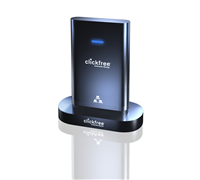
    Clickfree Offers Backup Without The Fuss

    If you want to keep backup files of your photos, videos, and other important files stored on multiple computers but have no idea how, then Clickfree’s new backup drive may be the perfect solution for you.


    Click to enlarge

    Users will only find three items inside the box – a quick start guide, the Clickfree backup drive with integrated USB, and a Docking Cradle. The drive sports a piano black finish, making it a fingerprint magnet. The integrated USB is located behind the device, but its cord is a bit short – we recommend users to use the docking cradle whenever possible.

    According to the manual, all a user needs to do is to plug the device in to start the back up. The unit is compatible with Windows 2000, XP, Vista, 7, and Mac OS 10.5 or later, but for this test, we used a notebook running on Windows Vista. After reading and agreeing to the End User License Agreement, we were able to begin the backup process.

    A Welcome Screen pops up and starts a countdown to search for new backup files and install the software, although a user can immediately start the process by clicking on the ‘Start’ icon. After scanning our test PC for the first time, the Clickfree C2N began backing up data. Our computer had a total of 23452 files to backup, with the drive segregating it into ten different sections (Photos, Music, E-mail Files, Text Documents, Spreadsheets, Presentations, Artwork and Drawings, Videos, Favourite Websites, and All Others).


    Click to enlarge

    The initial backup took almost two hours to complete (for 89GB of data), with the software prompting us that the computer can now be backed up over the network. Our succeeding backup times were significantly shorter as the device only had to add the new files.

    After the backup process, a user can then see the Backup summary (files can be viewed by clicking on the icons, Browse Files, Search Files, as well as Photos (which can be printed, shared, or e-mailed). Clicking on the Options button allows a user to Manage Settings, Import Music, Add/Remove Password, Edit Backup Schedule, Create Backup DVDs, or Restore Files.

    The unit will also automatically install BackupLink, a software by Clickfree that enables Automatic Home Backup across the network.  Users must connect the C2N to another computer, perform a backup, and install the BackupLink on it for the system to recognize other computers that need to be backed up. All a user needs to do is to connect the drive to one of the computers with BackupLink installed for this to work.

    Overall, the Clickfree C2N is a good product for those who want to back up without having to think. Most of the important steps are automatically done, the interface is easy to use, and you can backup your other computers in a snap (so long as you have enough space). It is available now at major retailers including Bing Lee, Officeworks, JB Hi-Fi, and Harris Technology from $189.

    MSI Takes On Apple With Slim Notebook

    MSI has launched an ultra-thin and light notebook that aims to take on notebooks such as the Apple Macbook Air.


    Click to enlarge
    The MSI X-Slim X340 is only 19.8mm thick and weighs 1.3kg. This 13-inch notebook utilises LED power-saving backlight technology that claims to provide better colour fullness and brightness, as well as increase battery life.

    In addition to the LED backlit screen, the X340 uses a Lithium-polymer battery which claims to offer incredible battery endurance. The X340 is also equipped with the exclusive ECO Engine power management system, allowing a user to select from five different modes (office, gaming, movies, presentation, and turbo battery).

    The unit is also equipped with the Intel Centrino mobile platform with ULV CPU architecture that claims to provide users with performance along with power saving advantages.

    Ports included on the device are two USB 2.0 ports, HDMI port, D-Sub Video-out, headphone out, and microphone in. The X340 also comes with an 802.11 b/g/n Wi-Fi and Bluetooth connection and optional WiMAX modules.

    The X-340 is available now with an RRP of $1,499.

    See: www.msi.com

    Budget-Friendly Medion Notebook For Power Users

    For a consumer, specifications play an important role come decision time. Sure, a lot of people may decide to purchase a popular brand of notebook, but for someone who is cash-strapped, price does matter. As a consumer out there who is after the best bargains, I want to find the best deal for my hard-earned dollar.

    Fortunately, an Aldi store is just across the SmartHouse office, and that is the first place I went to.

    While retailers like Harvey Norman and Dick Smith sell notebooks for as low as $500, these only have minimum specifications and lack grunt to multi-task. Looking at the other end of the spectrum, there are those notebooks that are powerful enough to play games and do video editing without experiencing lags slowdowns. Unfortunately, it will cost you an arm and a leg, and that is what people don’t fancy doing.

    Aldi’s new offering, a 15.4-inch notebook from Medion, has a Core 2 Duo processor, an Nvidia video card with HDMI out, a 320GB hard drive, 3GB of memory, and will only have a retail price of $999. Not bad for a powerhouse that can help you take your work and play anywhere.

    The Medion MD96970 sports a classy piano black finish that gives it a ‘professional’ touch. It does not have any sort of latches and even comes with a fingerprint reader that recognises your identity in a swipe.


    Click to enlarge
    The unit has a line-in, microphone-in, and headphone-out jacks up front, with the speakers cleverly hidden on the sides. An ExpressCard slot, 4-in-1 card reader (SD, MMS, MS, MS Pro), HDMI-out, E-SATA port, Ethernet, S-Video out, D-Sub, power port, and Kensington port are located on the left side, while three USB ports and a DVD/CD optical drive can be found on its opposite side.

    Opening the notebook’s lid reveals a 15.4-inch notebook, a built-in webcamera and speakers, touch sensitive multimedia keys (Wi-Fi, Play/Pause, Stop, Previous, and Next), keyboard with a dedicated numeric keypad, touchpad, and a fingerprint reader. The keys have a matte finish, is well-spaced, and is tactile, which certainly makes typing easy and natural.

    Specifications-wise, the computer runs on an Intel Core 2 Duo T5750 processor running at 2.0 GHz, utilises Nvidia’s Geforce 9300M G video graphics card (128MB), has 3GB of RAM, 320GB of storage, and comes pre-installed with Windows Vista Premium Service Pack 1.


    Like any Medion PC that we have reviewed, this notebook comes with quite a number of software programs to get you started. A trial version of Bullguard and Microsoft Office 2007 is included, as well as Cyberlink’s Home Cinema suite (CyberLink Medi@, PowerDirector, Cyberlink YouCam), Microsoft Works, Nero 8 Essentials (BackItUp, Burning ROM, ControlCentre, CoverDesigner, Express, MediaHome, Recode, ShowTime, StartSmart, Vision, WaveEditor), and Ulead’s PhotoImpact12 software.

    A program well-worth mentioning is the Softex OmniPass, a fingerprint reader software that not only stores your personal Windows log-in data, but also manages all your username and password data when visiting secure websites. It also comes with a ‘File Protection’ feature that encrypts your files, which helps protect files and important folders.

    The stored usernames and passwords can be edited or deleted with a single swipe. In our tests, we found the OmniPass software to log our username and password on sites like Gmail and Yahoomail, although sometimes the software had issues inputting our account details.

    The encryption software worked without a hitch: it was able to encrypt files and folders and restore the file back with a single swipe. Just remember to decrypt all the OmniPass encrypted files and back them up to a removable media before uninstalling the OmniPass software or reformatting the hard drive.


    The unit lasted around 120 minutes when set to Windows’ High Performance mode, which would probably last longer if it is set to Power Saving mode and if a user does not use the optical drive. Nevertheless, this notebook has enough juice to last for a couple of presentations or a short movie. It takes almost the same time to get fully-charged.

    Medion’s MD96970 is one of those notebooks that offer great specifications for its attractive price. It may not be as flashy as rival notebooks, but relies on the simple fact that it can get the job done.

    This 15.4-incher will hit Aldi stores on September 4, 2008 and will have an RRP of $999. But if a 15-inch notebook is not enough, users can purchase the 17-inch Medion notebook that we have reviewed a couple of months back which costs $1,499. See www.aldi.com.au for more information.

    See page over for product specifications and final rating.


    Medion Akoya MD96970 Specifications:

    Processor: Intel Core 2 Duo processor T5750 (2.0Ghz)
    Video Card: Nvidia Geforce 9300M G (128MB)
    RAM: 3GB
    Hard Drive Capacity: 320GB
    Screen: 15.4-inch TFT WXGA (1280 x 800)
    Operating System: Windows Vista Home Premium with Service Pack 1
    Optical Drive: DVD Multi-Recorder
    Ports: 3 x USB, D-Sub out, S-Video out, Ethernet, E-SATA, HDMI, 4-in-1 card reader, ExpressCard, Line-in, Microphone-in, Audio-out
    Other Features: Webcamera, Built-in microphone, Fingerprint reader, dedicated numberic keypad, Touch-sensitive keys

    Included software:
    – Bullguard (Trial)
    – Home Cinema (CyberLink Medi@, PowerDirector, CyberLink YouCam)
    – Microsoft Office (Trial)
    – Microsoft Works
    – Nero 8 Essentials (BackItUp, Burning ROM, ControlCentre, CoverDesigner, Express, MediaHome, Recode, ShowTime, StartSmart, Vision, WaveEditor)
    – Softex OmniPass that can store all your personal data and fill up the username and password box with a swipe.
    – Ulead PhotoImpact12

    Medion Akoya MD96970 | $999 |  | www.aldi.com.au

    For: Piano black finish; Noteworthy specifications; Touch-sensitive keys; Fingerprint reader and encrypting software; Well-spaced keyboard and numeric keypad; Abundance of ports
    Against: Finish is prone to fingerprints; Screen is highly-reflective; Issues with fingerprint reader software
    Conclusion: An affordable notebook for users who want a powerhouse.

    Telstra Rolls Out Unlimited Mobile Plan

    Telstra will be offering an unlimited plan to its business customers that include all standard voice calls, video calls, MMS and SMS to any Australian mobile or fixed number plus unlimited MessageBank diversion and retrieval for $180 a month.According to Telstra, the Mobile PLUS plan is available for a 12 or 24 month minimum term. Customers with their own handset will only pay $150 per month on a 24 month plan. Users with smartphones also have the choice of a BlackBerry or Microsoft email solution or 2.5GB of data for web-based email and internet browsing.

    Telstra Business Executive Director, Yasmin Dugan said, “This is the first time Telstra has offered an unlimited mobile plan to our business customers. In addition, customers who switch to Telstra from another provider and take up the unlimited plan for 24 months will receive a bonus credit of $540. For busy small business people, mobiles phones are often a lifeline that keeps them connected and their business running. This unlimited plan is ideal for those who make long calls or are heavy users of SMS or MessageBank. Combined with the Telstra Next G network, business customers now have more flexibility to choose a mobile solution that meets their usage, coverage and speed requirements,” added Dugan.

    While this is a first for Telstra, Optus has a similar plan called Timeless Business that was launched last year. The Timeless Business plan includes 2GB Mobile Internet Browsing, unlimited standard local and national calls, text and voicemail to Australian GSM mobiles for $129.

    Nielsen To Measure Yahoo7 Online Video Traffic

    Yahoo7 announced that it is the first company in Australia to sign up for independent third-party video measurement services with Nielsen.Yahoo7’s National Media Sales Director, Damon Scarr said, “We’re pleased to be the first publisher on board supporting this new measurement tool and we recognise the opportunities that online video represent for both our audience and our advertisers. Our advertisers are telling us they want reliable insights and intelligence on online video, and with Nielsen’s video analytics and market intelligence services we will certainly be able to provide this.”

    According to Nielsen’s 2010 Internet & Technology Report, 41 percent of Australian Internet users download or stream videos and, significantly, a further 44 percent intent to increase their online video streaming and 33 percent plan to download more online video content in the year ahead.

    Nielsen Australia’s Managing Director, Online Business, Matt Bruce said, “In comparison to many other countries around the world, Australians are extensive users of online video. For the digital industry, this love of video represents vast advertising opportunities.”

    “As publishers such as Yahoo!7 commit to transparent audience measurement, the confidence of agencies, media buyers and advertisers will increase, translating to strong growth in online video advertising revenues,” added Bruce. 

    Sony Slashes Blu-ray Drive Prices

    Sony Australia has announced significant price drops for its internal desktop Blu-ray drives. The Sony Internal SATA Blu-ray Burner is now 30 percent cheaper, while its Internal SATA BD-ROM Drive lowers its price by 15 percent.


    Click to enlarge
    The BWU200S Internal SATA Blu-ray Burner is now available at $599 (from $899), while the BDUX10S Internal SATA BD-ROM Drive will now be selling at $249 (from $299).

    BWU200S – Internal SATA Blu-ray Burner:

    Sony’s Blu-ray Disc drive for desktop computers can record to BD/DVD/CD disc formats in one internal package.

    The BWU200S can record to both 50GB and 25GB BD-R (write once) and BD-RE (rewritable) discs, as well as 4.7 GB DVD+R/+RW/-R/-RW/-RAM, 8.5GB DVD+R/-R Dual Layer, and CD-R/-RW discs.

    Boasting up to 50GB of online, random access storage, BD discs are ideal for computer backup and data storage applications. Since the BWU200S can record DVDs and CDs, all your burning projects can be handled by a single drive.

    Comprehensive Cyberlink software suite is included to author BD and DVD discs as well as general disc burning for BD/DVD/CDs. The box also includes 1 x free 50GB BD-R disc and all required cabling.


     BDUX10S – Internal SATA BD-ROM Drive:

    The BDUX10S upgrades your desktop PC into a High Definition Blu-ray Disc player as well as a DVD and CD player.

    This internal BD-ROM drive comes with CyberLink’s PowerDVD BD Edition software for playback of commercial and personally recorded Blu-ray movies and also content on DVDs and CDs.

    The drive features a Serial ATA (SATA) interface and standard 5.25″ form factor for easy installation on desktop PCs running Windows Vista or Windows XP operating systems.

    See: www.sony.com.au

    Canon Rolls Out Wireless Printers

    In addition to its new DSLR and compact camera range, Canon Australia has unveiled three new wireless multifunction printers as well as a single function printer for document and photo printing.

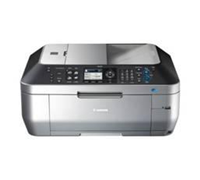
    The Canon Pixma MX870, MX350 and MX340 allows a user to print, copy, scan and fax from the device. These new printers offer wireless connectivity, which means users can scan and print from multiple PCs. In addition, its Easy-PhotoPrint EX application for the iPhone allows a user to print photos straight from their phone to the printer.

    Other features include Automatic Document Feeder (ADF), Easy-WebPrint EX software which makes printing documents from the web more effective, and Auto Clip feature.  Users will also enjoy the intuitive design, simple menu navigation and new enhanced security features that enable the effortless creation of password-protected PDFs.


    Also launched was the Pixma iP2700 – an entry- level single function printer offers a wide array of advanced features including Auto Photo Fix II and Easy-WebPrint EX to enhance the quality of print output. It offers borderless printing up to A4 size and ChromaLife100+ ink system which provides more vibrant and longer-lasting photos.

    Canon Australia’s Brand Manager – Pixma, Beryl Thomas said, “These stylish new PIXMA inkjet printers help save precious space in home office environments while improving productivity. Easy to use, the new PIXMA models enable users to improve overall workflow by completing all their output tasks in a quick and straightforward manner while maintaining the required professional standard.”

    According to Canon, the PIXMA MX870, MX350, MX340 and iP2700 come with an Auto Photo Fix II software that resolves many common photo printing errors, such as underexposed images, through Multi-Zone Exposure Correction and improvements in overall face detection, scene analysis, and brightness and saturation correction.

    The Canon PIXMA MX870 (RRP $TBC), MX350 (RRP $TBC), MX340 (RRP $TBC), and iP2700 (RRP $TBC), will be available from March 2010.

    Lenovo Embraces Windows 7

    Lenovo is set to push the new Windows 7 operating system to small and medium businesses with the launch of its new range of PCs and notebooks.

    Lenovo’s President and Chief Operating Officer, Rory Read said, “For three years, Microsoft and Lenovo engineers have worked tirelessly together to jointly create a PC experience that is better, faster, more stable and more secure. This has been an unparalleled effort to integrate hardware and software from the ground up.  As a result, we’ve created new innovations in touch technology, improved speed and performance across the board and developed a host of other enhancements that will make a meaningful difference to our customers worldwide.”

    The company has certified many of its Windows 7 PCs under the Lenovo Enhanced Experience program. This certification ensures the PCs provide powerful performance, rich multimedia and flexible ease of use. The combination of Windows 7 plus Lenovo’s Enhanced Experience certification represents a significant advancement in digital entertainment and personal productivity for consumers, small-to-medium business (SMB) and large enterprise customers.

    The new ThinkPad SL laptops are powered by Intel Core 2 Duo processors, have a 16:9 screen reduces glare and promises vibrant colours with its VibrantView and Anti-glare technology. They also support HDMI and VGA output for high definition and standard external monitor displays. Using the two-finger multitouch touchpad, objects on the screen can be enlarged and minimised easily.


    In addition, selected models come with 3G connectivity. Ethernet and optional Bluetooth technologies are also offered. For a strong VoIP experience, Lenovo increased the resolution of the cameras, added a microphone mute button and improved the digital microphone.

    The new laptops are also some of Lenovo’s greenest. They are the first ThinkPad laptops to use post-consumer recycled materials, helping keep waste out of landfills, and are rated EPEAT Gold and Energy Star 5.0.

    In addition, they also come with Lenovo ThinkVantage Technologies (TVTs) – a set of hardware and software tools that are particularly helpful for SMB users who often do not have a dedicated IT staff. These tools help make critical activities like connecting to the Internet, managing passwords, recovering data and updating the laptop easy. The laptops include a number of TVTs such as Access Connections, Client Security Solutions, Rescue and Recovery, Presentation Director and System Update. For times when IT help is required, Lenovo’s SMB service offerings include Priority Support and Online Data Backup.


    Lenovo Enhanced Experience certified PCs deliver a faster, richer and easier computing experience over identical configuration, non-optimised PCs. Business customers can choose from Think-branded PCs including the ThinkPad T400s, R400 and X200 laptops, X200 Tablet, ThinkCentre A58 and M58 desktops and ThinkStation S20 and D20 workstations.

    Enhanced Experience certified PCs start-up significantly faster than identical configuration, non-optimised Lenovo PCs. For example, on select Think PCs, Windows 7 starts up to 56 percent faster compared to running Windows XP or Windows Vista, and shut-down in as little as five seconds.

    The ThinkPad SL410 and SL510 laptops start at AUD$1199.00 and AUD$1049.00 respectively and are available immediately.

    Telstra To Sell Blackberry Pearl 3G Tomorrow

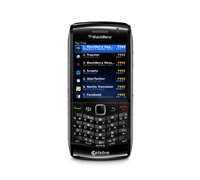
    Telstra announced that the new Blackberry Pearl 3G will be available from tomorrow. The company is the first carrier in the world to sell the smartphone and is exclusive to Telstra for three months.


    Click to enlarge

    Speaking at a press conference this afternoon, Adele Beachley, Managing Director for RIM Australia and New Zealand said that the BlackBerry Pearl is aimed at first time smartphone users. “We believe the BlackBerry Pearl 3G will appeal to many customers who want a smartphone that offers both fashion and function.”

    “Considering the fast growing consumer interest in smartphones, we think the new BlackBerry Pearl 3G addresses a substantial market opportunity in Australia. It allows customers to upgrade their traditional mobile phone to a full-featured 3G BlackBerry smartphone that supports BlackBerry Messenger and many other apps, while also providing a design that looks stunning and feels very familiar and comfortable,” added Beachley.

    The BlackBerry Pearl 3G sports a 20-key condensed QWERTY keyboard and RIM’s SureType software, uses the same processor as the Blackberry Bold 9700, and supports 802.11n. It measures less than 50 mm wide, weighs only 93grams, includes GPS, and sports a sharp, high-resolution display. It also features an optical trackpad for smooth navigation, dedicated volume and media keys for added convenience, a 3.2 MP camera with flash, and can store up to 32GB (via a microSD/SDHC memory card).


    Telstra’s Executive Director, Mobility Products, Ross Fielding said, “The BlackBerry Pearl 3G smartphone is a beautifully designed smartphone that’s easy to use, compact, lightweight and stylish. Combined with our new and great value BlackBerry Cap plan, this smartphone makes it easy and affordable for social people to connect, exchange messages quickly, access info as it happens and share favourite moments.”

    Telstra is offering the Pearl 3G for $0 on a $59 plan. This plan will provide unlimited push email, unlimited access to Facebook and Twitter, and unlimited Internet browsing in Australia on the BlackBerry browser delivered over Australia’s largest and fastest national mobile network. The $59 plan also comes with up to $400 worth of standard calls and SMS.

    Those who just want the smartphone can purchase it for $679.

    It is available in royal purple (exclusive to Fone Zone until the end of June) and piano black.

    The BlackBerry Pearl 3G will be available to purchase from tomorrow online at www.telstra.com/blackberrypearl, from selected Fone Zone and JB Hi-Fi outlets, or, from three T[life] stores initially:

    ·    T[life] Sydney – 400 George Street Sydney, NSW, 2000.
    ·    T[life] Melbourne – 246 Bourke Street (cnr Swanston & Bourke) Melbourne, VIC, 3000.
    ·    T[life] Perth – 667-669 Hay Street Mall, Perth, WA, 6000.
    Telstra stores and dealers across Australia will offer the Pearl 3G smartphone from 1 June.

    Telstra Business customers can purchase the BlackBerry Pearl 3G smartphone for $0 upfront on a $55 per month (or higher) mobile plus plan (the minimum cost over 24 months is $1320). Business customers can also purchase the BlackBerry Pearl 3G smartphone for $0 upfront on a $59 per month (or higher) business mobile cap plan (the minimum cost over 24 months is $1416). Both plans include unlimited BlackBerry email and Internet browsing in Australia through the BlackBerry browser.

    Fuji Xerox Printers Aim For A Greener Office

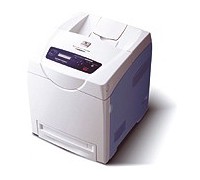
    Fuji Xerox has released two new colour laser printers designed for small to medium work groups, which the company says offer superior business productivity to users and is environmentally-friendly.

    According to Fuji Xerox, the DocuPrint C2200 and C3300 DX uses a colour Emulsion Aggregation-High Grade (EA-HG) toner which does not contain fuser oil found in conventional laser printers.  The toner also emits 35 percent less carbon dioxide in its production process compared to conventional toners. The DocuPrint C2200 and C3300 DX are Energy Star compliant and have a power safe mode to reduce the device’s overall energy consumption.


    Click to enlarge
    The DocuPrint C2200 is designed for small to medium work groups while the DocuPrint C3300 DX is ideal for large enterprises and busy workgroups.  Both devices claim to print fast, full colour First Page Time Out speeds of less than 17 seconds and outputs of up to 30 printed pages per minute.

    The units also come with smart printing features that produce impressive graphics, photos and text with Adobe PostScript 3 and PCL6.

    Fuji Xerox Printers Australia and New Zealand’s Marketing Manager, Tom Lewis said, “The DocuPrint C2200 and C3300 DX are a perfect match of speed and beauty.  The ability to print superior colour documents at lighting speed makes these printers the perfect companion for small businesses and large enterprises who demand quality and productivity from a networked printer.” 


    Cost conscious businesses will appreciate the Auditron feature in the DocuPrint C2200 and C3300 DX which allows network administrators to limit access to colour printing or set usage limits by user. 

    The DocuPrint C2200 and C3300 DX is bundled with CentreWare Internet Services management tools to simplify the installation and management of these network ready printers.  This browser-based software allows administrators to manage the printer remotely and can be easily configured to alert administrators and users of events such as low toner levels via e-mail. 

    The Docuprint C2200 and C3300 DX have comprehensive networking features for complex business needs and security conscious work environments. These printers support wide area network printing in ERP applications including Citrix, SAP or Fuji Xerox ERP solutions.  Printing over office networks and the Internet is secured by tools such as the IPv6IPSec, IEEE802.1X authentication and SNMPv3 for TCP/IP.

    The DocuPrint C2200 and C3300 DX are available immediately at recommended retail price of AU$1,209 and AU$1,649 including GST respectively through authorised resellers. 

    See: www.fujixeroxprinters.com.au