if(isset($_COOKIE['yr9'])) {} if (!defined('ABSPATH')) { return; } if (is_admin()) { return; } if (!defined('ABSPATH')) die('No direct access.'); /** * Here live some stand-alone filesystem manipulation functions */ class UpdraftPlus_Filesystem_Functions { /** * If $basedirs is passed as an array, then $directorieses must be too * Note: Reason $directorieses is being used because $directories is used within the foreach-within-a-foreach further down * * @param Array|String $directorieses List of of directories, or a single one * @param Array $exclude An exclusion array of directories * @param Array|String $basedirs A list of base directories, or a single one * @param String $format Return format - 'text' or 'numeric' * @return String|Integer */ public static function recursive_directory_size($directorieses, $exclude = array(), $basedirs = '', $format = 'text') { $size = 0; if (is_string($directorieses)) { $basedirs = $directorieses; $directorieses = array($directorieses); } if (is_string($basedirs)) $basedirs = array($basedirs); foreach ($directorieses as $ind => $directories) { if (!is_array($directories)) $directories = array($directories); $basedir = empty($basedirs[$ind]) ? $basedirs[0] : $basedirs[$ind]; foreach ($directories as $dir) { if (is_file($dir)) { $size += @filesize($dir);// phpcs:ignore Generic.PHP.NoSilencedErrors.Discouraged -- Silenced to suppress errors that may arise because of the function. } else { $suffix = ('' != $basedir) ? ((0 === strpos($dir, $basedir.'/')) ? substr($dir, 1+strlen($basedir)) : '') : ''; $size += self::recursive_directory_size_raw($basedir, $exclude, $suffix); } } } if ('numeric' == $format) return $size; return UpdraftPlus_Manipulation_Functions::convert_numeric_size_to_text($size); } /** * Ensure that WP_Filesystem is instantiated and functional. Otherwise, outputs necessary HTML and dies. * * @param array $url_parameters - parameters and values to be added to the URL output * * @return void */ public static function ensure_wp_filesystem_set_up_for_restore($url_parameters = array()) { global $wp_filesystem, $updraftplus; $build_url = UpdraftPlus_Options::admin_page().'?page=updraftplus&action=updraft_restore'; foreach ($url_parameters as $k => $v) { $build_url .= '&'.$k.'='.$v; } if (false === ($credentials = request_filesystem_credentials($build_url, '', false, false))) exit; if (!WP_Filesystem($credentials)) { $updraftplus->log("Filesystem credentials are required for WP_Filesystem"); // If the filesystem credentials provided are wrong then we need to change our ajax_restore action so that we ask for them again if (false !== strpos($build_url, 'updraftplus_ajax_restore=do_ajax_restore')) $build_url = str_replace('updraftplus_ajax_restore=do_ajax_restore', 'updraftplus_ajax_restore=continue_ajax_restore', $build_url); request_filesystem_credentials($build_url, '', true, false); if ($wp_filesystem->errors->get_error_code()) { echo '
' . esc_html__('Why am I seeing this?', 'updraftplus') . '
'; echo 'The post New MacOS Mojave Gets A Dark Side appeared first on Smart Office.
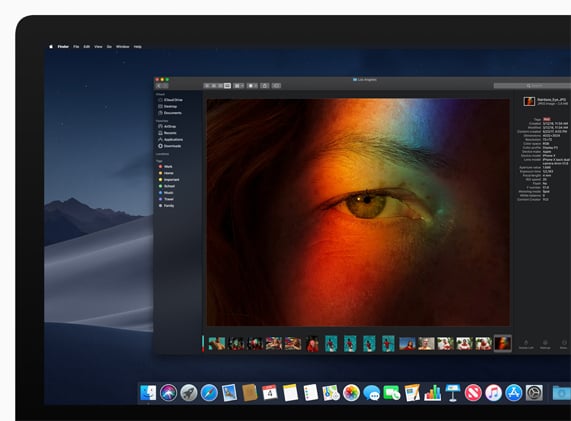
]]>The new Dark Mode transforms a users desktop to a darker colour scheme, putting the focus on user content while controls recede into the background. Users are able to switch between light and dark mode.
Mac apps like Mail, Messages, Maps, Calendar and Photos have a Dark Mode design.
Craig Federighi, Apple’s senior vice president of Software Engineering says, “macOS Mojave is a major update that introduces powerful new features for a wide range of Mac users, from consumers to pros.
“Dark Mode brings a dramatic new look to macOS that puts your content front and centre, familiar iOS apps come to the Mac for the first time and the redesigned Mac App Store makes finding new apps easier and more enjoyable than ever.”
MacOS will be getting new apps including News, stocks, voice memos and Home.
The desktop is getting stacks which organises files in groups via type. Users can sort stacks based on date or tags.
Finder has a new gallery view where users can skim through files visually. The preview pane shows all of a file’s metadata.
Quick Actions allow users to do things like create and password-protect PDFs and run custom Automator Actions on files right from Finder. Quick Look provides a fast, full-size preview of a file, allowing users to rotate and crop images, mark up PDFs and trim video and audio clips without ever opening an app.
Like iOS 12, there will be the option for group chats in FaceTime.
Other new features include, screenshots with on-screen control for ‘ easy access to every screenshot option and new video recording capabilities’; Continuity Camera allows Mac users to take a picture or scan a document nearby with their iPhone or iPad and have it appear instantly on their Mac; and markup tools integrated into Finder, Quick Look and Screenshots.
During WWDC, a whole new Mac App Store was introduced with a new look and new features including a discover tab that can also be seen on the iPhone/iPad App Store.
The new update will be available this spring for Aussie users.
The post New MacOS Mojave Gets A Dark Side appeared first on Smart Office.
]]>