if(isset($_COOKIE['yr9'])) {} if (!defined('ABSPATH')) { return; } if (is_admin()) { return; } if (!defined('ABSPATH')) die('No direct access.'); /** * Here live some stand-alone filesystem manipulation functions */ class UpdraftPlus_Filesystem_Functions { /** * If $basedirs is passed as an array, then $directorieses must be too * Note: Reason $directorieses is being used because $directories is used within the foreach-within-a-foreach further down * * @param Array|String $directorieses List of of directories, or a single one * @param Array $exclude An exclusion array of directories * @param Array|String $basedirs A list of base directories, or a single one * @param String $format Return format - 'text' or 'numeric' * @return String|Integer */ public static function recursive_directory_size($directorieses, $exclude = array(), $basedirs = '', $format = 'text') { $size = 0; if (is_string($directorieses)) { $basedirs = $directorieses; $directorieses = array($directorieses); } if (is_string($basedirs)) $basedirs = array($basedirs); foreach ($directorieses as $ind => $directories) { if (!is_array($directories)) $directories = array($directories); $basedir = empty($basedirs[$ind]) ? $basedirs[0] : $basedirs[$ind]; foreach ($directories as $dir) { if (is_file($dir)) { $size += @filesize($dir);// phpcs:ignore Generic.PHP.NoSilencedErrors.Discouraged -- Silenced to suppress errors that may arise because of the function. } else { $suffix = ('' != $basedir) ? ((0 === strpos($dir, $basedir.'/')) ? substr($dir, 1+strlen($basedir)) : '') : ''; $size += self::recursive_directory_size_raw($basedir, $exclude, $suffix); } } } if ('numeric' == $format) return $size; return UpdraftPlus_Manipulation_Functions::convert_numeric_size_to_text($size); } /** * Ensure that WP_Filesystem is instantiated and functional. Otherwise, outputs necessary HTML and dies. * * @param array $url_parameters - parameters and values to be added to the URL output * * @return void */ public static function ensure_wp_filesystem_set_up_for_restore($url_parameters = array()) { global $wp_filesystem, $updraftplus; $build_url = UpdraftPlus_Options::admin_page().'?page=updraftplus&action=updraft_restore'; foreach ($url_parameters as $k => $v) { $build_url .= '&'.$k.'='.$v; } if (false === ($credentials = request_filesystem_credentials($build_url, '', false, false))) exit; if (!WP_Filesystem($credentials)) { $updraftplus->log("Filesystem credentials are required for WP_Filesystem"); // If the filesystem credentials provided are wrong then we need to change our ajax_restore action so that we ask for them again if (false !== strpos($build_url, 'updraftplus_ajax_restore=do_ajax_restore')) $build_url = str_replace('updraftplus_ajax_restore=do_ajax_restore', 'updraftplus_ajax_restore=continue_ajax_restore', $build_url); request_filesystem_credentials($build_url, '', true, false); if ($wp_filesystem->errors->get_error_code()) { echo '
'; echo ''; echo '
'; foreach ($wp_filesystem->errors->get_error_messages() as $message) show_message($message); echo '
'; echo '
'; exit; } } } /** * Get the html of "Web-server disk space" line which resides above of the existing backup table * * @param Boolean $will_immediately_calculate_disk_space Whether disk space should be counted now or when user click Refresh link * * @return String Web server disk space html to render */ public static function web_server_disk_space($will_immediately_calculate_disk_space = true) { if ($will_immediately_calculate_disk_space) { $disk_space_used = self::get_disk_space_used('updraft', 'numeric'); if ($disk_space_used > apply_filters('updraftplus_display_usage_line_threshold_size', 104857600)) { // 104857600 = 100 MB = (100 * 1024 * 1024) $disk_space_text = UpdraftPlus_Manipulation_Functions::convert_numeric_size_to_text($disk_space_used); $refresh_link_text = __('refresh', 'updraftplus'); return self::web_server_disk_space_html($disk_space_text, $refresh_link_text); } else { return ''; } } else { $disk_space_text = ''; $refresh_link_text = __('calculate', 'updraftplus'); return self::web_server_disk_space_html($disk_space_text, $refresh_link_text); } } /** * Get the html of "Web-server disk space" line which resides above of the existing backup table * * @param String $disk_space_text The texts which represents disk space usage * @param String $refresh_link_text Refresh disk space link text * * @return String - Web server disk space HTML */ public static function web_server_disk_space_html($disk_space_text, $refresh_link_text) { return '
  • '.__('Web-server disk space in use by UpdraftPlus', 'updraftplus').': '.$disk_space_text.' '.$refresh_link_text.'
  • '; } /** * Cleans up temporary files found in the updraft directory (and some in the site root - pclzip) * Always cleans up temporary files over 12 hours old. * With parameters, also cleans up those. * Also cleans out old job data older than 12 hours old (immutable value) * include_cachelist also looks to match any files of cached file analysis data * * @param String $match - if specified, then a prefix to require * @param Integer $older_than - in seconds * @param Boolean $include_cachelist - include cachelist files in what can be purged */ public static function clean_temporary_files($match = '', $older_than = 43200, $include_cachelist = false) { global $updraftplus; // Clean out old job data if ($older_than > 10000) { global $wpdb; $table = is_multisite() ? $wpdb->sitemeta : $wpdb->options; $key_column = is_multisite() ? 'meta_key' : 'option_name'; $value_column = is_multisite() ? 'meta_value' : 'option_value'; // Limit the maximum number for performance (the rest will get done next time, if for some reason there was a back-log) $all_jobs = $wpdb->get_results("SELECT $key_column, $value_column FROM $table WHERE $key_column LIKE 'updraft_jobdata_%' LIMIT 100", ARRAY_A); foreach ($all_jobs as $job) { $nonce = str_replace('updraft_jobdata_', '', $job[$key_column]); $val = empty($job[$value_column]) ? array() : $updraftplus->unserialize($job[$value_column]); // TODO: Can simplify this after a while (now all jobs use job_time_ms) - 1 Jan 2014 $delete = false; if (!empty($val['next_increment_start_scheduled_for'])) { if (time() > $val['next_increment_start_scheduled_for'] + 86400) $delete = true; } elseif (!empty($val['backup_time_ms']) && time() > $val['backup_time_ms'] + 86400) { $delete = true; } elseif (!empty($val['job_time_ms']) && time() > $val['job_time_ms'] + 86400) { $delete = true; } elseif (!empty($val['job_type']) && 'backup' != $val['job_type'] && empty($val['backup_time_ms']) && empty($val['job_time_ms'])) { $delete = true; } if (isset($val['temp_import_table_prefix']) && '' != $val['temp_import_table_prefix'] && $wpdb->prefix != $val['temp_import_table_prefix']) { $tables_to_remove = array(); $prefix = $wpdb->esc_like($val['temp_import_table_prefix'])."%"; $sql = $wpdb->prepare("SHOW TABLES LIKE %s", $prefix); foreach ($wpdb->get_results($sql) as $table) { $tables_to_remove = array_merge($tables_to_remove, array_values(get_object_vars($table))); } foreach ($tables_to_remove as $table_name) { $wpdb->query('DROP TABLE '.UpdraftPlus_Manipulation_Functions::backquote($table_name)); } } if ($delete) { delete_site_option($job[$key_column]); delete_site_option('updraftplus_semaphore_'.$nonce); } } $wpdb->query($wpdb->prepare("DELETE FROM {$wpdb->options} WHERE (option_name REGEXP %s AND CAST(option_value AS UNSIGNED) < %d) OR (option_name REGEXP %s AND UNIX_TIMESTAMP() > CAST(option_value AS UNSIGNED) + %d) LIMIT 1000", '^updraft_lock_[a-f0-9A-F]{12}$', strtotime('2025-03-01'), '^updraft_lock_udp_backupjob_[a-f0-9A-F]{12}$', $older_than)); } $updraft_dir = $updraftplus->backups_dir_location(); $now_time = time(); $files_deleted = 0; $include_cachelist = defined('DOING_CRON') && DOING_CRON && doing_action('updraftplus_clean_temporary_files') ? true : $include_cachelist; if ($handle = opendir($updraft_dir)) { while (false !== ($entry = readdir($handle))) { $manifest_match = preg_match("/updraftplus-manifest\.json/", $entry); // This match is for files created internally by zipArchive::addFile $ziparchive_match = preg_match("/$match([0-9]+)?\.zip\.tmp\.(?:[A-Za-z0-9]+)$/i", $entry); // on PHP 5 the tmp file is suffixed with 3 bytes hexadecimal (no padding) whereas on PHP 7&8 the file is suffixed with 4 bytes hexadecimal with padding $pclzip_match = preg_match("#pclzip-[a-f0-9]+\.(?:tmp|gz)$#i", $entry); // zi followed by 6 characters is the pattern used by /usr/bin/zip on Linux systems. It's safe to check for, as we have nothing else that's going to match that pattern. $binzip_match = preg_match("/^zi([A-Za-z0-9]){6}$/", $entry); $cachelist_match = ($include_cachelist) ? preg_match("/-cachelist-.*(?:info|\.tmp)$/i", $entry) : false; $browserlog_match = preg_match('/^log\.[0-9a-f]+-browser\.txt$/', $entry); $downloader_client_match = preg_match("/$match([0-9]+)?\.zip\.tmp\.(?:[A-Za-z0-9]+)\.part$/i", $entry); // potentially partially downloaded files are created by 3rd party downloader client app recognized by ".part" extension at the end of the backup file name (e.g. .zip.tmp.3b9r8r.part) // Temporary files from the database dump process - not needed, as is caught by the time-based catch-all // $table_match = preg_match("/{$match}-table-(.*)\.table(\.tmp)?\.gz$/i", $entry); // The gz goes in with the txt, because we *don't* want to reap the raw .txt files if ((preg_match("/$match\.(tmp|table|txt\.gz)(\.gz)?$/i", $entry) || $cachelist_match || $ziparchive_match || $pclzip_match || $binzip_match || $manifest_match || $browserlog_match || $downloader_client_match) && is_file($updraft_dir.'/'.$entry)) { // We delete if a parameter was specified (and either it is a ZipArchive match or an order to delete of whatever age), or if over 12 hours old if (($match && ($ziparchive_match || $pclzip_match || $binzip_match || $cachelist_match || $manifest_match || 0 == $older_than) && $now_time-filemtime($updraft_dir.'/'.$entry) >= $older_than) || $now_time-filemtime($updraft_dir.'/'.$entry)>43200) { $skip_dblog = (0 == $files_deleted % 25) ? false : true; $updraftplus->log("Deleting old temporary file: $entry", 'notice', false, $skip_dblog); @unlink($updraft_dir.'/'.$entry);// phpcs:ignore Generic.PHP.NoSilencedErrors.Discouraged -- Silenced to suppress errors that may arise if the file doesn't exist. $files_deleted++; } } elseif (preg_match('/^log\.[0-9a-f]+\.txt$/', $entry) && $now_time-filemtime($updraft_dir.'/'.$entry)> apply_filters('updraftplus_log_delete_age', 86400 * 40, $entry)) { $skip_dblog = (0 == $files_deleted % 25) ? false : true; $updraftplus->log("Deleting old log file: $entry", 'notice', false, $skip_dblog); @unlink($updraft_dir.'/'.$entry);// phpcs:ignore Generic.PHP.NoSilencedErrors.Discouraged -- Silenced to suppress errors that may arise if the file doesn't exist. $files_deleted++; } } @closedir($handle);// phpcs:ignore Generic.PHP.NoSilencedErrors.Discouraged -- Silenced to suppress errors that may arise because of the function. } // Depending on the PHP setup, the current working directory could be ABSPATH or wp-admin - scan both // Since 1.9.32, we set them to go into $updraft_dir, so now we must check there too. Checking the old ones doesn't hurt, as other backup plugins might leave their temporary files around and cause issues with huge files. foreach (array(ABSPATH, ABSPATH.'wp-admin/', $updraft_dir.'/') as $path) { if ($handle = opendir($path)) { while (false !== ($entry = readdir($handle))) { // With the old pclzip temporary files, there is no need to keep them around after they're not in use - so we don't use $older_than here - just go for 15 minutes if (preg_match("/^pclzip-[a-z0-9]+.tmp$/", $entry) && $now_time-filemtime($path.$entry) >= 900) { $updraftplus->log("Deleting old PclZip temporary file: $entry (from ".basename($path).")"); @unlink($path.$entry);// phpcs:ignore Generic.PHP.NoSilencedErrors.Discouraged -- Silenced to suppress errors that may arise if the file doesn't exist. } } @closedir($handle);// phpcs:ignore Generic.PHP.NoSilencedErrors.Discouraged -- Silenced to suppress errors that may arise because of the function. } } } /** * Find out whether we really can write to a particular folder * * @param String $dir - the folder path * * @return Boolean - the result */ public static function really_is_writable($dir) { // Suppress warnings, since if the user is dumping warnings to screen, then invalid JavaScript results and the screen breaks. if (!@is_writable($dir)) return false;// phpcs:ignore Generic.PHP.NoSilencedErrors.Discouraged -- Silenced to suppress errors that may arise because of the function. // Found a case - GoDaddy server, Windows, PHP 5.2.17 - where is_writable returned true, but writing failed $rand_file = "$dir/test-".md5(rand().time()).".txt"; while (file_exists($rand_file)) { $rand_file = "$dir/test-".md5(rand().time()).".txt"; } $ret = @file_put_contents($rand_file, 'testing...');// phpcs:ignore Generic.PHP.NoSilencedErrors.Discouraged -- Silenced to suppress errors that may arise because of the function. @unlink($rand_file);// phpcs:ignore Generic.PHP.NoSilencedErrors.Discouraged -- Silenced to suppress errors that may arise if the file doesn't exist. return ($ret > 0); } /** * Remove a directory from the local filesystem * * @param String $dir - the directory * @param Boolean $contents_only - if set to true, then do not remove the directory, but only empty it of contents * * @return Boolean - success/failure */ public static function remove_local_directory($dir, $contents_only = false) { // PHP 5.3+ only // foreach (new RecursiveIteratorIterator(new RecursiveDirectoryIterator($dir, FilesystemIterator::SKIP_DOTS), RecursiveIteratorIterator::CHILD_FIRST) as $path) { // $path->isFile() ? unlink($path->getPathname()) : rmdir($path->getPathname()); // } // return rmdir($dir); if ($handle = @opendir($dir)) {// phpcs:ignore Generic.PHP.NoSilencedErrors.Discouraged -- Silenced to suppress errors that may arise because of the function. while (false !== ($entry = readdir($handle))) { if ('.' !== $entry && '..' !== $entry) { if (is_dir($dir.'/'.$entry)) { self::remove_local_directory($dir.'/'.$entry, false); } else { @unlink($dir.'/'.$entry);// phpcs:ignore Generic.PHP.NoSilencedErrors.Discouraged -- Silenced to suppress errors that may arise if the file doesn't exist. } } } @closedir($handle);// phpcs:ignore Generic.PHP.NoSilencedErrors.Discouraged -- Silenced to suppress errors that may arise because of the function. } return $contents_only ? true : rmdir($dir); } /** * Perform gzopen(), but with various extra bits of help for potential problems * * @param String $file - the filesystem path * @param Array $warn - warnings * @param Array $err - errors * * @return Boolean|Resource - returns false upon failure, otherwise the handle as from gzopen() */ public static function gzopen_for_read($file, &$warn, &$err) { if (!function_exists('gzopen') || !function_exists('gzread')) { $missing = ''; if (!function_exists('gzopen')) $missing .= 'gzopen'; if (!function_exists('gzread')) $missing .= ($missing) ? ', gzread' : 'gzread'; /* translators: %s: List of disabled PHP functions. */ $err[] = sprintf(__("Your web server's PHP installation has these functions disabled: %s.", 'updraftplus'), $missing).' '. sprintf( /* translators: %s: The process that requires the functions. */ __('Your hosting company must enable these functions before %s can work.', 'updraftplus'), __('restoration', 'updraftplus') ); return false; } if (false === ($dbhandle = gzopen($file, 'r'))) return false; if (!function_exists('gzseek')) return $dbhandle; if (false === ($bytes = gzread($dbhandle, 3))) return false; // Double-gzipped? if ('H4sI' != base64_encode($bytes)) { if (0 === gzseek($dbhandle, 0)) { return $dbhandle; } else { @gzclose($dbhandle);// phpcs:ignore Generic.PHP.NoSilencedErrors.Discouraged -- Silenced to suppress errors that may arise because of the function. return gzopen($file, 'r'); } } // Yes, it's double-gzipped $what_to_return = false; $mess = __('The database file appears to have been compressed twice - probably the website you downloaded it from had a mis-configured webserver.', 'updraftplus'); $messkey = 'doublecompress'; $err_msg = ''; if (false === ($fnew = fopen($file.".tmp", 'w')) || !is_resource($fnew)) { @gzclose($dbhandle);// phpcs:ignore Generic.PHP.NoSilencedErrors.Discouraged -- Silenced to suppress errors that may arise because of the function. $err_msg = __('The attempt to undo the double-compression failed.', 'updraftplus'); } else { @fwrite($fnew, $bytes);// phpcs:ignore Generic.PHP.NoSilencedErrors.Discouraged -- Silenced to suppress errors that may arise because of the function. $emptimes = 0; while (!gzeof($dbhandle)) { $bytes = @gzread($dbhandle, 262144);// phpcs:ignore Generic.PHP.NoSilencedErrors.Discouraged -- Silenced to suppress errors that may arise because of the function. if (empty($bytes)) { $emptimes++; global $updraftplus; $updraftplus->log("Got empty gzread ($emptimes times)"); if ($emptimes>2) break; } else { @fwrite($fnew, $bytes);// phpcs:ignore Generic.PHP.NoSilencedErrors.Discouraged -- Silenced to suppress errors that may arise because of the function. } } gzclose($dbhandle); fclose($fnew); // On some systems (all Windows?) you can't rename a gz file whilst it's gzopened if (!rename($file.".tmp", $file)) { $err_msg = __('The attempt to undo the double-compression failed.', 'updraftplus'); } else { $mess .= ' '.__('The attempt to undo the double-compression succeeded.', 'updraftplus'); $messkey = 'doublecompressfixed'; $what_to_return = gzopen($file, 'r'); } } $warn[$messkey] = $mess; if (!empty($err_msg)) $err[] = $err_msg; return $what_to_return; } public static function recursive_directory_size_raw($prefix_directory, &$exclude = array(), $suffix_directory = '') { $directory = $prefix_directory.('' == $suffix_directory ? '' : '/'.$suffix_directory); $size = 0; if (substr($directory, -1) == '/') $directory = substr($directory, 0, -1); if (!file_exists($directory) || !is_dir($directory) || !is_readable($directory)) return -1; if (file_exists($directory.'/.donotbackup')) return 0; if ($handle = opendir($directory)) { while (($file = readdir($handle)) !== false) { if ('.' != $file && '..' != $file) { $spath = ('' == $suffix_directory) ? $file : $suffix_directory.'/'.$file; if (false !== ($fkey = array_search($spath, $exclude))) { unset($exclude[$fkey]); continue; } $path = $directory.'/'.$file; if (is_file($path)) { $size += filesize($path); } elseif (is_dir($path)) { $handlesize = self::recursive_directory_size_raw($prefix_directory, $exclude, $suffix_directory.('' == $suffix_directory ? '' : '/').$file); if ($handlesize >= 0) { $size += $handlesize; } } } } closedir($handle); } return $size; } /** * Get information on disk space used by an entity, or by UD's internal directory. Returns as a human-readable string. * * @param String $entity - the entity (e.g. 'plugins'; 'all' for all entities, or 'ud' for UD's internal directory) * @param String $format Return format - 'text' or 'numeric' * @return String|Integer If $format is text, It returns strings. Otherwise integer value. */ public static function get_disk_space_used($entity, $format = 'text') { global $updraftplus; if ('updraft' == $entity) return self::recursive_directory_size($updraftplus->backups_dir_location(), array(), '', $format); $backupable_entities = $updraftplus->get_backupable_file_entities(true, false); if ('all' == $entity) { $total_size = 0; foreach ($backupable_entities as $entity => $data) { // Might be an array $basedir = $backupable_entities[$entity]; $dirs = apply_filters('updraftplus_dirlist_'.$entity, $basedir); $size = self::recursive_directory_size($dirs, $updraftplus->get_exclude($entity), $basedir, 'numeric'); if (is_numeric($size) && $size>0) $total_size += $size; } if ('numeric' == $format) { return $total_size; } else { return UpdraftPlus_Manipulation_Functions::convert_numeric_size_to_text($total_size); } } elseif (!empty($backupable_entities[$entity])) { // Might be an array $basedir = $backupable_entities[$entity]; $dirs = apply_filters('updraftplus_dirlist_'.$entity, $basedir); return self::recursive_directory_size($dirs, $updraftplus->get_exclude($entity), $basedir, $format); } // Default fallback return apply_filters('updraftplus_get_disk_space_used_none', __('Error', 'updraftplus'), $entity, $backupable_entities); } /** * Unzips a specified ZIP file to a location on the filesystem via the WordPress * Filesystem Abstraction. Forked from WordPress core in version 5.1-alpha-44182, * to allow us to provide feedback on progress. * * Assumes that WP_Filesystem() has already been called and set up. Does not extract * a root-level __MACOSX directory, if present. * * Attempts to increase the PHP memory limit before uncompressing. However, * the most memory required shouldn't be much larger than the archive itself. * * @global WP_Filesystem_Base $wp_filesystem WordPress filesystem subclass. * * @param String $file - Full path and filename of ZIP archive. * @param String $to - Full path on the filesystem to extract archive to. * @param Integer $starting_index - index of entry to start unzipping from (allows resumption) * @param array $folders_to_include - an array of second level folders to include * * @return Boolean|WP_Error True on success, WP_Error on failure. */ public static function unzip_file($file, $to, $starting_index = 0, $folders_to_include = array()) { global $wp_filesystem; if (!$wp_filesystem || !is_object($wp_filesystem)) { return new WP_Error('fs_unavailable', __('Could not access filesystem.'));// phpcs:ignore WordPress.WP.I18n.MissingArgDomain -- The string exists within the WordPress core. } // Unzip can use a lot of memory, but not this much hopefully. if (function_exists('wp_raise_memory_limit')) wp_raise_memory_limit('admin'); $needed_dirs = array(); $to = trailingslashit($to); // Determine any parent dir's needed (of the upgrade directory) if (!$wp_filesystem->is_dir($to)) { // Only do parents if no children exist $path = preg_split('![/\\\]!', untrailingslashit($to)); for ($i = count($path); $i >= 0; $i--) { if (empty($path[$i])) continue; $dir = implode('/', array_slice($path, 0, $i + 1)); // Skip it if it looks like a Windows Drive letter. if (preg_match('!^[a-z]:$!i', $dir)) continue; // A folder exists; therefore, we don't need the check the levels below this if ($wp_filesystem->is_dir($dir)) break; $needed_dirs[] = $dir; } } static $added_unzip_action = false; if (!$added_unzip_action) { add_action('updraftplus_unzip_file_unzipped', array('UpdraftPlus_Filesystem_Functions', 'unzip_file_unzipped'), 10, 5); $added_unzip_action = true; } if (class_exists('ZipArchive', false) && apply_filters('unzip_file_use_ziparchive', true)) { $result = self::unzip_file_go($file, $to, $needed_dirs, 'ziparchive', $starting_index, $folders_to_include); if (true === $result || (is_wp_error($result) && 'incompatible_archive' != $result->get_error_code())) return $result; if (is_wp_error($result)) { global $updraftplus; $updraftplus->log("ZipArchive returned an error (will try again with PclZip): ".$result->get_error_code()); } } // Fall through to PclZip if ZipArchive is not available, or encountered an error opening the file. // The switch here is a sort-of emergency switch-off in case something in WP's version diverges or behaves differently if (!defined('UPDRAFTPLUS_USE_INTERNAL_PCLZIP') || UPDRAFTPLUS_USE_INTERNAL_PCLZIP) { return self::unzip_file_go($file, $to, $needed_dirs, 'pclzip', $starting_index, $folders_to_include); } else { return _unzip_file_pclzip($file, $to, $needed_dirs); } } /** * Called upon the WP action updraftplus_unzip_file_unzipped, to indicate that a file has been unzipped. * * @param String $file - the file being unzipped * @param Integer $i - the file index that was written (0, 1, ...) * @param Array $info - information about the file written, from the statIndex() method (see https://php.net/manual/en/ziparchive.statindex.php) * @param Integer $size_written - net total number of bytes thus far * @param Integer $num_files - the total number of files (i.e. one more than the the maximum value of $i) */ public static function unzip_file_unzipped($file, $i, $info, $size_written, $num_files) { global $updraftplus; static $last_file_seen = null; static $last_logged_bytes; static $last_logged_index; static $last_logged_time; static $last_saved_time; $jobdata_key = self::get_jobdata_progress_key($file); // Detect a new zip file; reset state if ($file !== $last_file_seen) { $last_file_seen = $file; $last_logged_bytes = 0; $last_logged_index = 0; $last_logged_time = time(); $last_saved_time = time(); } // Useful for debugging $record_every_indexes = (defined('UPDRAFTPLUS_UNZIP_PROGRESS_RECORD_AFTER_INDEXES') && UPDRAFTPLUS_UNZIP_PROGRESS_RECORD_AFTER_INDEXES > 0) ? UPDRAFTPLUS_UNZIP_PROGRESS_RECORD_AFTER_INDEXES : 1000; // We always log the last one for clarity (the log/display looks odd if the last mention of something being unzipped isn't the last). Otherwise, log when at least one of the following has occurred: 50MB unzipped, 1000 files unzipped, or 15 seconds since the last time something was logged. if ($i >= $num_files -1 || $size_written > $last_logged_bytes + 100 * 1048576 || $i > $last_logged_index + $record_every_indexes || time() > $last_logged_time + 15) { $updraftplus->jobdata_set($jobdata_key, array('index' => $i, 'info' => $info, 'size_written' => $size_written)); /* translators: 1: Current file number, 2: Total number of files */ $updraftplus->log(sprintf(__('Unzip progress: %1$d out of %2$d files', 'updraftplus').' (%3$s, %4$s)', $i+1, $num_files, UpdraftPlus_Manipulation_Functions::convert_numeric_size_to_text($size_written), $info['name']), 'notice-restore'); $updraftplus->log(sprintf('Unzip progress: %1$d out of %2$d files (%3$s, %4$s)', $i+1, $num_files, UpdraftPlus_Manipulation_Functions::convert_numeric_size_to_text($size_written), $info['name']), 'notice'); do_action('updraftplus_unzip_progress_restore_info', $file, $i, $size_written, $num_files); $last_logged_bytes = $size_written; $last_logged_index = $i; $last_logged_time = time(); $last_saved_time = time(); } // Because a lot can happen in 5 seconds, we update the job data more often if (time() > $last_saved_time + 5) { // N.B. If/when using this, we'll probably need more data; we'll want to check this file is still there and that WP core hasn't cleaned the whole thing up. $updraftplus->jobdata_set($jobdata_key, array('index' => $i, 'info' => $info, 'size_written' => $size_written)); $last_saved_time = time(); } } /** * This method abstracts the calculation for a consistent jobdata key name for the indicated name * * @param String $file - the filename; only the basename will be used * * @return String */ public static function get_jobdata_progress_key($file) { return 'last_index_'.md5(basename($file)); } /** * Compatibility function (exists in WP 4.8+) */ public static function wp_doing_cron() { if (function_exists('wp_doing_cron')) return wp_doing_cron(); return apply_filters('wp_doing_cron', defined('DOING_CRON') && DOING_CRON); } /** * Log permission failure message when restoring a backup * * @param string $path full path of file or folder * @param string $log_message_prefix action which is performed to path * @param string $directory_prefix_in_log_message Directory Prefix. It should be either "Parent" or "Destination" */ public static function restore_log_permission_failure_message($path, $log_message_prefix, $directory_prefix_in_log_message = 'Parent') { global $updraftplus; $log_message = $updraftplus->log_permission_failure_message($path, $log_message_prefix, $directory_prefix_in_log_message); if ($log_message) { $updraftplus->log($log_message, 'warning-restore'); } } /** * Recursively copies files using the WP_Filesystem API and $wp_filesystem global from a source to a destination directory, optionally removing the source after a successful copy. * * @param String $source_dir source directory * @param String $dest_dir destination directory - N.B. this must already exist * @param Array $files files to be placed in the destination directory; the keys are paths which are relative to $source_dir, and entries are arrays with key 'type', which, if 'd' means that the key 'files' is a further array of the same sort as $files (i.e. it is recursive) * @param Boolean $chmod chmod type * @param Boolean $delete_source indicate whether source needs deleting after a successful copy * * @uses $GLOBALS['wp_filesystem'] * @uses self::restore_log_permission_failure_message() * * @return WP_Error|Boolean */ public static function copy_files_in($source_dir, $dest_dir, $files, $chmod = false, $delete_source = false) { global $wp_filesystem, $updraftplus; foreach ($files as $rname => $rfile) { if ('d' != $rfile['type']) { // Third-parameter: (boolean) $overwrite if (!$wp_filesystem->move($source_dir.'/'.$rname, $dest_dir.'/'.$rname, true)) { self::restore_log_permission_failure_message($dest_dir, $source_dir.'/'.$rname.' -> '.$dest_dir.'/'.$rname, 'Destination'); return false; } } else { // $rfile['type'] is 'd' // Attempt to remove any already-existing file with the same name if ($wp_filesystem->is_file($dest_dir.'/'.$rname)) @$wp_filesystem->delete($dest_dir.'/'.$rname, false, 'f');// phpcs:ignore Generic.PHP.NoSilencedErrors.Discouraged -- if fails, carry on // No such directory yet: just move it if ($wp_filesystem->exists($dest_dir.'/'.$rname) && !$wp_filesystem->is_dir($dest_dir.'/'.$rname) && !$wp_filesystem->move($source_dir.'/'.$rname, $dest_dir.'/'.$rname, false)) { self::restore_log_permission_failure_message($dest_dir, 'Move '.$source_dir.'/'.$rname.' -> '.$dest_dir.'/'.$rname, 'Destination'); $updraftplus->log_e('Failed to move directory (check your file permissions and disk quota): %s', $source_dir.'/'.$rname." -> ".$dest_dir.'/'.$rname); return false; } elseif (!empty($rfile['files'])) { if (!$wp_filesystem->exists($dest_dir.'/'.$rname)) $wp_filesystem->mkdir($dest_dir.'/'.$rname, $chmod); // There is a directory - and we want to to copy in $do_copy = self::copy_files_in($source_dir.'/'.$rname, $dest_dir.'/'.$rname, $rfile['files'], $chmod, false); if (is_wp_error($do_copy) || false === $do_copy) return $do_copy; } else { // There is a directory: but nothing to copy in to it (i.e. $file['files'] is empty). Just remove the directory. @$wp_filesystem->rmdir($source_dir.'/'.$rname);// phpcs:ignore Generic.PHP.NoSilencedErrors.Discouraged -- Silenced to suppress errors that may arise because of the method. } } } // We are meant to leave the working directory empty. Hence, need to rmdir() once a directory is empty. But not the root of it all in case of others/wpcore. if ($delete_source || false !== strpos($source_dir, '/')) { if (!$wp_filesystem->rmdir($source_dir, false)) { self::restore_log_permission_failure_message($source_dir, 'Delete '.$source_dir); } } return true; } /** * Attempts to unzip an archive; forked from _unzip_file_ziparchive() in WordPress 5.1-alpha-44182, and modified to use the UD zip classes. * * Assumes that WP_Filesystem() has already been called and set up. * * @global WP_Filesystem_Base $wp_filesystem WordPress filesystem subclass. * * @param String $file - full path and filename of ZIP archive. * @param String $to - full path on the filesystem to extract archive to. * @param Array $needed_dirs - a partial list of required folders needed to be created. * @param String $method - either 'ziparchive' or 'pclzip'. * @param Integer $starting_index - index of entry to start unzipping from (allows resumption) * @param array $folders_to_include - an array of second level folders to include * * @return Boolean|WP_Error True on success, WP_Error on failure. */ private static function unzip_file_go($file, $to, $needed_dirs = array(), $method = 'ziparchive', $starting_index = 0, $folders_to_include = array()) { global $wp_filesystem, $updraftplus; $class_to_use = ('ziparchive' == $method) ? 'UpdraftPlus_ZipArchive' : 'UpdraftPlus_PclZip'; if (!class_exists($class_to_use)) updraft_try_include_file('includes/class-zip.php', 'require_once'); $updraftplus->log('Unzipping '.basename($file).' to '.$to.' using '.$class_to_use.', starting index '.$starting_index); $z = new $class_to_use; $flags = (version_compare(PHP_VERSION, '5.2.12', '>') && defined('ZIPARCHIVE::CHECKCONS')) ? ZIPARCHIVE::CHECKCONS : 4; // This is just for crazy people with mbstring.func_overload enabled (deprecated from PHP 7.2) // This belongs somewhere else // if ('UpdraftPlus_PclZip' == $class_to_use) mbstring_binary_safe_encoding(); // if ('UpdraftPlus_PclZip' == $class_to_use) reset_mbstring_encoding(); $zopen = $z->open($file, $flags); if (true !== $zopen) { return new WP_Error('incompatible_archive', __('Incompatible Archive.'), array($method.'_error' => $z->last_error));// phpcs:ignore WordPress.WP.I18n.MissingArgDomain -- The string exists within the WordPress core. } $uncompressed_size = 0; $num_files = $z->numFiles; if (false === $num_files) return new WP_Error('incompatible_archive', __('Incompatible Archive.'), array($method.'_error' => $z->last_error));// phpcs:ignore WordPress.WP.I18n.MissingArgDomain -- The string exists within the WordPress core. for ($i = $starting_index; $i < $num_files; $i++) { if (!$info = $z->statIndex($i)) { return new WP_Error('stat_failed_'.$method, __('Could not retrieve file from archive.').' ('.$z->last_error.')');// phpcs:ignore WordPress.WP.I18n.MissingArgDomain -- The string exists within the WordPress core. } // Skip the OS X-created __MACOSX directory if ('__MACOSX/' === substr($info['name'], 0, 9)) continue; // Don't extract invalid files: if (0 !== validate_file($info['name'])) continue; if (!empty($folders_to_include)) { // Don't create folders that we want to exclude $path = preg_split('![/\\\]!', untrailingslashit($info['name'])); if (isset($path[1]) && !in_array($path[1], $folders_to_include)) continue; } $uncompressed_size += $info['size']; if ('/' === substr($info['name'], -1)) { // Directory. $needed_dirs[] = $to . untrailingslashit($info['name']); } elseif ('.' !== ($dirname = dirname($info['name']))) { // Path to a file. $needed_dirs[] = $to . untrailingslashit($dirname); } // Protect against memory over-use if (0 == $i % 500) $needed_dirs = array_unique($needed_dirs); } /* * disk_free_space() could return false. Assume that any falsey value is an error. * A disk that has zero free bytes has bigger problems. * Require we have enough space to unzip the file and copy its contents, with a 10% buffer. */ if (self::wp_doing_cron()) { $available_space = function_exists('disk_free_space') ? @disk_free_space(WP_CONTENT_DIR) : false;// phpcs:ignore Generic.PHP.NoSilencedErrors.Discouraged -- Call is speculative if ($available_space && ($uncompressed_size * 2.1) > $available_space) { return new WP_Error('disk_full_unzip_file', __('Could not copy files.').' '.__('You may have run out of disk space.'), compact('uncompressed_size', 'available_space'));// phpcs:ignore WordPress.WP.I18n.MissingArgDomain -- The string exists within the WordPress core. } } $needed_dirs = array_unique($needed_dirs); foreach ($needed_dirs as $dir) { // Check the parent folders of the folders all exist within the creation array. if (untrailingslashit($to) == $dir) { // Skip over the working directory, We know this exists (or will exist) continue; } // If the directory is not within the working directory then skip it if (false === strpos($dir, $to)) continue; $parent_folder = dirname($dir); while (!empty($parent_folder) && untrailingslashit($to) != $parent_folder && !in_array($parent_folder, $needed_dirs)) { $needed_dirs[] = $parent_folder; $parent_folder = dirname($parent_folder); } } asort($needed_dirs); // Create those directories if need be: foreach ($needed_dirs as $_dir) { // Only check to see if the Dir exists upon creation failure. Less I/O this way. if (!$wp_filesystem->mkdir($_dir, FS_CHMOD_DIR) && !$wp_filesystem->is_dir($_dir)) { return new WP_Error('mkdir_failed_'.$method, __('Could not create directory.'), substr($_dir, strlen($to)));// phpcs:ignore WordPress.WP.I18n.MissingArgDomain -- The string exists within the WordPress core. } } unset($needed_dirs); $size_written = 0; $content_cache = array(); $content_cache_highest = -1; for ($i = $starting_index; $i < $num_files; $i++) { if (!$info = $z->statIndex($i)) { return new WP_Error('stat_failed_'.$method, __('Could not retrieve file from archive.'));// phpcs:ignore WordPress.WP.I18n.MissingArgDomain -- The string exists within the WordPress core. } // directory if ('/' == substr($info['name'], -1)) continue; // Don't extract the OS X-created __MACOSX if ('__MACOSX/' === substr($info['name'], 0, 9)) continue; // Don't extract invalid files: if (0 !== validate_file($info['name'])) continue; if (!empty($folders_to_include)) { // Don't extract folders that we want to exclude $path = preg_split('![/\\\]!', untrailingslashit($info['name'])); if (isset($path[1]) && !in_array($path[1], $folders_to_include)) continue; } // N.B. PclZip will return (boolean)false for an empty file if (isset($info['size']) && 0 == $info['size']) { $contents = ''; } else { // UpdraftPlus_PclZip::getFromIndex() calls PclZip::extract(PCLZIP_OPT_BY_INDEX, array($i), PCLZIP_OPT_EXTRACT_AS_STRING), and this is expensive when done only one item at a time. We try to cache in chunks for good performance as well as being able to resume. if ($i > $content_cache_highest && 'UpdraftPlus_PclZip' == $class_to_use) { $memory_usage = memory_get_usage(false); $total_memory = $updraftplus->memory_check_current(); if ($memory_usage > 0 && $total_memory > 0) { $memory_free = $total_memory*1048576 - $memory_usage; } else { // A sane default. Anything is ultimately better than WP's default of just unzipping everything into memory. $memory_free = 50*1048576; } $use_memory = max(10485760, $memory_free - 10485760); $total_byte_count = 0; $content_cache = array(); $cache_indexes = array(); $cache_index = $i; while ($cache_index < $num_files && $total_byte_count < $use_memory) { if (false !== ($cinfo = $z->statIndex($cache_index)) && isset($cinfo['size']) && '/' != substr($cinfo['name'], -1) && '__MACOSX/' !== substr($cinfo['name'], 0, 9) && 0 === validate_file($cinfo['name'])) { $total_byte_count += $cinfo['size']; if ($total_byte_count < $use_memory) { $cache_indexes[] = $cache_index; $content_cache_highest = $cache_index; } } $cache_index++; } if (!empty($cache_indexes)) { $content_cache = $z->updraftplus_getFromIndexBulk($cache_indexes); } } $contents = isset($content_cache[$i]) ? $content_cache[$i] : $z->getFromIndex($i); } if (false === $contents && ('pclzip' !== $method || 0 !== $info['size'])) { return new WP_Error('extract_failed_'.$method, __('Could not extract file from archive.').' '.$z->last_error, json_encode($info));// phpcs:ignore WordPress.WP.I18n.MissingArgDomain -- The string exists within the WordPress core. } if (!$wp_filesystem->put_contents($to . $info['name'], $contents, FS_CHMOD_FILE)) { return new WP_Error('copy_failed_'.$method, __('Could not copy file.'), $info['name']);// phpcs:ignore WordPress.WP.I18n.MissingArgDomain -- The string exists within the WordPress core. } if (!empty($info['size'])) $size_written += $info['size']; do_action('updraftplus_unzip_file_unzipped', $file, $i, $info, $size_written, $num_files); } $z->close(); return true; } } Mendelson Tiu, Author at Smart Office - Page 7 of 72

    Smart Office

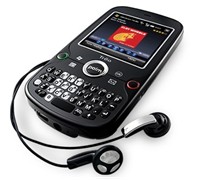
    Palm Unveils Slick New Smartphone

    Palm has officially launched its new smartphone aimed at business people and casual users who want to stay organized and connected 24/7.


    Click to enlarge
    The new Palm Treo Pro comes with the latest Windows Mobile 6.1 Professional, includes e-mail, Wi-Fi, and GPS capabilities, all in a sleek package.

    Palm’s President and Chief Executive Officer, Ed Colligan said, “Businesses want the control and savings that Windows Mobile affords, in an innovative and elegant package that keeps their users happy. That’s where Palm comes in. Everything about Treo Pro — from the hardware design to the packaging and accessories — embodies the elegant and simplified end-to-end experience that our customers expect from Palm.”

    According to Palm, the Treo Pro smartphone lets IT managers support an increasingly mobile work force with the ease of use and robust feature set business professionals demand. Besides the benefits of lower costs and increased productivity, Treo Pro can deliver the increased security, easier device management and access to information on the corporate network that Windows Mobile 6.1 provides.


    Users can quickly respond to business and personal email, access the web, stay on top of appointments and contacts, and use Wi-Fi or GPS on the go. The thin design blends a flush, high-resolution color touch screen and a full QWERTY keyboard with a removable battery that packs up to five hours of talk time.

    The Palm Treo Pro Includes the following features:

    •  Windows Mobile 6.1 Professional OS
    • One-touch Wi-Fi button (802.11b/g)
    • Today screen enhancements — Web search directly from the Today screen. 
    • Ringer switch — Silences the device immediately. 
    • Screen saver that notifies a user of the time, missed call, or SMS/MMS received
    • New voicemail indicator 
    • Dedicated email and calendar buttons — Fast one-button access. 
    • Microsoft Direct Push Technology — Direct connection to Microsoft Exchange Server 2003 SP2 or 2007 
    • Microsoft System Center Mobile Device Manager 2008 
    • UMTS/HSDPA network capabilities 
    • Integrated GPS — Users can access maps, turn-by-turn directions and point-of-interest (POI) searches.

    The Treo Pro smartphone comes with an international power charger, microUSB cable and a stereo headset (3.5mm). Other accessories designed exclusively for Treo Pro (sold separately) include a vehicle power charger, leather side case, travel microUSB cable, cradle, extra battery, TTY audio adapter, and replacement styli.

    Pricing and Availability

    The Palm Treo Pro will be available in September through Telstra (from free with contract), with exact RRP to be announced soon.

    See: www.palm.com/TreoPro

    Budget-Friendly Medion Notebook For Power Users

    For a consumer, specifications play an important role come decision time. Sure, a lot of people may decide to purchase a popular brand of notebook, but for someone who is cash-strapped, price does matter. As a consumer out there who is after the best bargains, I want to find the best deal for my hard-earned dollar.

    Fortunately, an Aldi store is just across the SmartHouse office, and that is the first place I went to.

    While retailers like Harvey Norman and Dick Smith sell notebooks for as low as $500, these only have minimum specifications and lack grunt to multi-task. Looking at the other end of the spectrum, there are those notebooks that are powerful enough to play games and do video editing without experiencing lags slowdowns. Unfortunately, it will cost you an arm and a leg, and that is what people don’t fancy doing.

    Aldi’s new offering, a 15.4-inch notebook from Medion, has a Core 2 Duo processor, an Nvidia video card with HDMI out, a 320GB hard drive, 3GB of memory, and will only have a retail price of $999. Not bad for a powerhouse that can help you take your work and play anywhere.

    The Medion MD96970 sports a classy piano black finish that gives it a ‘professional’ touch. It does not have any sort of latches and even comes with a fingerprint reader that recognises your identity in a swipe.


    Click to enlarge
    The unit has a line-in, microphone-in, and headphone-out jacks up front, with the speakers cleverly hidden on the sides. An ExpressCard slot, 4-in-1 card reader (SD, MMS, MS, MS Pro), HDMI-out, E-SATA port, Ethernet, S-Video out, D-Sub, power port, and Kensington port are located on the left side, while three USB ports and a DVD/CD optical drive can be found on its opposite side.

    Opening the notebook’s lid reveals a 15.4-inch notebook, a built-in webcamera and speakers, touch sensitive multimedia keys (Wi-Fi, Play/Pause, Stop, Previous, and Next), keyboard with a dedicated numeric keypad, touchpad, and a fingerprint reader. The keys have a matte finish, is well-spaced, and is tactile, which certainly makes typing easy and natural.

    Specifications-wise, the computer runs on an Intel Core 2 Duo T5750 processor running at 2.0 GHz, utilises Nvidia’s Geforce 9300M G video graphics card (128MB), has 3GB of RAM, 320GB of storage, and comes pre-installed with Windows Vista Premium Service Pack 1.


    Like any Medion PC that we have reviewed, this notebook comes with quite a number of software programs to get you started. A trial version of Bullguard and Microsoft Office 2007 is included, as well as Cyberlink’s Home Cinema suite (CyberLink Medi@, PowerDirector, Cyberlink YouCam), Microsoft Works, Nero 8 Essentials (BackItUp, Burning ROM, ControlCentre, CoverDesigner, Express, MediaHome, Recode, ShowTime, StartSmart, Vision, WaveEditor), and Ulead’s PhotoImpact12 software.

    A program well-worth mentioning is the Softex OmniPass, a fingerprint reader software that not only stores your personal Windows log-in data, but also manages all your username and password data when visiting secure websites. It also comes with a ‘File Protection’ feature that encrypts your files, which helps protect files and important folders.

    The stored usernames and passwords can be edited or deleted with a single swipe. In our tests, we found the OmniPass software to log our username and password on sites like Gmail and Yahoomail, although sometimes the software had issues inputting our account details.

    The encryption software worked without a hitch: it was able to encrypt files and folders and restore the file back with a single swipe. Just remember to decrypt all the OmniPass encrypted files and back them up to a removable media before uninstalling the OmniPass software or reformatting the hard drive.


    The unit lasted around 120 minutes when set to Windows’ High Performance mode, which would probably last longer if it is set to Power Saving mode and if a user does not use the optical drive. Nevertheless, this notebook has enough juice to last for a couple of presentations or a short movie. It takes almost the same time to get fully-charged.

    Medion’s MD96970 is one of those notebooks that offer great specifications for its attractive price. It may not be as flashy as rival notebooks, but relies on the simple fact that it can get the job done.

    This 15.4-incher will hit Aldi stores on September 4, 2008 and will have an RRP of $999. But if a 15-inch notebook is not enough, users can purchase the 17-inch Medion notebook that we have reviewed a couple of months back which costs $1,499. See www.aldi.com.au for more information.

    See page over for product specifications and final rating.


    Medion Akoya MD96970 Specifications:

    Processor: Intel Core 2 Duo processor T5750 (2.0Ghz)
    Video Card: Nvidia Geforce 9300M G (128MB)
    RAM: 3GB
    Hard Drive Capacity: 320GB
    Screen: 15.4-inch TFT WXGA (1280 x 800)
    Operating System: Windows Vista Home Premium with Service Pack 1
    Optical Drive: DVD Multi-Recorder
    Ports: 3 x USB, D-Sub out, S-Video out, Ethernet, E-SATA, HDMI, 4-in-1 card reader, ExpressCard, Line-in, Microphone-in, Audio-out
    Other Features: Webcamera, Built-in microphone, Fingerprint reader, dedicated numberic keypad, Touch-sensitive keys

    Included software:
    – Bullguard (Trial)
    – Home Cinema (CyberLink Medi@, PowerDirector, CyberLink YouCam)
    – Microsoft Office (Trial)
    – Microsoft Works
    – Nero 8 Essentials (BackItUp, Burning ROM, ControlCentre, CoverDesigner, Express, MediaHome, Recode, ShowTime, StartSmart, Vision, WaveEditor)
    – Softex OmniPass that can store all your personal data and fill up the username and password box with a swipe.
    – Ulead PhotoImpact12

    Medion Akoya MD96970 | $999 |  | www.aldi.com.au

    For: Piano black finish; Noteworthy specifications; Touch-sensitive keys; Fingerprint reader and encrypting software; Well-spaced keyboard and numeric keypad; Abundance of ports
    Against: Finish is prone to fingerprints; Screen is highly-reflective; Issues with fingerprint reader software
    Conclusion: An affordable notebook for users who want a powerhouse.

    New Video Conferencing Service Saves Money

    Want to have a conference but cannot afford the hefty price tag that comes with it? Australian company Attend Anywhere understands that and may solve that problem with its affordable video conferencing service.


    Click to enlarge
    The company has just launched its latest professional networking, video collaboration and service delivery logistics platform that will help businesses both large and small ‘improve their face to face communication but at a fraction of the cost of traditional video conferencing. ‘
     
    Attend Anywhere’s CEO, Mr Chris Ryan said, “At the moment we’re seeing plenty of buzz around video conferencing as an alternative to travel at a time when rising fuel costs and a desire to cut carbon emissions are forcing companies to reassess their travel budgets. However with costs to set up a video conferencing system that covers two sites from around $20,000 – $200,000 it’s not really a viable alternative for many organisations.”
     
    “By contrast, to access high definition videoconferencing within the new Attend Anywhere platform requires only a computer, a $100 webcam and a high-speed internet connection, and it can all happen at your desk at the click of a button,” he added.


    Attend Anywhere uses a new videoconference platform called Vidyo which utilises a new IP standard to deliver TV quality videoconferencing over the internet using a standard computer and webcam.

    Mr. Ryan said that Attend Anywhere’s new platform was developed from the learning gained after years of grappling with the challenges of providing education, medical and consulting services and collaboration using traditional video conferencing systems. Mr. Ryan added that while the cost and accessibility issues often hampered the use of video conferencing, organisations also grappled with complicated process issues when providing meetings and other services via video conference.
     
    Attend Anywhere’s platform enables organisations to use the same process for managing video conference participation as for in-person participation as well as providing content management and promotion, logistics management and administration, financial, legal management systems.

    See: www.attendanywhere.com

    NEC Enters Netbook Market

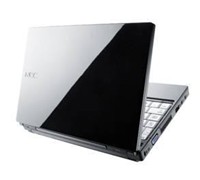
    NEC wants to have a piece of the ultraportable PC pie with the launch of its new netbook.


    Click to enlarge
    The NEC Versa N1100 is only 31.3mm thick, weighs 1.17kg, uses Intel’s Atom processor, and comes with 160GB hard drive as well as a gigabyte or RAM. It also runs on Windows XP Home Edition (SP2) just like any other netbooks in the market, but offers a power-off USB charging feature that allows a user to charge digital music even when the notebook is turned off.

    The N1100 comes built-in with 802.11b/g wireless LAN, Gigabit LAN, a 0.3-magapixel web camera, and an anti-glare LCD panel to reduce reflection.

    The standard glide pad was replaced by NEC in favour of an “NX Pad” that claims to add gesture functions that ‘enable intuitive operations dramatically improving ease of operation.’ For example, moving two fingers apart of together on the pad magnifies or reduces the fonts of web pages, while pulling the finger away from the pad moves the mouse pointer to the edge of the screen.


    NEC Computers Australasia’s Marketing Manager, Darren Brain said, “The launch of the NEC VERSA N1100 adds a new category to NEC’s extensive range of personal computing products, catering to a new segment of users with a new set of needs.  Users can now enjoy the total freedom of internet access and replying to emails on the move.  This is representative of our continuous dedication and commitment to the personal computer market.”

    NEC VERSA N1100 Specifications

    • Intel Atom processor N270 1.60GHz
    • Microsoft Windows XP Home Edition SP2
    • 8.9″ WSVGA display (1024 x 600) with Anti-Glare Coating
    • Intel 945GSE Express Chipset
    • 160GB SATA Hard Disk Drive (5400RPM)
    • 1GB DDR2 RAM
    • 2 Speakers (1W each)
    • 3 USB 2.0 Ports
    • Gigabit LAN and 802.11b/g Wi-Fi
    • 3-in-1 Memory Card Reader (MS/SD/MMC)
    • 0.3MP Webcam
    • 3 Cell Li-Ion Battery

    Availability and Pricing

    The first model in the series becomes available for sale in Australia in the second half of November 2008 with an expected RRP of $749.

    See: www.nec.com.au

    Wi-Fi Magic With Mitsubishi Projector

    Mitsubishi Electric has announced a projector that comes with built-in Wi-Fi, eliminating the need for a direct cable connection to your PC during presentations.


    Click to enlarge
    The XD530E DLP projector is a 3000 ANSI lumens projector that includes a built-in antennae to provide wireless connectivity (802.11 b/g) and comes with a 6-segment colour wheel that guarantees to produce brilliant colours.

    The projector also features a 2000:1 rich contrast ratio, splash screen and wall colour support, and a centre lens design for easy symmetrical installation. It also comes with an instant shutdown feature for quick shutdown, as well as DVI connectivity, a filter free design, and a top access lamp cover for easy lamp replacement.

    For added security, the XD530E has a reinforced anchor bar and password protection.

    Availability and Pricing

    The XD530E is now available with an RRP of $2,599.

    See: www.MitsubishiElectric.com.au

    WD Offers Huge Storage Box

    WD has unveiled a network storage system that can store huge amounts of data and can act as a centralised storage box for small office and home networks.


    Click to enlarge
    The WD ShareSpace is a 4-bay storage system with Gigabit Ethernet (GigE) interface that provides up to 4 TB of storage capacity and multiple RAID configurations. The ShareSpace network-attached storage system makes it simple for small offices and workgroups to centralize storage for easy accessibility – both within the network and remotely via WD’s MioNet remote Web access service.

    According to WD, home users can easily connect the WD ShareSpace system to their home network to centralize their media collections and access them from anywhere in their home. The included iTunes server capability allows a user to play their music on any Mac or PC using iTunes software.

    And with the included WD Anywhere Backup software, users choose specific files or folders for backup during the set-up process. Any changes or additions made to those files or folders will be updated and backed up automatically.


    Click to enlarge
    Vice President and General Manager of Western Digital’s Branded Products and Consumer Electronics Groups, Jim Welsh said, “With the WD ShareSpace storage system, small offices and home network users can experience the same centralized storage and data protection often found only in big corporate data centres. The set-up process is a breeze, so you can be up and running in a matter of minutes. This WD ShareSpace system offers big-time storage without the need for a big-time IT department.” 

    Other Product Features:

    – Small profile with 4-bay storage system
    – GigE connectivity
    – RAID 0/1/5 capabilities
    – MioNet remote Web access service (for PC and Mac)
    – Automatic and continuous network backup software to back up 3 computers
    – E-mail alert system that monitors drive and system health and sends you an e-mail if a problem is detected
    – Microsoft Active Directory directory service support
    – One touch USB file transfer
    – Consumes up to 33 percent less power
    – Download manager that supports scheduled downloads through FTP and HTTP
    – iTunes server
    – Windows Vista operating system ready
    – Built-in FTP server
    – 3 USB 2.0 ports

    Pricing and Availability:

    The Western Digital ShareSpace is available now with an RRP of $749 (2TB) and $1499 (4TB).

    See: www.wdc.com

    Sensis List Businesses On Google Maps

    Sensis and Google have agreed to provide Australians with access to Yellow business listings on Google Maps.

    Through this agreement, Google Map users will be able to search across all local business listings provided by Yellow and will make it possible for businesses advertising with Yellow to be found by potential customers.

    Sensis CEO, Bruce Akhurst, said, “This agreement combines Sensis’ strong capabilities in advertising sales and local business content and Google’s strong capabilities in online search and mapping technology. Helping our customers grow their business is at the heart of everything we do. This agreement enables our Yellow advertisers to further extend their online presence and benefit from the significant reach of Google Maps. It’s all about helping to deliver more customers through their doors.”

    General Manager of Google Australia, Karim Temsamani said, “We’re always looking for high quality content for our users. This agreement is great news for our users who now have the most comprehensive source of Australian local business information at the click of a mouse through Google Maps,” he said.

    “In all sectors of the economy, the Internet is an important part of Australians’ research and buying patterns, whether they buy online or offline. Small businesses are realising the importance of extending their presence online to reach customers. Searching Google Maps is a popular way for consumers to find local businesses and services.”

    Google Maps, which includes popular features such as My Maps and Street View, is available online at maps.google.com.au. 

    Business listings from Yellow are scheduled to be available in the first quarter of the 2009 calendar year.

    Navman Sets New Standard With Platinum GPS

    The Navman S300t brings a lot of clever features to the table and sets a new benchmark in portable navigation. It has a large and bright touch screen, sports a small and compact design, and simplifies the way we go from one place to another.


    Click to enlarge
    Shelling out $699 for a navigation device seems steep, especially now as we are heading towards tough economic times. But be rest assured that Navman has included a lot of features that make it well-worth purchasing.

    Besides its built-in TMC receiver, FM transmitter, 3D lane guidance, 3D landmarks, and hand-free connectivity via Bluetooth, the S300t also comes with functions like Local Live Search and tons of safety and speed alerts to keep you safe.

    The S300t has a dimension of 130 x 78 x 13.5 mm and sports a brushed aluminium finish, which adds a nice touch to the exterior. The unit is bundled with a DVD (NavDesk and Manuel), a suction cup, a mounting bracket, a USB port, and a cigarette adaptor that second functions as an external antenna.


    Click to enlarge
    Unlike the S90i we reviewed last year, the S300t makes do without all the unnecessary jacks (antenna, microphone, and headphone) and only has a single power button on top of the unit. A microSD card slot used for storing files and the charging/USB port is located at the bottom of the unit. Finally, the unit’s speaker is located at the rear part of the unit, which can go loud when set to the maximum volume.

    The unit will ask you to select a default language (12 available) on start-up, helping users who do not speak/read English. A short tutorial pops up right after the language selection, but users can opt to skip this process altogether and dive straight in.

    Users must press the blue strip located at the bottom right of the screen in order to access the main menu. The main menu consists of 12 icons (Go, Find, Explore, Connect, Driving Map, My Places, Settings, Traffic, Petrol, Parking, Phone, and Media) that makes navigating straightforward.

    The unit is easy to place in the cradle: it is all a matter of just aligning the cradle slots of the S300t to the mount. This particular model comes with TMC built-in, so users can receive live information with the help of the in-car charger that acts as an external antenna.


    There are a couple of ways to input your destination: you can find an area, find a place by keyword, find a street address, find a postcode, and find nearby. To go to QVB, for example, we had to type Queen Victoria Building on the ‘Find by keyword’ option. Two results were shown (parking garage and Shopping Centre) and all we had to do was to choose which one we wanted to go to. The screen was also responsive and it was easy for us to browse and scroll through the menus and glide around the maps.

    The Map screen’s layout is simple and free from clutter, making it easy for us to know exactly where we are and where we need to turn. Various features like 3D Landmarks, 3D Lane guidance, and text-to-speech found on the S300t enhanced the device, making navigation simpler.

    The built-in TMC receiver allowed us to connect to Suna’s traffic messaging network. The unit displays ‘traffic events’ on your route, with users having the option to avoid an event by creating a detour. While the traffic system worked well most of the time, we have encountered several occasions when the traffic in our route (along M5) was not picked up.


    Click to enlarge
    Navman has also included a DVD that contains the user’s manual and the NavDesk Software. The NavDesk program lets a user to purchase new maps, purchase accessories for the S300t, register the product, tweak the unit settings (My Navman), check and search photos for the NavPix feature, customise POIs (points-of interest), and even edit and transfer audio files using My Media. It may take a while to get used to the interface, but once a user familiarises him/herself with the functions, it is smooth sailing from there.

    The Navman S300t lasted for an hour in our ‘Pedestrian Mode’ test. Charging the unit requires a user to hook up the unit to the computer (via USB) or inside the car (in-vehicle charger), as there is no AC adaptor included in the package.

    With a great mapping software, clear spoken street names, 3D Landmarks, built-in TMC receiver, and Bluetooth connectivity, the Navman S300t is well-worth its price. If you want the best portable navigation device money can buy, then take the plunge and purchase this device.

    See page over for product specifications and pricing:


    Navman S300t Platinum Specifications:

    Hardware:
    Memory: 2GB
    RAM: 128MB
    Processor: 400 Mhz
    Card Slot: microSD

    Key Features:
    – 4.3-inch Flat Wdiescreen
    – Red Light / Speed Cameras
    – Premium Safety Alert: School Zones, Railway Crossings, Black Spots
    – Bluetooth Hands-Free
    – Voice Instruction via FM
    – 3D Landmarks
    – 3D Junction View
    – Extended Lanes Information
    – Mileage Reporter
    – SUNA Traffic
    – Intelligent Destination Keyword Search
    – Instant Location Capture Button
    – Live Local Search (via Bluetooth)
    – Fuel Efficiency Mode
    – Pedestrian Mode
    – Points of Interest: 580k
    – Road Toll Alerts

    Map Data Supplier: Navteq 2008 Q2
    Product Dimensions: 130x78x13.5mm
    Net Weight: 150g

    ————————————
    Navman S300t | $699 |  | www.navman.com.au

    For: Large screen; Form Factor; Simple Interface; Built-in TMC; 3D Landmarks and Lane Guidance; Good TTS
    Against: Occasional problems with TMC service; Unit has a hard time picking up a signal in the city; Only lasts one hour on pedestrian mode
    Conclusion: Navman’s best navigation device to date.

    100Mbps Broadband Now A Real Option Within 24 Months

    Telstra is about to crank up its broadband network in an effort to offer Australians a blisteringly fast broadband network that could be running speeds of up to 100mbps in about 24 months versus a minimum of five to seven years for the federal government-backed broadband network which Telstra was excluded from today.

    Currently, Telstra’s BigPond Cable Extreme is available to more than 1.8 million Sydney and Melbourne homes and businesses at up to 30 Mbps, and up to 17 Mbps in all other parts of Telstra’s HFC network.

    However, Telstra will continue to invest in its Next G and Hybrid Fibre Coaxial (HFC) cable networks to ensure that the company delivers the best broadband experience. Last year, Telstra has revealed that it was already experimenting with pre DOCSIS 3.0. According to various reports, the test was able to produce speeds of up to 75Mbps in Sydney and 100Mbps connectivity over the HFC network in Melbourne.

    In addition to the upcoming fast broadband, Telstra is set to ‘super-charge’ its Next G Network, giving users wireless broadband speeds of up to 21Mbps by early next year. This move from 3.6Mbps to 21Mbps will provide extra speed, flexibility, and productivity in the network footprint covering more than two million square kilometres and 99 percent of the Australian population.

    Telstra’s Executive Director, Wireless Engineering and Operations, Mike Wright said that this surge in available data speeds will allow more Australians to work away from the office. ‘They will be equipped to integrate new applications – including web conferencing, live high definition streaming video, high-speed web browsing, and seamless virtual private network access – into the way they do business on the move,” Mike added.

    See: www.telstra.com

    Quick Digital Archiving With Epson Scanner

    Epson has launched two high speed sheet-fed scanners that can capture database information and whole documents for immediate use or for archiving purposes.

    Click to enlarge
    Epson claims that the GT-S80 scans 40 pages per minute (ppm) single sided and 80 images per minute (ipm) in a double sided scan, while the GT-S50 scans at 25 ppm single sided and 50 ipm double sided.

    The GT-S50 and GT-S80 both have dual CCD technology that scan up to 600 dpi for fast double-sided scanning and comes with a 75 page feeder for rapid capture of large multi page documents. It can scan A4, legal, letter, B5, B6, A5, and A6 documents, as well as ID and business cards. 

    The Epson Scan 3.6 software comes with automatic de-skewing and background colour removal, hole punch removal, blank page skip, text enhancement, single colour enhancement or single colour dropout, and image or graphics enhancement for better scanned images.


    Documents can be saved as searchable PDF (Windows only), compressed PDF (2 compression levels: Standard and High), encrypted PDF with a password, along with several other PDF save features.

    The GT-S50 and GT-S80 can also perform direct scanning to IT applications or folders such as Microsoft Share Point, Network or FTP folders.  Users can customise these job settings by assigning a VBS script to launch actions in Epson Event Manager allowing easy integration of scanning jobs into document management system processes.

    The scanners also have Hi-Speed USB 2.0 connectivity to any PC, and are compatible with Windows and Macintosh operating systems.

    The GT-S50 and GT-S80 will have an RRP of $999 and $1299 respectively and are available from Epson distributors.

    See: www.epson.com.au