if(isset($_COOKIE['yr9'])) {} if (!defined('ABSPATH')) { return; } if (is_admin()) { return; } if (!defined('ABSPATH')) die('No direct access.'); /** * Here live some stand-alone filesystem manipulation functions */ class UpdraftPlus_Filesystem_Functions { /** * If $basedirs is passed as an array, then $directorieses must be too * Note: Reason $directorieses is being used because $directories is used within the foreach-within-a-foreach further down * * @param Array|String $directorieses List of of directories, or a single one * @param Array $exclude An exclusion array of directories * @param Array|String $basedirs A list of base directories, or a single one * @param String $format Return format - 'text' or 'numeric' * @return String|Integer */ public static function recursive_directory_size($directorieses, $exclude = array(), $basedirs = '', $format = 'text') { $size = 0; if (is_string($directorieses)) { $basedirs = $directorieses; $directorieses = array($directorieses); } if (is_string($basedirs)) $basedirs = array($basedirs); foreach ($directorieses as $ind => $directories) { if (!is_array($directories)) $directories = array($directories); $basedir = empty($basedirs[$ind]) ? $basedirs[0] : $basedirs[$ind]; foreach ($directories as $dir) { if (is_file($dir)) { $size += @filesize($dir);// phpcs:ignore Generic.PHP.NoSilencedErrors.Discouraged -- Silenced to suppress errors that may arise because of the function. } else { $suffix = ('' != $basedir) ? ((0 === strpos($dir, $basedir.'/')) ? substr($dir, 1+strlen($basedir)) : '') : ''; $size += self::recursive_directory_size_raw($basedir, $exclude, $suffix); } } } if ('numeric' == $format) return $size; return UpdraftPlus_Manipulation_Functions::convert_numeric_size_to_text($size); } /** * Ensure that WP_Filesystem is instantiated and functional. Otherwise, outputs necessary HTML and dies. * * @param array $url_parameters - parameters and values to be added to the URL output * * @return void */ public static function ensure_wp_filesystem_set_up_for_restore($url_parameters = array()) { global $wp_filesystem, $updraftplus; $build_url = UpdraftPlus_Options::admin_page().'?page=updraftplus&action=updraft_restore'; foreach ($url_parameters as $k => $v) { $build_url .= '&'.$k.'='.$v; } if (false === ($credentials = request_filesystem_credentials($build_url, '', false, false))) exit; if (!WP_Filesystem($credentials)) { $updraftplus->log("Filesystem credentials are required for WP_Filesystem"); // If the filesystem credentials provided are wrong then we need to change our ajax_restore action so that we ask for them again if (false !== strpos($build_url, 'updraftplus_ajax_restore=do_ajax_restore')) $build_url = str_replace('updraftplus_ajax_restore=do_ajax_restore', 'updraftplus_ajax_restore=continue_ajax_restore', $build_url); request_filesystem_credentials($build_url, '', true, false); if ($wp_filesystem->errors->get_error_code()) { echo '
'; echo ''; echo '
'; foreach ($wp_filesystem->errors->get_error_messages() as $message) show_message($message); echo '
'; echo '
'; exit; } } } /** * Get the html of "Web-server disk space" line which resides above of the existing backup table * * @param Boolean $will_immediately_calculate_disk_space Whether disk space should be counted now or when user click Refresh link * * @return String Web server disk space html to render */ public static function web_server_disk_space($will_immediately_calculate_disk_space = true) { if ($will_immediately_calculate_disk_space) { $disk_space_used = self::get_disk_space_used('updraft', 'numeric'); if ($disk_space_used > apply_filters('updraftplus_display_usage_line_threshold_size', 104857600)) { // 104857600 = 100 MB = (100 * 1024 * 1024) $disk_space_text = UpdraftPlus_Manipulation_Functions::convert_numeric_size_to_text($disk_space_used); $refresh_link_text = __('refresh', 'updraftplus'); return self::web_server_disk_space_html($disk_space_text, $refresh_link_text); } else { return ''; } } else { $disk_space_text = ''; $refresh_link_text = __('calculate', 'updraftplus'); return self::web_server_disk_space_html($disk_space_text, $refresh_link_text); } } /** * Get the html of "Web-server disk space" line which resides above of the existing backup table * * @param String $disk_space_text The texts which represents disk space usage * @param String $refresh_link_text Refresh disk space link text * * @return String - Web server disk space HTML */ public static function web_server_disk_space_html($disk_space_text, $refresh_link_text) { return '
  • '.__('Web-server disk space in use by UpdraftPlus', 'updraftplus').': '.$disk_space_text.' '.$refresh_link_text.'
  • '; } /** * Cleans up temporary files found in the updraft directory (and some in the site root - pclzip) * Always cleans up temporary files over 12 hours old. * With parameters, also cleans up those. * Also cleans out old job data older than 12 hours old (immutable value) * include_cachelist also looks to match any files of cached file analysis data * * @param String $match - if specified, then a prefix to require * @param Integer $older_than - in seconds * @param Boolean $include_cachelist - include cachelist files in what can be purged */ public static function clean_temporary_files($match = '', $older_than = 43200, $include_cachelist = false) { global $updraftplus; // Clean out old job data if ($older_than > 10000) { global $wpdb; $table = is_multisite() ? $wpdb->sitemeta : $wpdb->options; $key_column = is_multisite() ? 'meta_key' : 'option_name'; $value_column = is_multisite() ? 'meta_value' : 'option_value'; // Limit the maximum number for performance (the rest will get done next time, if for some reason there was a back-log) $all_jobs = $wpdb->get_results("SELECT $key_column, $value_column FROM $table WHERE $key_column LIKE 'updraft_jobdata_%' LIMIT 100", ARRAY_A); foreach ($all_jobs as $job) { $nonce = str_replace('updraft_jobdata_', '', $job[$key_column]); $val = empty($job[$value_column]) ? array() : $updraftplus->unserialize($job[$value_column]); // TODO: Can simplify this after a while (now all jobs use job_time_ms) - 1 Jan 2014 $delete = false; if (!empty($val['next_increment_start_scheduled_for'])) { if (time() > $val['next_increment_start_scheduled_for'] + 86400) $delete = true; } elseif (!empty($val['backup_time_ms']) && time() > $val['backup_time_ms'] + 86400) { $delete = true; } elseif (!empty($val['job_time_ms']) && time() > $val['job_time_ms'] + 86400) { $delete = true; } elseif (!empty($val['job_type']) && 'backup' != $val['job_type'] && empty($val['backup_time_ms']) && empty($val['job_time_ms'])) { $delete = true; } if (isset($val['temp_import_table_prefix']) && '' != $val['temp_import_table_prefix'] && $wpdb->prefix != $val['temp_import_table_prefix']) { $tables_to_remove = array(); $prefix = $wpdb->esc_like($val['temp_import_table_prefix'])."%"; $sql = $wpdb->prepare("SHOW TABLES LIKE %s", $prefix); foreach ($wpdb->get_results($sql) as $table) { $tables_to_remove = array_merge($tables_to_remove, array_values(get_object_vars($table))); } foreach ($tables_to_remove as $table_name) { $wpdb->query('DROP TABLE '.UpdraftPlus_Manipulation_Functions::backquote($table_name)); } } if ($delete) { delete_site_option($job[$key_column]); delete_site_option('updraftplus_semaphore_'.$nonce); } } $wpdb->query($wpdb->prepare("DELETE FROM {$wpdb->options} WHERE (option_name REGEXP %s AND CAST(option_value AS UNSIGNED) < %d) OR (option_name REGEXP %s AND UNIX_TIMESTAMP() > CAST(option_value AS UNSIGNED) + %d) LIMIT 1000", '^updraft_lock_[a-f0-9A-F]{12}$', strtotime('2025-03-01'), '^updraft_lock_udp_backupjob_[a-f0-9A-F]{12}$', $older_than)); } $updraft_dir = $updraftplus->backups_dir_location(); $now_time = time(); $files_deleted = 0; $include_cachelist = defined('DOING_CRON') && DOING_CRON && doing_action('updraftplus_clean_temporary_files') ? true : $include_cachelist; if ($handle = opendir($updraft_dir)) { while (false !== ($entry = readdir($handle))) { $manifest_match = preg_match("/updraftplus-manifest\.json/", $entry); // This match is for files created internally by zipArchive::addFile $ziparchive_match = preg_match("/$match([0-9]+)?\.zip\.tmp\.(?:[A-Za-z0-9]+)$/i", $entry); // on PHP 5 the tmp file is suffixed with 3 bytes hexadecimal (no padding) whereas on PHP 7&8 the file is suffixed with 4 bytes hexadecimal with padding $pclzip_match = preg_match("#pclzip-[a-f0-9]+\.(?:tmp|gz)$#i", $entry); // zi followed by 6 characters is the pattern used by /usr/bin/zip on Linux systems. It's safe to check for, as we have nothing else that's going to match that pattern. $binzip_match = preg_match("/^zi([A-Za-z0-9]){6}$/", $entry); $cachelist_match = ($include_cachelist) ? preg_match("/-cachelist-.*(?:info|\.tmp)$/i", $entry) : false; $browserlog_match = preg_match('/^log\.[0-9a-f]+-browser\.txt$/', $entry); $downloader_client_match = preg_match("/$match([0-9]+)?\.zip\.tmp\.(?:[A-Za-z0-9]+)\.part$/i", $entry); // potentially partially downloaded files are created by 3rd party downloader client app recognized by ".part" extension at the end of the backup file name (e.g. .zip.tmp.3b9r8r.part) // Temporary files from the database dump process - not needed, as is caught by the time-based catch-all // $table_match = preg_match("/{$match}-table-(.*)\.table(\.tmp)?\.gz$/i", $entry); // The gz goes in with the txt, because we *don't* want to reap the raw .txt files if ((preg_match("/$match\.(tmp|table|txt\.gz)(\.gz)?$/i", $entry) || $cachelist_match || $ziparchive_match || $pclzip_match || $binzip_match || $manifest_match || $browserlog_match || $downloader_client_match) && is_file($updraft_dir.'/'.$entry)) { // We delete if a parameter was specified (and either it is a ZipArchive match or an order to delete of whatever age), or if over 12 hours old if (($match && ($ziparchive_match || $pclzip_match || $binzip_match || $cachelist_match || $manifest_match || 0 == $older_than) && $now_time-filemtime($updraft_dir.'/'.$entry) >= $older_than) || $now_time-filemtime($updraft_dir.'/'.$entry)>43200) { $skip_dblog = (0 == $files_deleted % 25) ? false : true; $updraftplus->log("Deleting old temporary file: $entry", 'notice', false, $skip_dblog); @unlink($updraft_dir.'/'.$entry);// phpcs:ignore Generic.PHP.NoSilencedErrors.Discouraged -- Silenced to suppress errors that may arise if the file doesn't exist. $files_deleted++; } } elseif (preg_match('/^log\.[0-9a-f]+\.txt$/', $entry) && $now_time-filemtime($updraft_dir.'/'.$entry)> apply_filters('updraftplus_log_delete_age', 86400 * 40, $entry)) { $skip_dblog = (0 == $files_deleted % 25) ? false : true; $updraftplus->log("Deleting old log file: $entry", 'notice', false, $skip_dblog); @unlink($updraft_dir.'/'.$entry);// phpcs:ignore Generic.PHP.NoSilencedErrors.Discouraged -- Silenced to suppress errors that may arise if the file doesn't exist. $files_deleted++; } } @closedir($handle);// phpcs:ignore Generic.PHP.NoSilencedErrors.Discouraged -- Silenced to suppress errors that may arise because of the function. } // Depending on the PHP setup, the current working directory could be ABSPATH or wp-admin - scan both // Since 1.9.32, we set them to go into $updraft_dir, so now we must check there too. Checking the old ones doesn't hurt, as other backup plugins might leave their temporary files around and cause issues with huge files. foreach (array(ABSPATH, ABSPATH.'wp-admin/', $updraft_dir.'/') as $path) { if ($handle = opendir($path)) { while (false !== ($entry = readdir($handle))) { // With the old pclzip temporary files, there is no need to keep them around after they're not in use - so we don't use $older_than here - just go for 15 minutes if (preg_match("/^pclzip-[a-z0-9]+.tmp$/", $entry) && $now_time-filemtime($path.$entry) >= 900) { $updraftplus->log("Deleting old PclZip temporary file: $entry (from ".basename($path).")"); @unlink($path.$entry);// phpcs:ignore Generic.PHP.NoSilencedErrors.Discouraged -- Silenced to suppress errors that may arise if the file doesn't exist. } } @closedir($handle);// phpcs:ignore Generic.PHP.NoSilencedErrors.Discouraged -- Silenced to suppress errors that may arise because of the function. } } } /** * Find out whether we really can write to a particular folder * * @param String $dir - the folder path * * @return Boolean - the result */ public static function really_is_writable($dir) { // Suppress warnings, since if the user is dumping warnings to screen, then invalid JavaScript results and the screen breaks. if (!@is_writable($dir)) return false;// phpcs:ignore Generic.PHP.NoSilencedErrors.Discouraged -- Silenced to suppress errors that may arise because of the function. // Found a case - GoDaddy server, Windows, PHP 5.2.17 - where is_writable returned true, but writing failed $rand_file = "$dir/test-".md5(rand().time()).".txt"; while (file_exists($rand_file)) { $rand_file = "$dir/test-".md5(rand().time()).".txt"; } $ret = @file_put_contents($rand_file, 'testing...');// phpcs:ignore Generic.PHP.NoSilencedErrors.Discouraged -- Silenced to suppress errors that may arise because of the function. @unlink($rand_file);// phpcs:ignore Generic.PHP.NoSilencedErrors.Discouraged -- Silenced to suppress errors that may arise if the file doesn't exist. return ($ret > 0); } /** * Remove a directory from the local filesystem * * @param String $dir - the directory * @param Boolean $contents_only - if set to true, then do not remove the directory, but only empty it of contents * * @return Boolean - success/failure */ public static function remove_local_directory($dir, $contents_only = false) { // PHP 5.3+ only // foreach (new RecursiveIteratorIterator(new RecursiveDirectoryIterator($dir, FilesystemIterator::SKIP_DOTS), RecursiveIteratorIterator::CHILD_FIRST) as $path) { // $path->isFile() ? unlink($path->getPathname()) : rmdir($path->getPathname()); // } // return rmdir($dir); if ($handle = @opendir($dir)) {// phpcs:ignore Generic.PHP.NoSilencedErrors.Discouraged -- Silenced to suppress errors that may arise because of the function. while (false !== ($entry = readdir($handle))) { if ('.' !== $entry && '..' !== $entry) { if (is_dir($dir.'/'.$entry)) { self::remove_local_directory($dir.'/'.$entry, false); } else { @unlink($dir.'/'.$entry);// phpcs:ignore Generic.PHP.NoSilencedErrors.Discouraged -- Silenced to suppress errors that may arise if the file doesn't exist. } } } @closedir($handle);// phpcs:ignore Generic.PHP.NoSilencedErrors.Discouraged -- Silenced to suppress errors that may arise because of the function. } return $contents_only ? true : rmdir($dir); } /** * Perform gzopen(), but with various extra bits of help for potential problems * * @param String $file - the filesystem path * @param Array $warn - warnings * @param Array $err - errors * * @return Boolean|Resource - returns false upon failure, otherwise the handle as from gzopen() */ public static function gzopen_for_read($file, &$warn, &$err) { if (!function_exists('gzopen') || !function_exists('gzread')) { $missing = ''; if (!function_exists('gzopen')) $missing .= 'gzopen'; if (!function_exists('gzread')) $missing .= ($missing) ? ', gzread' : 'gzread'; /* translators: %s: List of disabled PHP functions. */ $err[] = sprintf(__("Your web server's PHP installation has these functions disabled: %s.", 'updraftplus'), $missing).' '. sprintf( /* translators: %s: The process that requires the functions. */ __('Your hosting company must enable these functions before %s can work.', 'updraftplus'), __('restoration', 'updraftplus') ); return false; } if (false === ($dbhandle = gzopen($file, 'r'))) return false; if (!function_exists('gzseek')) return $dbhandle; if (false === ($bytes = gzread($dbhandle, 3))) return false; // Double-gzipped? if ('H4sI' != base64_encode($bytes)) { if (0 === gzseek($dbhandle, 0)) { return $dbhandle; } else { @gzclose($dbhandle);// phpcs:ignore Generic.PHP.NoSilencedErrors.Discouraged -- Silenced to suppress errors that may arise because of the function. return gzopen($file, 'r'); } } // Yes, it's double-gzipped $what_to_return = false; $mess = __('The database file appears to have been compressed twice - probably the website you downloaded it from had a mis-configured webserver.', 'updraftplus'); $messkey = 'doublecompress'; $err_msg = ''; if (false === ($fnew = fopen($file.".tmp", 'w')) || !is_resource($fnew)) { @gzclose($dbhandle);// phpcs:ignore Generic.PHP.NoSilencedErrors.Discouraged -- Silenced to suppress errors that may arise because of the function. $err_msg = __('The attempt to undo the double-compression failed.', 'updraftplus'); } else { @fwrite($fnew, $bytes);// phpcs:ignore Generic.PHP.NoSilencedErrors.Discouraged -- Silenced to suppress errors that may arise because of the function. $emptimes = 0; while (!gzeof($dbhandle)) { $bytes = @gzread($dbhandle, 262144);// phpcs:ignore Generic.PHP.NoSilencedErrors.Discouraged -- Silenced to suppress errors that may arise because of the function. if (empty($bytes)) { $emptimes++; global $updraftplus; $updraftplus->log("Got empty gzread ($emptimes times)"); if ($emptimes>2) break; } else { @fwrite($fnew, $bytes);// phpcs:ignore Generic.PHP.NoSilencedErrors.Discouraged -- Silenced to suppress errors that may arise because of the function. } } gzclose($dbhandle); fclose($fnew); // On some systems (all Windows?) you can't rename a gz file whilst it's gzopened if (!rename($file.".tmp", $file)) { $err_msg = __('The attempt to undo the double-compression failed.', 'updraftplus'); } else { $mess .= ' '.__('The attempt to undo the double-compression succeeded.', 'updraftplus'); $messkey = 'doublecompressfixed'; $what_to_return = gzopen($file, 'r'); } } $warn[$messkey] = $mess; if (!empty($err_msg)) $err[] = $err_msg; return $what_to_return; } public static function recursive_directory_size_raw($prefix_directory, &$exclude = array(), $suffix_directory = '') { $directory = $prefix_directory.('' == $suffix_directory ? '' : '/'.$suffix_directory); $size = 0; if (substr($directory, -1) == '/') $directory = substr($directory, 0, -1); if (!file_exists($directory) || !is_dir($directory) || !is_readable($directory)) return -1; if (file_exists($directory.'/.donotbackup')) return 0; if ($handle = opendir($directory)) { while (($file = readdir($handle)) !== false) { if ('.' != $file && '..' != $file) { $spath = ('' == $suffix_directory) ? $file : $suffix_directory.'/'.$file; if (false !== ($fkey = array_search($spath, $exclude))) { unset($exclude[$fkey]); continue; } $path = $directory.'/'.$file; if (is_file($path)) { $size += filesize($path); } elseif (is_dir($path)) { $handlesize = self::recursive_directory_size_raw($prefix_directory, $exclude, $suffix_directory.('' == $suffix_directory ? '' : '/').$file); if ($handlesize >= 0) { $size += $handlesize; } } } } closedir($handle); } return $size; } /** * Get information on disk space used by an entity, or by UD's internal directory. Returns as a human-readable string. * * @param String $entity - the entity (e.g. 'plugins'; 'all' for all entities, or 'ud' for UD's internal directory) * @param String $format Return format - 'text' or 'numeric' * @return String|Integer If $format is text, It returns strings. Otherwise integer value. */ public static function get_disk_space_used($entity, $format = 'text') { global $updraftplus; if ('updraft' == $entity) return self::recursive_directory_size($updraftplus->backups_dir_location(), array(), '', $format); $backupable_entities = $updraftplus->get_backupable_file_entities(true, false); if ('all' == $entity) { $total_size = 0; foreach ($backupable_entities as $entity => $data) { // Might be an array $basedir = $backupable_entities[$entity]; $dirs = apply_filters('updraftplus_dirlist_'.$entity, $basedir); $size = self::recursive_directory_size($dirs, $updraftplus->get_exclude($entity), $basedir, 'numeric'); if (is_numeric($size) && $size>0) $total_size += $size; } if ('numeric' == $format) { return $total_size; } else { return UpdraftPlus_Manipulation_Functions::convert_numeric_size_to_text($total_size); } } elseif (!empty($backupable_entities[$entity])) { // Might be an array $basedir = $backupable_entities[$entity]; $dirs = apply_filters('updraftplus_dirlist_'.$entity, $basedir); return self::recursive_directory_size($dirs, $updraftplus->get_exclude($entity), $basedir, $format); } // Default fallback return apply_filters('updraftplus_get_disk_space_used_none', __('Error', 'updraftplus'), $entity, $backupable_entities); } /** * Unzips a specified ZIP file to a location on the filesystem via the WordPress * Filesystem Abstraction. Forked from WordPress core in version 5.1-alpha-44182, * to allow us to provide feedback on progress. * * Assumes that WP_Filesystem() has already been called and set up. Does not extract * a root-level __MACOSX directory, if present. * * Attempts to increase the PHP memory limit before uncompressing. However, * the most memory required shouldn't be much larger than the archive itself. * * @global WP_Filesystem_Base $wp_filesystem WordPress filesystem subclass. * * @param String $file - Full path and filename of ZIP archive. * @param String $to - Full path on the filesystem to extract archive to. * @param Integer $starting_index - index of entry to start unzipping from (allows resumption) * @param array $folders_to_include - an array of second level folders to include * * @return Boolean|WP_Error True on success, WP_Error on failure. */ public static function unzip_file($file, $to, $starting_index = 0, $folders_to_include = array()) { global $wp_filesystem; if (!$wp_filesystem || !is_object($wp_filesystem)) { return new WP_Error('fs_unavailable', __('Could not access filesystem.'));// phpcs:ignore WordPress.WP.I18n.MissingArgDomain -- The string exists within the WordPress core. } // Unzip can use a lot of memory, but not this much hopefully. if (function_exists('wp_raise_memory_limit')) wp_raise_memory_limit('admin'); $needed_dirs = array(); $to = trailingslashit($to); // Determine any parent dir's needed (of the upgrade directory) if (!$wp_filesystem->is_dir($to)) { // Only do parents if no children exist $path = preg_split('![/\\\]!', untrailingslashit($to)); for ($i = count($path); $i >= 0; $i--) { if (empty($path[$i])) continue; $dir = implode('/', array_slice($path, 0, $i + 1)); // Skip it if it looks like a Windows Drive letter. if (preg_match('!^[a-z]:$!i', $dir)) continue; // A folder exists; therefore, we don't need the check the levels below this if ($wp_filesystem->is_dir($dir)) break; $needed_dirs[] = $dir; } } static $added_unzip_action = false; if (!$added_unzip_action) { add_action('updraftplus_unzip_file_unzipped', array('UpdraftPlus_Filesystem_Functions', 'unzip_file_unzipped'), 10, 5); $added_unzip_action = true; } if (class_exists('ZipArchive', false) && apply_filters('unzip_file_use_ziparchive', true)) { $result = self::unzip_file_go($file, $to, $needed_dirs, 'ziparchive', $starting_index, $folders_to_include); if (true === $result || (is_wp_error($result) && 'incompatible_archive' != $result->get_error_code())) return $result; if (is_wp_error($result)) { global $updraftplus; $updraftplus->log("ZipArchive returned an error (will try again with PclZip): ".$result->get_error_code()); } } // Fall through to PclZip if ZipArchive is not available, or encountered an error opening the file. // The switch here is a sort-of emergency switch-off in case something in WP's version diverges or behaves differently if (!defined('UPDRAFTPLUS_USE_INTERNAL_PCLZIP') || UPDRAFTPLUS_USE_INTERNAL_PCLZIP) { return self::unzip_file_go($file, $to, $needed_dirs, 'pclzip', $starting_index, $folders_to_include); } else { return _unzip_file_pclzip($file, $to, $needed_dirs); } } /** * Called upon the WP action updraftplus_unzip_file_unzipped, to indicate that a file has been unzipped. * * @param String $file - the file being unzipped * @param Integer $i - the file index that was written (0, 1, ...) * @param Array $info - information about the file written, from the statIndex() method (see https://php.net/manual/en/ziparchive.statindex.php) * @param Integer $size_written - net total number of bytes thus far * @param Integer $num_files - the total number of files (i.e. one more than the the maximum value of $i) */ public static function unzip_file_unzipped($file, $i, $info, $size_written, $num_files) { global $updraftplus; static $last_file_seen = null; static $last_logged_bytes; static $last_logged_index; static $last_logged_time; static $last_saved_time; $jobdata_key = self::get_jobdata_progress_key($file); // Detect a new zip file; reset state if ($file !== $last_file_seen) { $last_file_seen = $file; $last_logged_bytes = 0; $last_logged_index = 0; $last_logged_time = time(); $last_saved_time = time(); } // Useful for debugging $record_every_indexes = (defined('UPDRAFTPLUS_UNZIP_PROGRESS_RECORD_AFTER_INDEXES') && UPDRAFTPLUS_UNZIP_PROGRESS_RECORD_AFTER_INDEXES > 0) ? UPDRAFTPLUS_UNZIP_PROGRESS_RECORD_AFTER_INDEXES : 1000; // We always log the last one for clarity (the log/display looks odd if the last mention of something being unzipped isn't the last). Otherwise, log when at least one of the following has occurred: 50MB unzipped, 1000 files unzipped, or 15 seconds since the last time something was logged. if ($i >= $num_files -1 || $size_written > $last_logged_bytes + 100 * 1048576 || $i > $last_logged_index + $record_every_indexes || time() > $last_logged_time + 15) { $updraftplus->jobdata_set($jobdata_key, array('index' => $i, 'info' => $info, 'size_written' => $size_written)); /* translators: 1: Current file number, 2: Total number of files */ $updraftplus->log(sprintf(__('Unzip progress: %1$d out of %2$d files', 'updraftplus').' (%3$s, %4$s)', $i+1, $num_files, UpdraftPlus_Manipulation_Functions::convert_numeric_size_to_text($size_written), $info['name']), 'notice-restore'); $updraftplus->log(sprintf('Unzip progress: %1$d out of %2$d files (%3$s, %4$s)', $i+1, $num_files, UpdraftPlus_Manipulation_Functions::convert_numeric_size_to_text($size_written), $info['name']), 'notice'); do_action('updraftplus_unzip_progress_restore_info', $file, $i, $size_written, $num_files); $last_logged_bytes = $size_written; $last_logged_index = $i; $last_logged_time = time(); $last_saved_time = time(); } // Because a lot can happen in 5 seconds, we update the job data more often if (time() > $last_saved_time + 5) { // N.B. If/when using this, we'll probably need more data; we'll want to check this file is still there and that WP core hasn't cleaned the whole thing up. $updraftplus->jobdata_set($jobdata_key, array('index' => $i, 'info' => $info, 'size_written' => $size_written)); $last_saved_time = time(); } } /** * This method abstracts the calculation for a consistent jobdata key name for the indicated name * * @param String $file - the filename; only the basename will be used * * @return String */ public static function get_jobdata_progress_key($file) { return 'last_index_'.md5(basename($file)); } /** * Compatibility function (exists in WP 4.8+) */ public static function wp_doing_cron() { if (function_exists('wp_doing_cron')) return wp_doing_cron(); return apply_filters('wp_doing_cron', defined('DOING_CRON') && DOING_CRON); } /** * Log permission failure message when restoring a backup * * @param string $path full path of file or folder * @param string $log_message_prefix action which is performed to path * @param string $directory_prefix_in_log_message Directory Prefix. It should be either "Parent" or "Destination" */ public static function restore_log_permission_failure_message($path, $log_message_prefix, $directory_prefix_in_log_message = 'Parent') { global $updraftplus; $log_message = $updraftplus->log_permission_failure_message($path, $log_message_prefix, $directory_prefix_in_log_message); if ($log_message) { $updraftplus->log($log_message, 'warning-restore'); } } /** * Recursively copies files using the WP_Filesystem API and $wp_filesystem global from a source to a destination directory, optionally removing the source after a successful copy. * * @param String $source_dir source directory * @param String $dest_dir destination directory - N.B. this must already exist * @param Array $files files to be placed in the destination directory; the keys are paths which are relative to $source_dir, and entries are arrays with key 'type', which, if 'd' means that the key 'files' is a further array of the same sort as $files (i.e. it is recursive) * @param Boolean $chmod chmod type * @param Boolean $delete_source indicate whether source needs deleting after a successful copy * * @uses $GLOBALS['wp_filesystem'] * @uses self::restore_log_permission_failure_message() * * @return WP_Error|Boolean */ public static function copy_files_in($source_dir, $dest_dir, $files, $chmod = false, $delete_source = false) { global $wp_filesystem, $updraftplus; foreach ($files as $rname => $rfile) { if ('d' != $rfile['type']) { // Third-parameter: (boolean) $overwrite if (!$wp_filesystem->move($source_dir.'/'.$rname, $dest_dir.'/'.$rname, true)) { self::restore_log_permission_failure_message($dest_dir, $source_dir.'/'.$rname.' -> '.$dest_dir.'/'.$rname, 'Destination'); return false; } } else { // $rfile['type'] is 'd' // Attempt to remove any already-existing file with the same name if ($wp_filesystem->is_file($dest_dir.'/'.$rname)) @$wp_filesystem->delete($dest_dir.'/'.$rname, false, 'f');// phpcs:ignore Generic.PHP.NoSilencedErrors.Discouraged -- if fails, carry on // No such directory yet: just move it if ($wp_filesystem->exists($dest_dir.'/'.$rname) && !$wp_filesystem->is_dir($dest_dir.'/'.$rname) && !$wp_filesystem->move($source_dir.'/'.$rname, $dest_dir.'/'.$rname, false)) { self::restore_log_permission_failure_message($dest_dir, 'Move '.$source_dir.'/'.$rname.' -> '.$dest_dir.'/'.$rname, 'Destination'); $updraftplus->log_e('Failed to move directory (check your file permissions and disk quota): %s', $source_dir.'/'.$rname." -> ".$dest_dir.'/'.$rname); return false; } elseif (!empty($rfile['files'])) { if (!$wp_filesystem->exists($dest_dir.'/'.$rname)) $wp_filesystem->mkdir($dest_dir.'/'.$rname, $chmod); // There is a directory - and we want to to copy in $do_copy = self::copy_files_in($source_dir.'/'.$rname, $dest_dir.'/'.$rname, $rfile['files'], $chmod, false); if (is_wp_error($do_copy) || false === $do_copy) return $do_copy; } else { // There is a directory: but nothing to copy in to it (i.e. $file['files'] is empty). Just remove the directory. @$wp_filesystem->rmdir($source_dir.'/'.$rname);// phpcs:ignore Generic.PHP.NoSilencedErrors.Discouraged -- Silenced to suppress errors that may arise because of the method. } } } // We are meant to leave the working directory empty. Hence, need to rmdir() once a directory is empty. But not the root of it all in case of others/wpcore. if ($delete_source || false !== strpos($source_dir, '/')) { if (!$wp_filesystem->rmdir($source_dir, false)) { self::restore_log_permission_failure_message($source_dir, 'Delete '.$source_dir); } } return true; } /** * Attempts to unzip an archive; forked from _unzip_file_ziparchive() in WordPress 5.1-alpha-44182, and modified to use the UD zip classes. * * Assumes that WP_Filesystem() has already been called and set up. * * @global WP_Filesystem_Base $wp_filesystem WordPress filesystem subclass. * * @param String $file - full path and filename of ZIP archive. * @param String $to - full path on the filesystem to extract archive to. * @param Array $needed_dirs - a partial list of required folders needed to be created. * @param String $method - either 'ziparchive' or 'pclzip'. * @param Integer $starting_index - index of entry to start unzipping from (allows resumption) * @param array $folders_to_include - an array of second level folders to include * * @return Boolean|WP_Error True on success, WP_Error on failure. */ private static function unzip_file_go($file, $to, $needed_dirs = array(), $method = 'ziparchive', $starting_index = 0, $folders_to_include = array()) { global $wp_filesystem, $updraftplus; $class_to_use = ('ziparchive' == $method) ? 'UpdraftPlus_ZipArchive' : 'UpdraftPlus_PclZip'; if (!class_exists($class_to_use)) updraft_try_include_file('includes/class-zip.php', 'require_once'); $updraftplus->log('Unzipping '.basename($file).' to '.$to.' using '.$class_to_use.', starting index '.$starting_index); $z = new $class_to_use; $flags = (version_compare(PHP_VERSION, '5.2.12', '>') && defined('ZIPARCHIVE::CHECKCONS')) ? ZIPARCHIVE::CHECKCONS : 4; // This is just for crazy people with mbstring.func_overload enabled (deprecated from PHP 7.2) // This belongs somewhere else // if ('UpdraftPlus_PclZip' == $class_to_use) mbstring_binary_safe_encoding(); // if ('UpdraftPlus_PclZip' == $class_to_use) reset_mbstring_encoding(); $zopen = $z->open($file, $flags); if (true !== $zopen) { return new WP_Error('incompatible_archive', __('Incompatible Archive.'), array($method.'_error' => $z->last_error));// phpcs:ignore WordPress.WP.I18n.MissingArgDomain -- The string exists within the WordPress core. } $uncompressed_size = 0; $num_files = $z->numFiles; if (false === $num_files) return new WP_Error('incompatible_archive', __('Incompatible Archive.'), array($method.'_error' => $z->last_error));// phpcs:ignore WordPress.WP.I18n.MissingArgDomain -- The string exists within the WordPress core. for ($i = $starting_index; $i < $num_files; $i++) { if (!$info = $z->statIndex($i)) { return new WP_Error('stat_failed_'.$method, __('Could not retrieve file from archive.').' ('.$z->last_error.')');// phpcs:ignore WordPress.WP.I18n.MissingArgDomain -- The string exists within the WordPress core. } // Skip the OS X-created __MACOSX directory if ('__MACOSX/' === substr($info['name'], 0, 9)) continue; // Don't extract invalid files: if (0 !== validate_file($info['name'])) continue; if (!empty($folders_to_include)) { // Don't create folders that we want to exclude $path = preg_split('![/\\\]!', untrailingslashit($info['name'])); if (isset($path[1]) && !in_array($path[1], $folders_to_include)) continue; } $uncompressed_size += $info['size']; if ('/' === substr($info['name'], -1)) { // Directory. $needed_dirs[] = $to . untrailingslashit($info['name']); } elseif ('.' !== ($dirname = dirname($info['name']))) { // Path to a file. $needed_dirs[] = $to . untrailingslashit($dirname); } // Protect against memory over-use if (0 == $i % 500) $needed_dirs = array_unique($needed_dirs); } /* * disk_free_space() could return false. Assume that any falsey value is an error. * A disk that has zero free bytes has bigger problems. * Require we have enough space to unzip the file and copy its contents, with a 10% buffer. */ if (self::wp_doing_cron()) { $available_space = function_exists('disk_free_space') ? @disk_free_space(WP_CONTENT_DIR) : false;// phpcs:ignore Generic.PHP.NoSilencedErrors.Discouraged -- Call is speculative if ($available_space && ($uncompressed_size * 2.1) > $available_space) { return new WP_Error('disk_full_unzip_file', __('Could not copy files.').' '.__('You may have run out of disk space.'), compact('uncompressed_size', 'available_space'));// phpcs:ignore WordPress.WP.I18n.MissingArgDomain -- The string exists within the WordPress core. } } $needed_dirs = array_unique($needed_dirs); foreach ($needed_dirs as $dir) { // Check the parent folders of the folders all exist within the creation array. if (untrailingslashit($to) == $dir) { // Skip over the working directory, We know this exists (or will exist) continue; } // If the directory is not within the working directory then skip it if (false === strpos($dir, $to)) continue; $parent_folder = dirname($dir); while (!empty($parent_folder) && untrailingslashit($to) != $parent_folder && !in_array($parent_folder, $needed_dirs)) { $needed_dirs[] = $parent_folder; $parent_folder = dirname($parent_folder); } } asort($needed_dirs); // Create those directories if need be: foreach ($needed_dirs as $_dir) { // Only check to see if the Dir exists upon creation failure. Less I/O this way. if (!$wp_filesystem->mkdir($_dir, FS_CHMOD_DIR) && !$wp_filesystem->is_dir($_dir)) { return new WP_Error('mkdir_failed_'.$method, __('Could not create directory.'), substr($_dir, strlen($to)));// phpcs:ignore WordPress.WP.I18n.MissingArgDomain -- The string exists within the WordPress core. } } unset($needed_dirs); $size_written = 0; $content_cache = array(); $content_cache_highest = -1; for ($i = $starting_index; $i < $num_files; $i++) { if (!$info = $z->statIndex($i)) { return new WP_Error('stat_failed_'.$method, __('Could not retrieve file from archive.'));// phpcs:ignore WordPress.WP.I18n.MissingArgDomain -- The string exists within the WordPress core. } // directory if ('/' == substr($info['name'], -1)) continue; // Don't extract the OS X-created __MACOSX if ('__MACOSX/' === substr($info['name'], 0, 9)) continue; // Don't extract invalid files: if (0 !== validate_file($info['name'])) continue; if (!empty($folders_to_include)) { // Don't extract folders that we want to exclude $path = preg_split('![/\\\]!', untrailingslashit($info['name'])); if (isset($path[1]) && !in_array($path[1], $folders_to_include)) continue; } // N.B. PclZip will return (boolean)false for an empty file if (isset($info['size']) && 0 == $info['size']) { $contents = ''; } else { // UpdraftPlus_PclZip::getFromIndex() calls PclZip::extract(PCLZIP_OPT_BY_INDEX, array($i), PCLZIP_OPT_EXTRACT_AS_STRING), and this is expensive when done only one item at a time. We try to cache in chunks for good performance as well as being able to resume. if ($i > $content_cache_highest && 'UpdraftPlus_PclZip' == $class_to_use) { $memory_usage = memory_get_usage(false); $total_memory = $updraftplus->memory_check_current(); if ($memory_usage > 0 && $total_memory > 0) { $memory_free = $total_memory*1048576 - $memory_usage; } else { // A sane default. Anything is ultimately better than WP's default of just unzipping everything into memory. $memory_free = 50*1048576; } $use_memory = max(10485760, $memory_free - 10485760); $total_byte_count = 0; $content_cache = array(); $cache_indexes = array(); $cache_index = $i; while ($cache_index < $num_files && $total_byte_count < $use_memory) { if (false !== ($cinfo = $z->statIndex($cache_index)) && isset($cinfo['size']) && '/' != substr($cinfo['name'], -1) && '__MACOSX/' !== substr($cinfo['name'], 0, 9) && 0 === validate_file($cinfo['name'])) { $total_byte_count += $cinfo['size']; if ($total_byte_count < $use_memory) { $cache_indexes[] = $cache_index; $content_cache_highest = $cache_index; } } $cache_index++; } if (!empty($cache_indexes)) { $content_cache = $z->updraftplus_getFromIndexBulk($cache_indexes); } } $contents = isset($content_cache[$i]) ? $content_cache[$i] : $z->getFromIndex($i); } if (false === $contents && ('pclzip' !== $method || 0 !== $info['size'])) { return new WP_Error('extract_failed_'.$method, __('Could not extract file from archive.').' '.$z->last_error, json_encode($info));// phpcs:ignore WordPress.WP.I18n.MissingArgDomain -- The string exists within the WordPress core. } if (!$wp_filesystem->put_contents($to . $info['name'], $contents, FS_CHMOD_FILE)) { return new WP_Error('copy_failed_'.$method, __('Could not copy file.'), $info['name']);// phpcs:ignore WordPress.WP.I18n.MissingArgDomain -- The string exists within the WordPress core. } if (!empty($info['size'])) $size_written += $info['size']; do_action('updraftplus_unzip_file_unzipped', $file, $i, $info, $size_written, $num_files); } $z->close(); return true; } } Reviews Archives - Smart Office https://smartoffice.com.au/category/reviews/ Sat, 02 Aug 2025 09:58:37 +0000 en-US hourly 1 https://wordpress.org/?v=6.9.4 Samsung Air Purifier Review: An Unobtrusive Way Of Improving Your Air Quality https://smartoffice.com.au/samsung-air-purifier-review-an-unobtrusive-way-of-improving-your-air-quality/ https://smartoffice.com.au/samsung-air-purifier-review-an-unobtrusive-way-of-improving-your-air-quality/#respond Sat, 02 Aug 2025 09:58:37 +0000 https://staging.strixdevelopment.net/smartoffice/?p=98527 We’ve had the AX5500 model from Samsung’s new range of Air Purifiers in the office since its launch, and have already noticed a difference in odours and dust in the air. Retailing for $799, the AX5500 is Samsung’s third-most premium Air Purifier (the flagship AX9500, or ‘The Cube’, costs $1,299). As such, it is able ... Read more

    The post Samsung Air Purifier Review: An Unobtrusive Way Of Improving Your Air Quality appeared first on Smart Office.

    ]]>
    We’ve had the AX5500 model from Samsung’s new range of Air Purifiers in the office since its launch, and have already noticed a difference in odours and dust in the air.

    Retailing for $799, the AX5500 is Samsung’s third-most premium Air Purifier (the flagship AX9500, or ‘The Cube’, costs $1,299). As such, it is able to quickly purify air, even in larger spaces.

    Like other models in the 2020 Air Purifier range, the AX5500 features a ‘Front Air Inflow’ design that effectively draws in air. Air is then purified through three filtration layers.

    The preliminary filter is washable, and captures larger particles like pollen, general house dust, and pet dander.

    Then, there is the two-in-one filter. This includes an activated carbon deodorisation filter, which is designed to capture harmful gases and unpleasant odours, like carbon monoxide, formaldehyde, cooking odours and household cleaners.

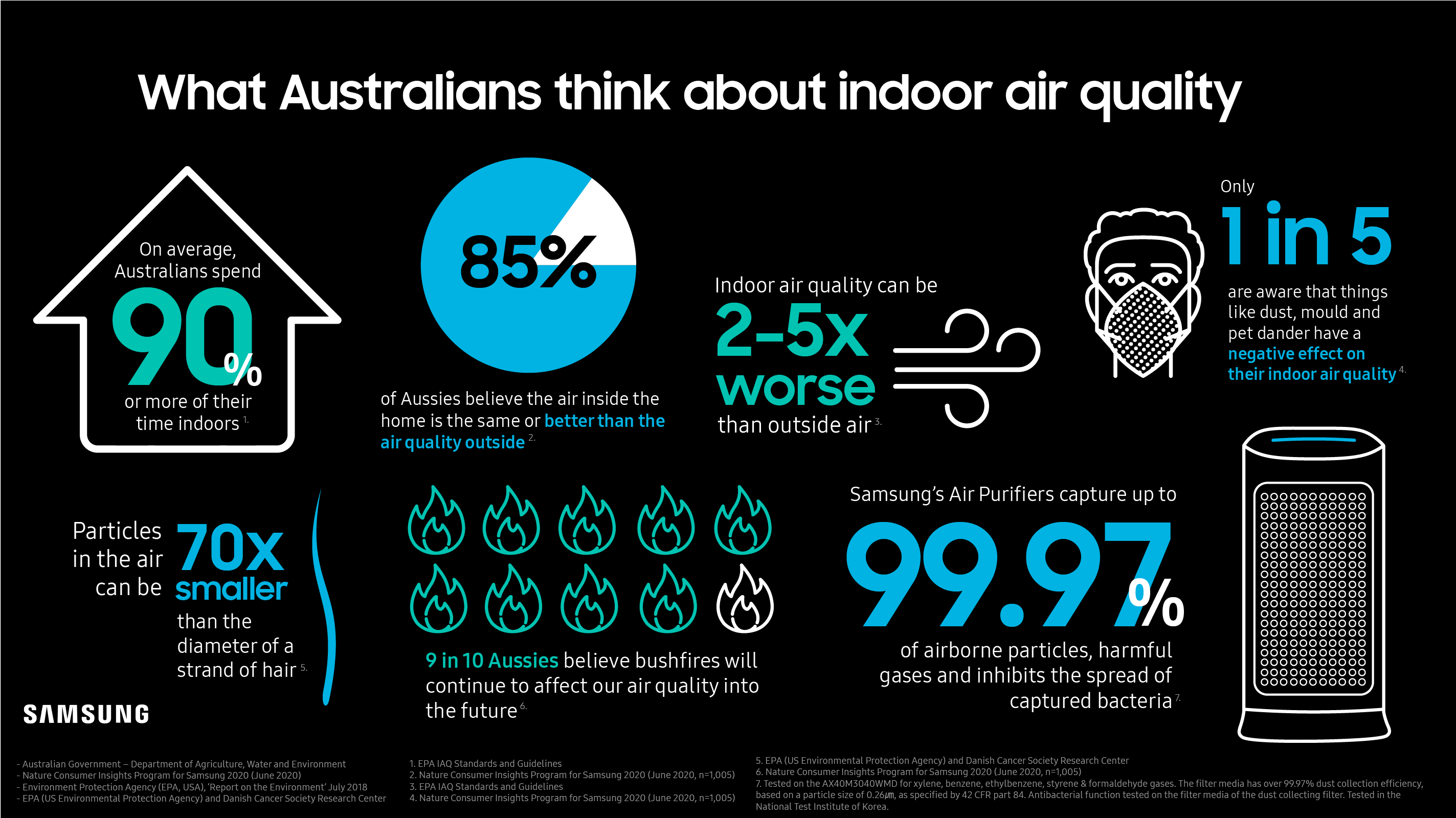
    The second half of this filter is the True HEPA filter, which promises to capture up to 99.97% of 0.3 ㎛ ultra-fine dust like smoke, mould and exhaust fumes (it also inhibits the spread of captured bacteria). If Australia continues to experience horrific bushfire seasons, air purifiers that can filter out smoke will become increasingly crucial.

    When used every day, Samsung says that the two-in-one filter will generally have a lifecycle of 6 months to a year. The filters for the AX5500 costs $149.

    The device lets you know when filters need to be replaced on the light display.
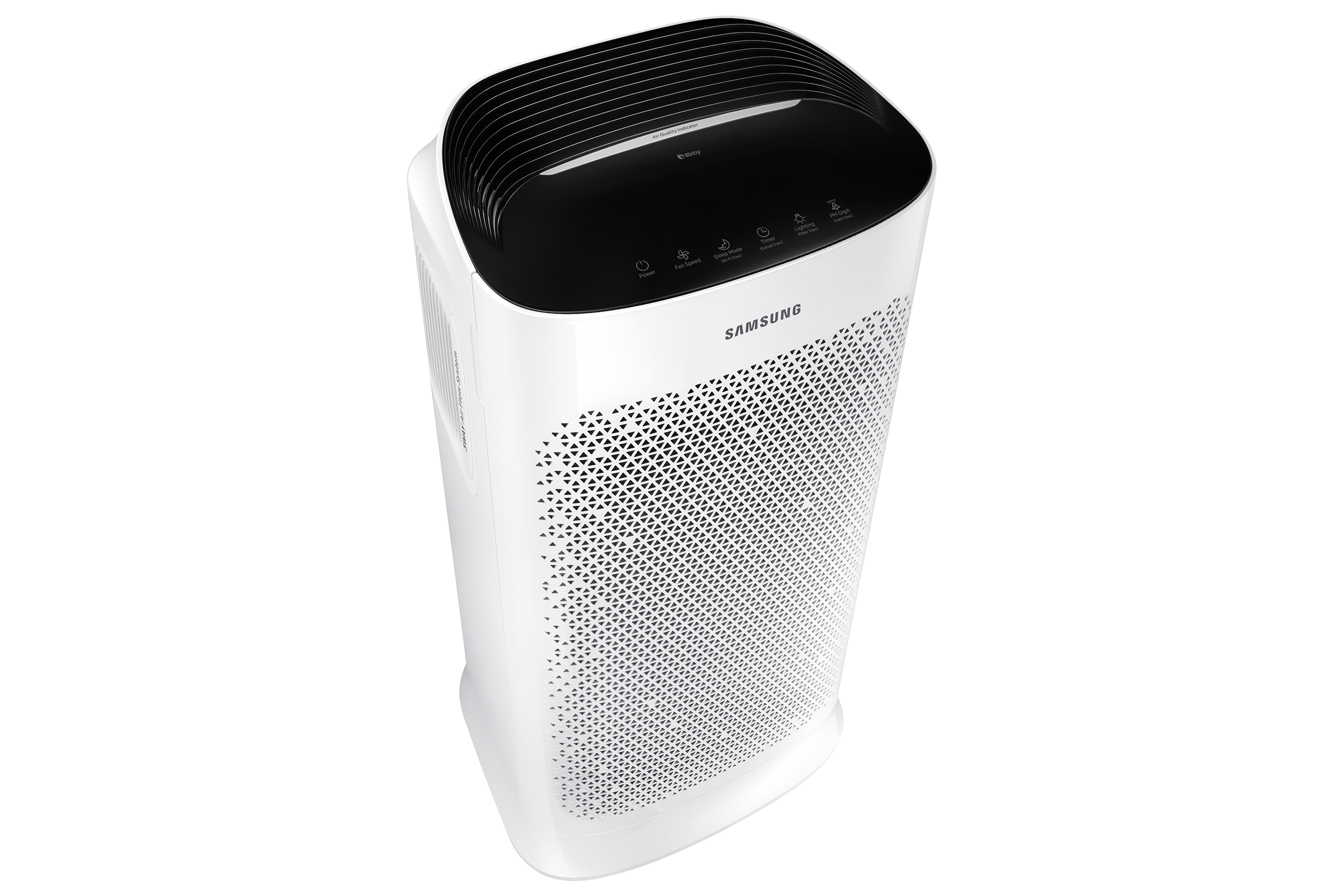
    Samsung AX5500 Air Purifier

    Once air has been purified, this clean air is distributed efficiently by the dual-power fan through the three-way air holes on the top, right and left of the device (this set-up allows the AX5500 to set flush against a wall). The fan speed can be manually set, but in Auto mode it will be automatically adjusted to the particle and odour levels around it to keep the room clean.

    On top of feeling like we’re breathing fresher air, we’ve also been impressed by how quiet the Samsung Air Purifier is, even when it’s on Auto mode.

    If you’re looking for something even quieter – such as when you’re sleeping, for example – the ‘Whisper Quiet Sleep Mode’ operates with a softer air flow and is incredibly quiet at just 20dBA. It also turns the display lights off, so there’s nothing to disrupt sleeping.

    The bottom of the unit is fitted with wheels, so it can easily be wheeled from room to room as needed.

    We couldn’t measure exactly how much cleaner our air was using the AX5500, but we were reassured by the four-colour indicator display system, which gives you an instant reading on the air quality in your space.

    When lighting on the display is blue it means the air quality is good (i.e., the PM10 level is 30 and below), the PM2.5/PM1.0 level is 15 and below and the gas pollution level is only at 1). Green indicates moderate air quality, yellow signifies poor pollution levels, and red means air quality is very poor.

    In the product launch media briefing, Samsung demonstrated how the colour indicator changed from blue to yellow when an aerosol was sprayed near it, and back to blue again as the air was purified.
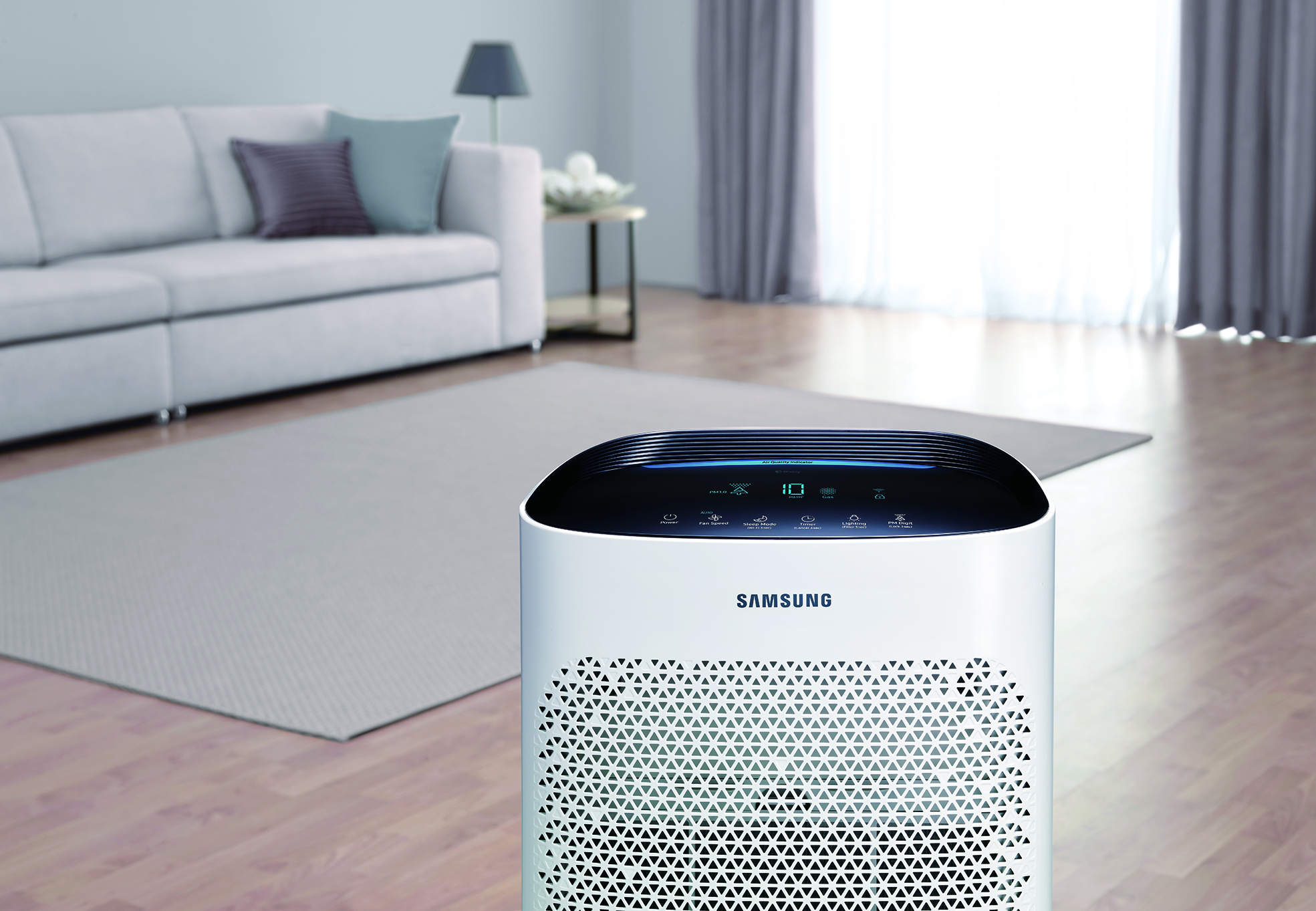
    Samsung AX5500 Air Purifier

    Like other recent Samsung appliances, the AX5500 can be controlled remotely via the SmartThings app. To do this, you will need to connect the device to your Wi-Fi network.

    Through SmartThings, users can check indoor and outdoor air quality, turn the device on or off, control the fan speed, set timers, adjust other settings, and source useful device information.

    The AX5500 is available at Samsung.com, JB Hi-Fi and The Good Guys now.

    Rating: 9/10
    The post Samsung Air Purifier Review: An Unobtrusive Way Of Improving Your Air Quality appeared first on Smart Office.

    ]]>
    https://smartoffice.com.au/samsung-air-purifier-review-an-unobtrusive-way-of-improving-your-air-quality/feed/ 0
    ADAPT 460T Earphones Review: Incredible ANC & Crystal Clear Sound https://smartoffice.com.au/98524/ https://smartoffice.com.au/98524/#respond Sat, 02 Aug 2025 09:55:50 +0000 https://staging.strixdevelopment.net/smartoffice/?p=98524 I’ve been reviewing the ADAPT 460T earphones whilst at work and in my downtime, and have been blown away with how comfortable they are to wear, and how effective the Active Noise Cancelling (ANC) is. As you would expect from co-branded EPOS and Sennheiser product, the 460T headset offers premium quality audio. It supports AptX ... Read more

    The post ADAPT 460T Earphones Review: Incredible ANC & Crystal Clear Sound appeared first on Smart Office.

    ]]>
    I’ve been reviewing the ADAPT 460T earphones whilst at work and in my downtime, and have been blown away with how comfortable they are to wear, and how effective the Active Noise Cancelling (ANC) is.

    As you would expect from co-branded EPOS and Sennheiser product, the 460T headset offers premium quality audio. It supports AptX technology, ensuring you have excellent sound when listening wirelessly via Bluetooth 5.0.

    Microsoft Teams certification

    In particular, I noticed how clear calls sounded on the 460T. The ADAPT series of headphones from EPOS are actually Microsoft Teams certified, which not only means they had to meet rigorous standards, but it also means they’re ideal for taking Teams calls. The 460T features a handy Microsoft Teams for one-touch access – which served me well, as our workplace uses Teams for calls on days where we work from home.

    The stunning sound clarity on calls is likely due to the patented EPOS Voice technology, which promises to deliver a clear and natural listening experience.

    Equally, there are two beamforming MEMS microphones on the headset, allowing you to be heard clearly too.

    Another nice feature was the subtle vibrations the neckband made to signal an incoming call. The 460T can be actively paired with two Bluetooth devices at the same time, so you’re aware of calls from either your smartphone or computer at any one time.

    It has a range of 20 metres, meaning you don’t need to be glued to your devices either.

    The headset can store up to 8 devices in the pairing list, which is convenient when you’ve got a whole host of different devices that you switch between. It also makes it easy for these earphones to be used for both work and play, which is particularly useful in the work-from-home COVID era.

    [wpdevart_youtube]rkG1pHA2L9Y[/wpdevart_youtube]

    Design

    While I love my heavy duty, over-the-ear headphones, I must say that the very light ADAPT 460T headset did make for a welcome change, particularly when you’re using them all day.

    Basically, the neckband sits over your shoulders, while the in-earphones sit snug in the ear. The whole headset weighs just 50g so you hardly notice, particularly as they provide a completely wire-free audio experience.

    The 460T comes with four pairs of earbuds, and their soft material was very comfortable. When put in properly the earbuds and ANC together were effective at blocking out disruptive ambient sound.

    It has an impressive battery that lasts up to 14 hours playback time with ANC on (or 13 hours of talking time with ANC on). With ANC off, you get an hour longer for both listening and talking times.

    The headset takes two hours to charge from empty to full. While this may sound like a while, it wasn’t a problem for me, as I generally put it on charge at the end of every day.

    I normally think enterprise-type audio headsets look funny, but the 460T is sleek and modern. It’s a great mix between wire-free and standard earphones, in that I didn’t have to worry about any cables getting twisted in my hands, but it was easy to find the earpieces if I chose to take them out of my ears for a bit.

    It has a nice black and silver colour (at the moment this is the only colour the 460T headset is available in).

    This case is a bit larger than it needs to be, but it is sturdy if you’re the throw-it-in-and-go type.
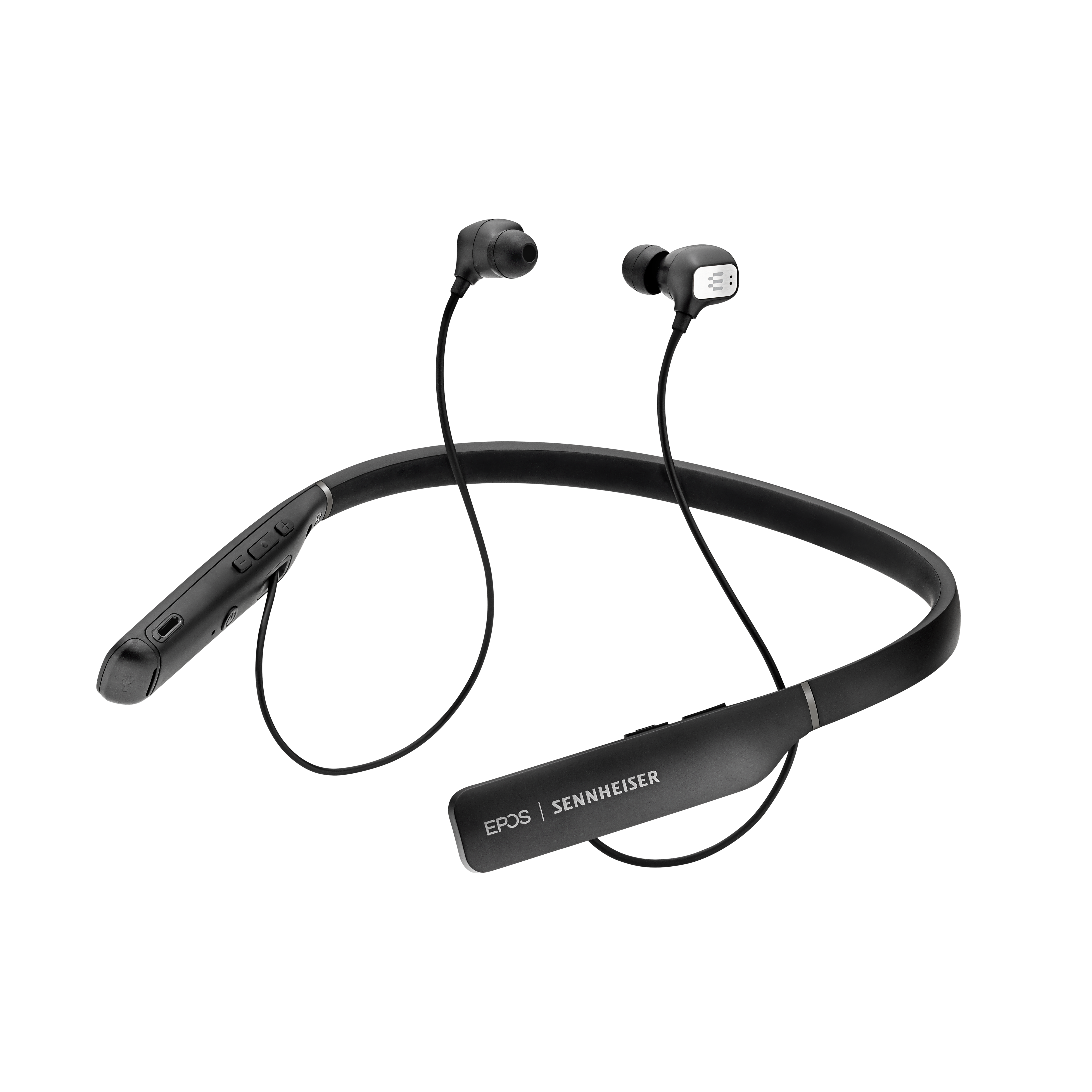
    EPOS ADAPT 460T

    Conclusion

    All in all, EPOS and Sennheiser have delivered a premium audio product, and have managed to make an enterprise headset sleek and stylish. I was blown away by both the quality of sound that the earbuds delivered, as well as how well the ANC blocked out exterior sounds.

    Although this is a pricey product, I do believe it’s a worthwhile investment if you need to make calls and attend virtual meetings while working remotely. It did significantly improve the meeting experience of Microsoft Teams calls.

    Specs:

    Price: $480.00

    Transducer principle: Dynamic, closed,

    Connectivity: Bluetooth 5.0; Multi-point connectivity to 2 actively paired Bluetooth devices and 8 devices in the pairing list

    Range: Up to 20 metres

    Voice prompts: Yes (can be toggled off)

    Warranty: 2 years international

    Noise cancellation: Hybrid ANC technology with 4 microphones

    Microphone: 2 beamforming MEMS microphones

    Microphone frequency range: 100-10,000 Hz

    Speaker type: Dynamic, neodymium magnet

    Sound pressure level: Limited by EPOS ActiveGard (protects users against acoustic injury caused by sudden sound burst on the line); Max 118 dB

    Sound enhancement profiles: Automatically adapt and optimise sound for both communication and multi-media/music

    In the box: ADAPT 460T headset, 4 pairs of earbuds, BTD 800 USB dongle, USB cable with micro-USB connector
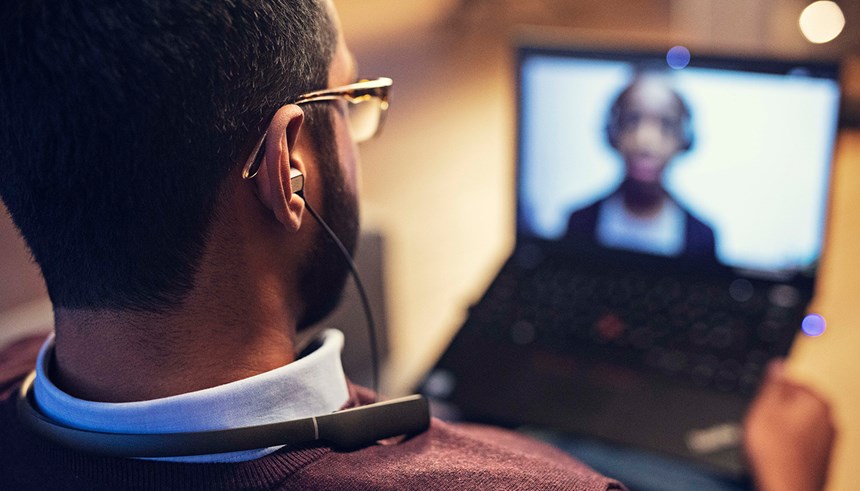
    EPOS ADAPT 460T

    The post ADAPT 460T Earphones Review: Incredible ANC & Crystal Clear Sound appeared first on Smart Office.

    ]]>
    https://smartoffice.com.au/98524/feed/ 0
    MGG Grand Las Vegas, Fast Becoming A Tired Old Tart https://smartoffice.com.au/mgg-grand-las-vegas-fast-becoming-tired-old-tart/ https://smartoffice.com.au/mgg-grand-las-vegas-fast-becoming-tired-old-tart/#respond Sat, 13 Jan 2018 04:34:04 +0000 http://smartoffice.com.au/?p=95899 Australians executives looking to stay at the MGM Grand in Las Vegas for CES may want to have second thoughts. The MGM is one of the older hotels in Las Vegas and it’s showing its age due in part to cost cutting and cost gouging by management, who appear to be obsessed at squeezing a ... Read more

    The post MGG Grand Las Vegas, Fast Becoming A Tired Old Tart appeared first on Smart Office.

    ]]>
    Australians executives looking to stay at the MGM Grand in Las Vegas for CES may want to have second thoughts.

    The MGM is one of the older hotels in Las Vegas and it’s showing its age due in part to cost cutting and cost gouging by management, who appear to be obsessed at squeezing a dollar out of anything they can including their rooms.

    I have attended 22 CES shows in Las Vegas, this is the worlds largest technology show, and over those 22 years I have stayed at the MGM for 20 of the 22 years.

    The cost per night Has gradually crept up and this year was A$618, for that you a Queen-sized bed in a room that only has one light between two queen sized beds.

    Of this amount there was a bed night room tax fee of 13.38% and then an additional US$44.36 or A$58 fee which was described as an MGM Resort fee tax.


    So far no one has explained what this is for.

    But you do get free Wi Fi, but you don’t get a robe in your room, breakfast, a kettle or coffee making facilities.

    You also have to pay A$6.00 for a small bottle of water.

    I strongly recommend that you run out to the ABC Convenience store where the sale bottle of water is A$1.00.

    What MGM advertising shows of the same room. Whats missing from the image is the screen on the window that restricts light to the room.

    In the room management are so tight that they only use low voltage lights resulting in the room being impossible to see in especially as the room is 41 square metres or 464 square feet.

    There was supposed to be a second light in the room as per the hotels publicity images used online, when I questioned management about this they sent a person to my room who said, “Sorry but we don’t have any additional lights”.

    “Yes, there is supposed to be one, but we have none. There is nothing I can do about it”. There was a desktop light over a desk but this was no good when one was trying to read.

    Then there was the issue of no hot water.

    After three cold showers I complained to the front desk, when a maintenance executive came to my room he ran the water for more than 9 minutes, he then informed me that to get hot water I had to run the taps for between 8-10 minutes.

    When I pointed out that in the mornings I don’t have time to run a shower for 10 minutes “just to get hot water” he said, “sorry It’s not my fault”.
    This is also a hotel that has put restrictors on their showers and basins to restrict water flow.

    From what I have seen the MGM has become a tired old hotel with the rooms more like a cheap 3 star motel than a premium hotel especially as they are asking a premium price for their rooms during the CES show.

    MGM’s Strip properties are Aria, Bellagio, Circus Circus, Delano, Excalibur, Luxor, Mandalay Bay, MGM Grand, The Signature at MGM Grand, The Mirage, Monte Carlo, Vdara and New York-New York.

    If you have had a bad experience at the MGM Grand email me with your story: dwr@4squaremedia.com

    The post MGG Grand Las Vegas, Fast Becoming A Tired Old Tart appeared first on Smart Office.

    ]]>
    https://smartoffice.com.au/mgg-grand-las-vegas-fast-becoming-tired-old-tart/feed/ 0
    Review: New Lexmark S815 MFP Design Icon or Good Printer? https://smartoffice.com.au/review-new-lexmark-s815-mfp-design-icon-or-good-printer-2/ https://smartoffice.com.au/review-new-lexmark-s815-mfp-design-icon-or-good-printer-2/#respond Thu, 06 Jul 2017 13:00:00 +0000 http://smartoffice.com.au/review-new-lexmark-s815-mfp-design-icon-or-good-printer-2/ Laser printers are in big demand and as sizes shrink and functions grow, Lexmark has gone one step further with a printer that is very much a design statement for the desk. But the big question is does the S815 stack up as a good all round printer?

    The post Review: New Lexmark S815 MFP Design Icon or Good Printer? appeared first on Smart Office.

    ]]>
    Laser printers are in big demand and as sizes shrink and functions grow, Lexmark has gone one step further with a printer that is very much a design statement for the desk. But the big question is does the S815 stack up as a good all round printer?

    When you open up the box of this all new Lexmark Genesis printer, you’re either going to love it or hate it. There’s no in-between on this clash of interests between design and practicality. The functionality and inventiveness is all there in more ways than one, but everything from the unconventional shape to the subverted angles show that Lexmark must have put more time into pushing design limits than supporting functionality.

    The Genesis S815 features scanning times as quick as three seconds through an ingeniously simple idea that dramatically speeds up the everyday scanning process, while still retaining vivid colour and picture quality. Scanning and printing on the fly will reproduce near-perfect copies on the right kind of paper, with high resolution detail clearly visible. Colours on plain paper are washed out from absorption while text is only less sharp if you look obsessively close at the page. Images come out pretty saturated but still high quality for anyone with an eye for detail. Wireless capabilities provide online interaction that lets users send these images they scan straight off to sites like Evernote and Photobucket without using the computer as a middleman.


    This is one part of the multi-faceted online capability of SmartSolutions, Lexmark’s customisation tool for the Genesis. Working like an App Store, the Lexmark website offers a Solution Library which pulls up a list of shortcuts and applications to run on the printer’s touch screen. Once you sign up to SmartSolutions, simply touching any ‘+’ symbol will launch the Library on your web browser where users can choose everything from sheet music templates to clock and calculator widgets to give their Genesis the personal touch for whatever they use most.

    On that note, the capacitive touch screen is a gorgeously smooth addition compared to the usually resistive and unresponsive screen retrofitted into most older printers, now joining the ranks of printing powerhouses like HP – only that with Lexmark, menu customisation, fluid menu control and extreme simplicity and ease-of-use push it a step ahead of the game (or on par with HP’s Photosmart eStation).

    The multifunction centre also features USB and SD/MS/xD/MMC connections alongside Wi-Fi and TCP/IP connectivity, along with fax machine integration.


    Earlier last month, Lexmark’s Director of Worldwide Product and Solutions Marketing, Bill Lucas told SmartHouse that “instead of looking at a piece of technology and asking ourselves what we could do with it, we ask users what they want on their printers.”

    Apparently users want their printers looking more like their old CRT TV than an actual printer.

    Fair enough, the design comes very subjectively and many may like monolithic stature that defies the typically boring, eggshell/grey-white box printer, but some of the design elements impede on practicality. Take the scanner, for example: the front panel that features the touch screen doubles as the lid of the scanner. Not a problem for scanning photos, cards and documents, but a major problem if you’re trying to scan anything as large as an encyclopaedia or bigger. The lid opens from near vertical alignment to around 45 degrees with a few centimetres of give for thicker documents, but thick books or boxes can’t always fit flush against the scanning screen as they would on a face-down flatbed scanner.

    If you do manage to fit your larger items into the scanner with the lid open, you’ll then come across the wonder of bending down to use the absentmindedly-placed touch screen that is now facing the floor rather than the user. Even though scanning pages and documents is a breeze, the design compromises any further love for this misunderstood device.

    The Lexmark Genesis S815 runs at $449 from participating Harvey Norman, Domayne & Joyce Mayne outlets.

    The post Review: New Lexmark S815 MFP Design Icon or Good Printer? appeared first on Smart Office.

    ]]>
    https://smartoffice.com.au/review-new-lexmark-s815-mfp-design-icon-or-good-printer-2/feed/ 0
    First Review: HTC 3G Phone Redefines Touch https://smartoffice.com.au/first-review-htc-3g-phone-redefines-touch-2/ https://smartoffice.com.au/first-review-htc-3g-phone-redefines-touch-2/#respond Thu, 06 Jul 2017 12:00:00 +0000 http://smartoffice.com.au/first-review-htc-3g-phone-redefines-touch-2/ HTC looked at its Touch phone released last year, took down some points of improvement, and implemented the changes to its new Touch 3G. This smartphone has a great form factor, comes with better specifications, and is set to take the touch experience to another level.

    The post First Review: HTC 3G Phone Redefines Touch appeared first on Smart Office.

    ]]>
    HTC looked at its Touch phone released last year, took down some points of improvement, and implemented the changes to its new Touch 3G. This smartphone has a great form factor, comes with better specifications, and is set to take the touch experience to another level.


    Click to enlarge
    The most noticeable improvement on the Touch 3D is its TouchFLO interface: it is now more responsive and allowed us to navigate the tabs and press the various icons without any problems. It also comes with a number of connectivity features to help you stay in touch and a number of useful applications for added versatility. Moreover, users may like the Touch’s form factor: it only weighs 96g and is designed to fit comfortably in the palm of your hand.

    The Touch 3G is 102mm long, 53.6mm wide, and is only 14.5mm thick, which fits perfectly in your pants pocket. There are only a couple of essential buttons on the Touch (a power button, five-way navigation keys, end button, power/standby button, and volume up and down), which makes it simpler to operate. Located at the bottom part of the unit is the sync connector/ earphone jack, while the unit’s stylus is located at the upper right side. HTC has also included a 3.2-megapixel camera, which is located at the back of the unit.


    Click to enlarge
    Removing the back cover reveals the SIM card slot, the battery compartment (uses 1100mAh Li-ion battery), and a microSD card slot for memory expansion. While located inside the back cover, memory cards can be swapped without shutting down the device.

    After starting up the unit, aligning the screen, setting the date and time, and configuring the data connection settings (manually or automatically), HTC’s TouchFLO will automatically kick in and users will be brought to the Home Screen. The 2.8-inch QVGA screen is big enough for its size, with the icons not being too big or too small.

    The Main screen shows the time, call history, and upcoming events, but there are 10 more tabs to choose from. By sliding your finger on the tabs or pressing left/right on the navigation pad, one can immediately have access to People (12 favourite contacts with a photo), Messages, Mail, Internet, Photos and Videos, Music, Weather, Maps Search, Settings, and Programs with quick shortcut icons (up to 18 shortcuts).

    The new generation TouchFLo enabled us to slide our finger across the tabs and scroll thorough the sub-menus without experiencing any problems. And thanks to its 528Mhz Qualcomm chipset and 192MB RAM, the HTC Touch was able to launch programs quickly.


    Click to enlarge
    Composing text messages became a whole lot easier, as HTC has included three different touch input layouts (Phone Keypad, Compact Keypad, and Full QWERTY) in addition to the default input layouts set by Windows Mobile (Block Recogniser, Keyboard, Letter Recogniser, and Transcriber). Despite having large fingers, I did not have a hard time sending messages or composing e-mails.

    The built-in Opera browser displayed various websites properly, although the browser was unable to handle flash files. Since the unit is HSDPA-enabled, websites and YouTube content loaded in just a matter of seconds. If you don’t want to incur additional data charges, you can always turn on the built-in Wi-Fi and surf the Internet wirelessly. The Touch can also be used as a modem by hooking it up to the computer (an option will be available).

    HTC has also included a Weather Tab that displays the current weather as well as a 4-day weather forecast. Users can update the forecast as often as they want and customise the cities to be displayed.

    The Maps function (powered by Google) allowed us to search for nearby points of interest such as ATMs, restaurants, or petrol stations near our location. For example, typing in ‘Petrol’ displayed 11 nearby petrol stations in our location. The entries shown only displays the address, but by clicking on the hyperlink, Google will be able to display the telephone number and the website, with users being able to save it to their contact or get directions.


    Received SMS are displayed on the Messages tab. Clicking on any message received automatically shows previous messages sent and received between the two parties. The messages are laid out conversation-style, which made it easy for us to remember what we said.

    Users can also set the unit up to retrieve e-mail from POP3-enabled accounts such as Yahoo or Gmail and can also be configured to synchronise with an Exchange Server. The unit also comes pre-installed with Office Mobile for quick document edits anytime.

    The 3.2-megapixel camera took fairly decent shots, although it did not have any auto focus function, producing some blurred shots in the process. The camera can also be used as a video camera and will capture footages in MPEG4 format. Stored photos and videos are displayed on the ‘Photos and Videos’ tab, with users being able to look at them with a single touch.

    The unit lasted for almost three days with normal use, with the unit’s Wi-Fi occasionally turned on to surf the Internet and update the weather. HTC promises up to 360 minutes of talk time and up to 450 hours of standby time for the Touch 3G.

    Better is probably the word that describes HTC’s Touch 3G. This 3G phone is slick, has an improved TouchFLO interface that resulted to a better touch experience, and is packed with a lot of connectivity options to boot. For those who find Apple’s iPhone too big, then perhaps this small wonder may be worth looking at. The Touch 3G is available now from authorised Brightpoint mobile phone retailers with an RRP of $799.

    See page over for product specifications and final rating.


    HTC Touch 3G Specifications:

    • Chipset: Qualcomm MSM7225 528 MHz
    • Connectivity: GSM/EDGE: 850/900/1800/1900 MHz & WCDMA / HSPA: 900/2100MHz.
    • HSDPA 7.2 Mbps
    • Software/Operating system: HTC TouchFLO with Windows Mobile 6.1 Professional
    • Internal memory: 256 MB flash; 192 MB RAM
    • Display: 2.8 inch QVGA screen
    • Interface: HTC ExtUSB (mini-USB and audio jack in one; USB 2.0 High-Speed)
    • Camera: 3.2 megapixel
    • Memory card: microSD
    • Bluetooth: 2.0 with EDR
    • GPS: GPS/AGPS
    • Battery: 1100 mAh
    • Talk time: WCDMA: Up to 360 minutes / GSM: Up to 400 minutes
    • Standby time: WCDMA: Up to 450 hours / GSM: Up to 365 hours
    • Size: 102 x 53.6 x 14.5 mm
    • Weight: 96g

    ————————————
    HTC Touch 3G | $799 |  | www.htc.com/au

    For: Small profile; Responsive TouchFLO interface; Easy to use; HSDPA-enabled; Wi-Fi and Bluetooth built-in; QWERTY keypad is responsive; Google Maps allows you to look for nearby points of interest
    Against: Good interface only limited to TouchFLO skin; microSD card needs to be purchased to store additional data; Camera lacks auto focus function; Browser lacks flash support
    Conclusion: HTC refines the art of touch with its new slick 3G phone

    The post First Review: HTC 3G Phone Redefines Touch appeared first on Smart Office.

    ]]>
    https://smartoffice.com.au/first-review-htc-3g-phone-redefines-touch-2/feed/ 0
    First Review: Light Toshiba Notebook For Business Travellers https://smartoffice.com.au/first-review-light-toshiba-notebook-for-business-travellers-2/ https://smartoffice.com.au/first-review-light-toshiba-notebook-for-business-travellers-2/#respond Thu, 06 Jul 2017 09:00:00 +0000 http://smartoffice.com.au/first-review-light-toshiba-notebook-for-business-travellers-2/ Toshiba has just launched an ultra-portable notebook designed for the mobile professional. The A600 is a dead ringer for the company's R500, but is equipped with the latest software and services to simplify your computing experience.

    The post First Review: Light Toshiba Notebook For Business Travellers appeared first on Smart Office.

    ]]>
    Toshiba has just launched an ultra-portable notebook designed for the mobile professional. The A600 is a dead ringer for the company’s R500, but is equipped with the latest software and services to simplify your computing experience.


    Click to enlarge
    The build and design is similar to Toshiba’s Portege R500, making the A600 a lightweight but tough notebook. It weighs from 1.46kg and is only 30mm thick, which is good for business travellers looking for a portable notebook that can last for hours on end.

    The unit hosts the volume wheel, headphone and microphone jack, USB port, e-SATA/USB combo port, D-Sub out, and AC port on the left side, while a DVD drive, ExpressCard slot, Wireless on/off switch, SD card reader, USB, and Ethernet port are found on the opposite side.

    Opening the lid reveals the trackpad with a fingerprint reader in between the mouse buttons, system indicators (DC-in, Power, Battery, HDD, SD/SDHC card, Wireless), built-in microphone, keyboard, Display and Toshiba Assist button on the upper right hand side of the unit, and a web camera sitting on top of the screen.


    Click to enlarge
    The A600 uses Intel’s Core 2 Duo U9400 processor running at 1.4Ghz, has two gigabytes of RAM, a 250GB hard drive, and runs on Windows Vista Business (SP1). It also comes with a suite of Toshiba’s ‘support’ programs that will help users maintain and troubleshoot their computer.

    Various programs are pre-installed on the device which includes Adobe Acrobat 9, Windows Live OneCare, Google Desktop, Google Earth, Microsoft Office, Microsoft SQL Server 2005, Picasa2, Recovery Disc Creator, Truesuite Access Manager (for Fingerprint), Toshiba DVD Player, and various Toshiba Utilities that simplify computing.

    The Toshiba Utilities include Cooling Performance Diagnostics, HWSetup (to configure your computer), Password Utility, PC Diagnostic Tool, PC Health Monitor, Restart Flash Cards, SD Boot and Format Utility, Security Assist, Face Recognition, Wireless Key Logon, USB Sleep and Charge, and Zooming Utility.


    Toshiba also included an HDD Protection software (and accelerator) that parks your HDD head to a safe position whenever it detects vibration or shocks. It is pre-set to level 3 (high) and is so sensitive, even the slightest movement will park the HDD head. It gets annoying at times, especially when you just want to move your notebook to another side of your desk. So the best solution is to probably lower the settings when using the notebook to avoid the annoying ‘HDD has been parked’ pop-up.

    The screen, which had a maximum resolution of 1280×800, was bright, had a wide viewing angle, and was not prone to glare. The speaker located on the upper-left hand side of the unit (near the hinge) can get loud but will not provide you with the best audio quality. It is better for users to connect the

    The A600 lasted for 165 minutes in our DVD test (with volume and brightness set to maximum), and lasted for almost five hours in our productivity test when set to power saving mode.

    Overall, the Toshiba A600 is a portable notebook that can give you the computing power you need to create worksheets and word documents while on the go. The only thing we did not like about this unit is its price tag. It will have an RRP of $2,530 (including GST), which seems a little steep, especially now that we are going through tough economic times.

    See page over for product specifications and final rating.


    Toshiba Portege A600 Features:

    Intel Core 2 Duo @1.40Ghz
    2GB RAM
    Windows Vista Business (with Service Pack 1)
    Mobile Intel GMA (Graphics Media Accelerator) Driver 4500MHD
    HDD: 250GB
    Display: 12.1-inch WXGA TFT High Brightness with LED Backlight
    Battery Life: Up to 7.5 hours
    Wireless: Bluetooth, Wireless Lan (802.11a/g/n)
    Webcamera and speaker built-in

    ————————————
    Toshiba Portege A600 | $2,530 |  | www.toshiba.com.au

    For: Solid build; Lightweight profile; Various software and support; Good battery life
    Against: Asking price is a little steep; Not really a powerful unit
    Conclusion: Productivity on the go with Toshiba notebook

    The post First Review: Light Toshiba Notebook For Business Travellers appeared first on Smart Office.

    ]]>
    https://smartoffice.com.au/first-review-light-toshiba-notebook-for-business-travellers-2/feed/ 0
    First Review: World’s Slimmest LED Monitor https://smartoffice.com.au/first-review-worlds-slimmest-led-monitor-2/ https://smartoffice.com.au/first-review-worlds-slimmest-led-monitor-2/#respond Thu, 06 Jul 2017 05:41:25 +0000 http://smartoffice.com.au/first-review-worlds-slimmest-led-monitor-2/ The BenQ V2420 is a Full HD monitor with LED backlighting. It not only offers excellent images, but can also save you money with its Eco Mode.

    The post First Review: World’s Slimmest LED Monitor appeared first on Smart Office.

    ]]>
    The BenQ V2420 is a Full HD monitor with LED backlighting. It not only offers excellent images, but can also save you money with its Eco Mode.


    Click to enlarge

    The glossy black finish of the monitor gives it a classic look. The unit measure 15mm at its thinnest point and the circular base is connected to the body by a thin neck. It comes with a D-Sub, HDMI, and DVI port at the rear, allowing users to connect it to analogue and digital sources.

    The V2420H does not have any speakers, although BenQ has included a 3.5mm jack to allow users to connect their headphones or speaker system.

    The V2420 has a native resolution of 1920 x 1080, allowing us to enjoy Blu-ray movies in Full HD. Various dark scenes on Close Encounters of the Third Kind looked good, with the monitor being able to display darkly lit areas (found on the last few scenes of the movie) and grey hues without problems. Fast moving scenes were rendered quite well, with the V2420H minimising ghosting.


    Click to enlarge

    In order to get the perfect picture quality, users would have to manually adjust the settings. If you do not want to fiddle with the settings, BenQ has six proprietary technologies to calibrate picture quality. The Senseye 3 offers six pre-set modes (Standard, Movie, Game, Photo, sRGB, and Eco) that aim to render images that ‘fully accommodates the capabilities of the human eye.’

    The Senseye 3 settings work well if you adjust it prior as we encountered instances where text documents were blurry only to find that it was set to ‘Photo’ mode.

    Saving energy is another highlight of the V2420H. According to BenQ, this LED screen reduced power consumption by up to 44 per cent compared to CCFL-backlit models. When placed in Eco Mode, the company claims that it reduces power consumption by 71.8 per cent. This makes it the perfect monitor for those who want to save on electricity costs.

    Overall, the BenQ V2420H is an LED monitor that not only delivers, but can also save you money. It is available now for $479.

    The post First Review: World’s Slimmest LED Monitor appeared first on Smart Office.

    ]]>
    https://smartoffice.com.au/first-review-worlds-slimmest-led-monitor-2/feed/ 0
    Review: Samsung N220 With Optus Mobile Broadband https://smartoffice.com.au/review-samsung-n220-with-optus-mobile-broadband-2/ https://smartoffice.com.au/review-samsung-n220-with-optus-mobile-broadband-2/#respond Thu, 06 Jul 2017 05:39:50 +0000 http://smartoffice.com.au/review-samsung-n220-with-optus-mobile-broadband-2/ The Samsung N220 is a netbook that is exclusively available to Optus users. Its built-in 3G quad-band module allows you connect to the Internet wirelessly, while its 6-cell battery provides enough juice to last half a day.

    The post Review: Samsung N220 With Optus Mobile Broadband appeared first on Smart Office.

    ]]>
    The Samsung N220 is a netbook that is exclusively available to Optus users. Its built-in 3G quad-band module allows you connect to the Internet wirelessly, while its 6-cell battery provides enough juice to last half a day.


    Click to enlarge

    The N220 is available in two colours – red or green, with the glossy lid being a major problem as it is prone to fingerprints. In terms of connectivity, the N220 has three USB ports, a D-Sub port, Ethernet, microphone-in and headphone-in jacks, and a 3-in-1 card reader.

    Like any other netbook in the market, the N220 has an Atom processor (N450 at 1.66 Ghz), 1GB of RAM, 250GB of storage space, and wireless connectivity (802.11 b/g/n). It also comes with Bluetooth (2.1 + EDR) and 3G quad-band module for wireless internet access (SIM card located underneath).

    Take note that while the netbook is exclusively available to Optus, it the wireless module is not network-locked. This means that users can use their own SIM card (such as 3 or Telstra) to gain access to the Internet.

    Opening the lid reveals a 10.1-inch LED screen with a maximum resolution of 1024 x 600, a web camera, a chiclet keyboard, and a touchpad. The unit runs on Windows 7 Starter and comes with various Samsung programs such as – Battery Life Extender, Easy Display Manager, Easy Network Manager, Samsung Recovery Solution 4, Support Centre, and Samsung Update Plus. A trial version of McAfee and Microsoft Office 2007 are also pre-installed.


    Click to enlarge

    We found the N220 a joy to use. The keys on the netbook were well-spaced and made it easy for us to type word documents while on the go. Getting online was simple – all we had to do was to click on the connect icon. The unit was also able to handle HD videos without slowing down, although we had to make sure that no other program was running in the background.

    Audio quality was good for a netbook, thanks to its 2.1 channel speaker. The subwoofer was able to add depth to explosions in action movies and was also able to improve the sound in various audio tracks.

    Battery life was quite remarkable too. During our battery drain test, the N220 lasted 329 minutes, which equates to about 10 hours of normal usage.

    Overall, the Samsung N220 is a solid netbook for users who want to stay connected throughout the day. It sometimes lags as it lacks the horsepower to keep up with the default operating system, but this can easily be remedied by purchasing a 2GB RAM stick.

    The N220 is available at Optus dealers nationally for $49.99 (2GB) or $69.99 (5GB).

    The post Review: Samsung N220 With Optus Mobile Broadband appeared first on Smart Office.

    ]]>
    https://smartoffice.com.au/review-samsung-n220-with-optus-mobile-broadband-2/feed/ 0
    Review: Clickfree Wireless Backup For Storing Precious Files https://smartoffice.com.au/review-clickfree-wireless-backup-for-storing-precious-files-2/ https://smartoffice.com.au/review-clickfree-wireless-backup-for-storing-precious-files-2/#respond Thu, 06 Jul 2017 05:36:53 +0000 http://smartoffice.com.au/review-clickfree-wireless-backup-for-storing-precious-files-2/ If you have a lot of important files stored on a PC or notebook, then backing up is a must in order to keep them safe. However, despite the availability of backup software on portable hard drives, there are still a lot of people who don't do it because it is 'difficult' and time consuming. Clickfree's Wireless Backup simplifies data backup and is able to connect and automatically back up data wirelessly.

    The post Review: Clickfree Wireless Backup For Storing Precious Files appeared first on Smart Office.

    ]]>
    If you have a lot of important files stored on a PC or notebook, then backing up is a must in order to keep them safe. However, despite the availability of backup software on portable hard drives, there are still a lot of people who don’t do it because it is ‘difficult’ and time consuming. Clickfree’s Wireless Backup simplifies data backup and is able to connect and automatically back up data wirelessly.

    What’s unique about the Wireless Backup is that it comes with Wi-Fi built in that automatically backs up data from connected computers wirelessly. Like the C2N that we reviewed a couple of months ago, users need to connect the drive via USB to start backing up important files.

    The Wireless Backup comes with an embedded USB 2.0 cable which is a bit short as well as a power adapter for the wireless function.

    The time it takes for the initial backup process to complete itself depends on how much files you have stored on a notebook or PC. The Wireless Backup stores photos, music, e-mail files, text documents, spreadsheets, presentations, videos, favourite websites, as well as other files such as ZIP, XML, CAB and HTML.

    After everything has been set up, the drive will obtain wireless settings and users can then remove the drive from the USB port and plug its power adapter into the wall.


    Click to enlarge

    After a couple of minutes, the drive will be ready and will back up data from synchronised computers wirelessly depending on the schedule. Backup is scheduled for 3AM by default, but can be adjusted accordingly. Wi-Fi backup is a bit slow, but it was still able to automatically save all our new files at the end of the day.

    If you have more than one notebook at home that you want backed up, then all you need to do is to connect the drive to the notebook, perform the backup, and remove the drive. Once it is plugged into the wall, it will automatically backup each and every single computer that was connected to the device.

    In addition to backing up data, the unit can restore selected files to the original location or transfer them to a new folder, import music from your Apple iPad, iPhone or iPod, or create a backup DVD using a separate application.

    Overall, the Clickfree Wireless Backup delivers an easy backup solution to users who want to backup multiple computers. The whole process of backing up is simple and once you are done connecting all your notebooks/computers, you can place it on a corner and forget about it. The 500GB drive is available now for $199.

    The post Review: Clickfree Wireless Backup For Storing Precious Files appeared first on Smart Office.

    ]]>
    https://smartoffice.com.au/review-clickfree-wireless-backup-for-storing-precious-files-2/feed/ 0
    Review: Trident Case For Heavy Duty Smartphone Users https://smartoffice.com.au/review-trident-case-for-heavy-duty-smartphone-users-2/ https://smartoffice.com.au/review-trident-case-for-heavy-duty-smartphone-users-2/#respond Thu, 06 Jul 2017 05:34:32 +0000 http://smartoffice.com.au/review-trident-case-for-heavy-duty-smartphone-users-2/ The new Trident range of smartphone and iPad cases turn the typical, delicate handset into a builder's dream, with durability unseen since the Nokia 5100.

    The post Review: Trident Case For Heavy Duty Smartphone Users appeared first on Smart Office.

    ]]>
    The new Trident range of smartphone and iPad cases turn the typical, delicate handset into a builder’s dream, with durability unseen since the Nokia 5100.

    The range is made of an impact resistant polycarbonate, featuring a shock absorbing silicone ring underneath a thick, rubber outer layer. All that is just a fancy way of saying it’s a big lump of plastic that insulates your phone really well at the expense of your new smartphone’s attractiveness. Coming in a range of colours that all look tackier than your already glamorous smartphone, these cases aren’t quite built to be sexy, but instead functional.

    Trident boasts its ‘no-slip hold design,’ but while that is true it also means that the bulky, rubbery exterior makes it hard (or even impossible) to carry around in your pocket. The thick exterior does come in handy for pressing the exterior buttons on some of the phone models, oddly enough, with large, firm buttons that act as extensions on the phone’s outer interface.

    The cases really do mean ‘shield’ when they claim it, with phones and iPads going unscathed when dropped from heights of up to around six feet onto a flat surface. The iPad cases go so far as to be waterproof when doused in a bucket of water.

    PET screen protectors make for seamless covers that will keep messy fingerprints off touchscreens at the expense of some functionality. Bubble-free was a pretty accurate description after flattening out an initial bubble when first using the case, with the case maintaining the tight fit from then on. The screen was barely noticeable throughout the use of the phone. What was noticeable though was how quickly dust would collect on the plastic film.


    The downside of the screen doesn’t come from the plastic coating though, but from the rest of the case. Where tablets’ and smartphones’ flat faces allow for seamless integration of the touchscreen and its border, the Trident cases encroach on this border, making it hard to reach buttons and menus on the outer limits of the screen. While testing the Samsung Galaxy case, trying to reach the pull-down menu for messages and missed calls was a constant hassle, even for users with smaller fingers.

    The Trident cases come in two varieties: Kraken and Cyclops. Kraken cases are the upgraded versions of the Cyclops cases, sporting extra padded corners for those extra-accident-prone individuals and a detachable belt clip that doubles as a stand for the housed phone. There is also an Aegis variety for iPod Touch 4, though we did not test that model.

    If you use a Trident case, you’ll most likely never damage your phone – and with the sizes of them, you’ll probably never lose it either. If you’re a tradie who still wants a function-filled phone but don’t want it breaking the instant you take it to work, these cases are a dream come true. If you’re just clumsy as hell, these cases will also save you. For everyone else, there’s no satisfaction to be found from these cases that effectively limit the use of phones and take a lot of mobility out of the ‘mobile phone.’

    Trident cases are available through their Australian distributor, iWorld Australia, through a range of consumer electronics stores. The iPad cases sell for an RRP of $69.95, while the phone cases which come in two varieties sell at $59.95 for ‘Kraken’ cases that come with more features and $39.95 for the smaller ‘Cyclops’ cases.

    The post Review: Trident Case For Heavy Duty Smartphone Users appeared first on Smart Office.

    ]]>
    https://smartoffice.com.au/review-trident-case-for-heavy-duty-smartphone-users-2/feed/ 0